> ## Documentation Index
> Fetch the complete documentation index at: https://docs.shieldlabs.ai/llms.txt
> Use this file to discover all available pages before exploring further.
# Identifiers
> Which identifiers each identification carries and how they tie to your users, devices, visitors and IP addresses.
ShieldLabs works with five identities: users (your accounts, keyed by the hashed User HID you pass), devices, visitors, public IPs and local IPs. Each identification, one check by the snippet, carries the identifiers that tie it to them, and the Device ID holds through cleared cookies, incognito mode and IP changes.
You read every identifier from the [webhook](/api/webhooks), and the [History API](/api/server-api) returns all identifications of one user, device, visitor or IP address when you search by its identifier.
## How identifiers map to identities
Five keys on each identification name the identities behind it: `user_hid` is the user, `device_id` the device, `visitor_id` the visitor, and `public_ip` and `local_ip` the two IP addresses. Each identity carries the worst band of its identifications and is linked to the others it shared an identification with, and the four High-Risk Events are detected on users. [Users, devices, visitors and IPs](/concepts/entities) covers that model; this page covers how each identifier is built and how long it lasts.
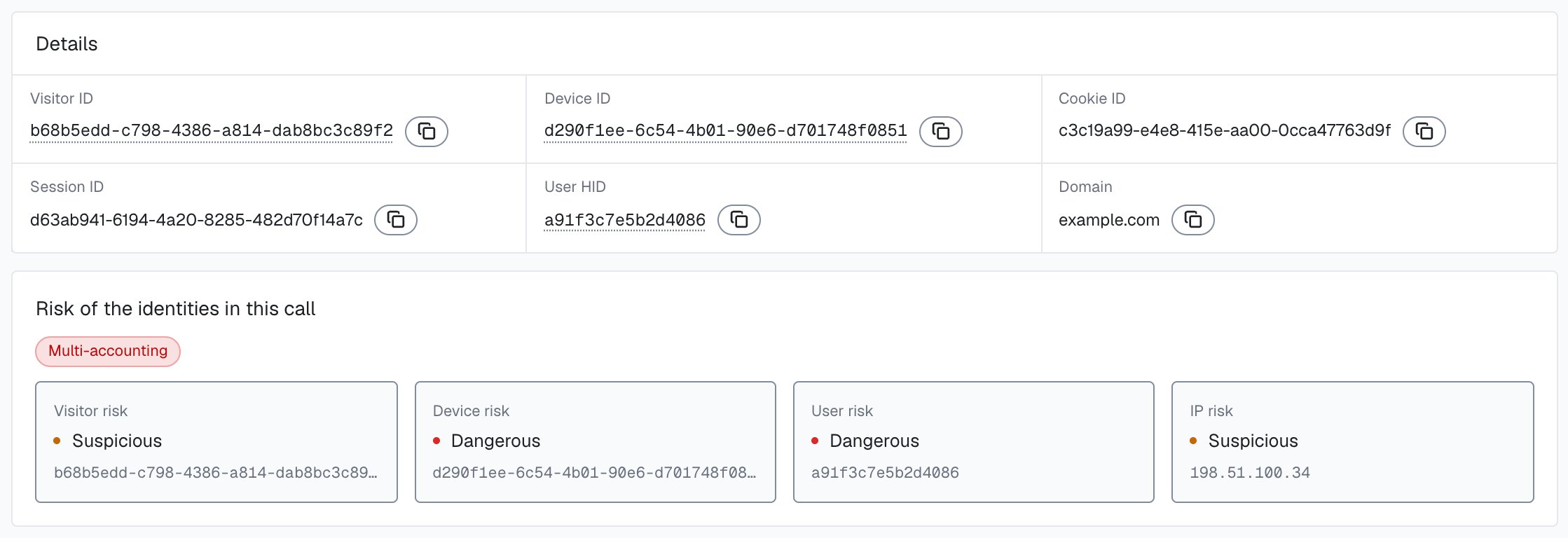
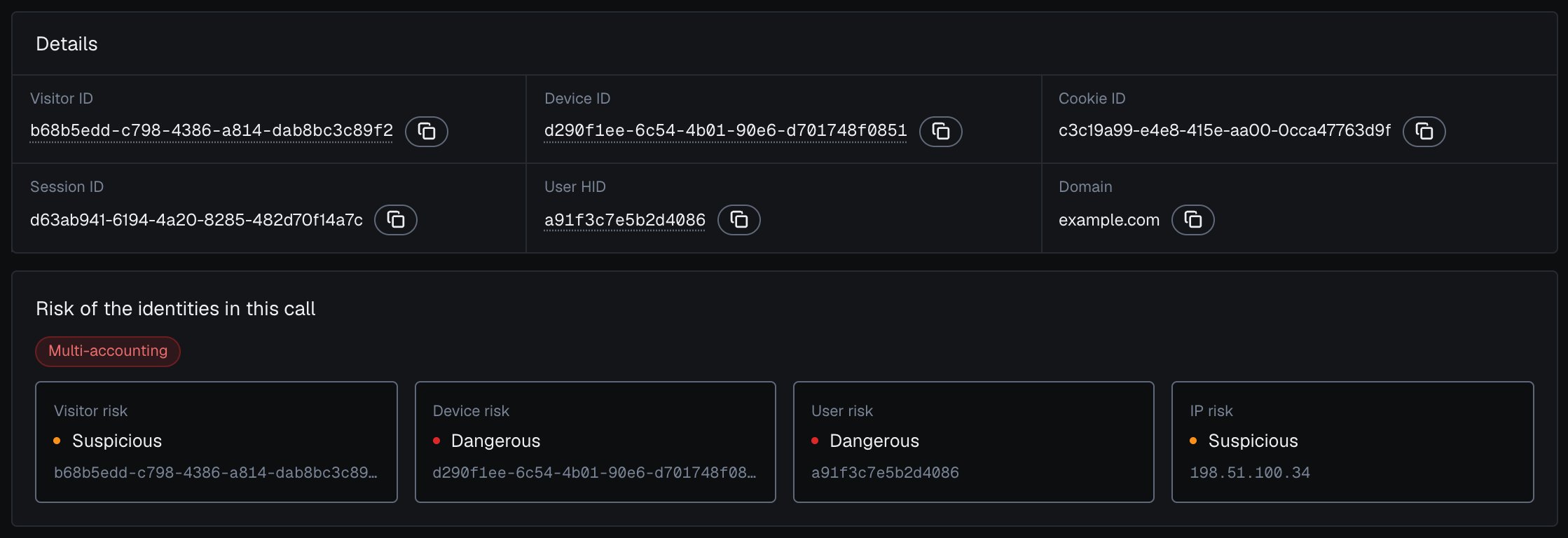
In the analytics dashboard, the [identification card](/dashboard/identification-card) shows these identifiers under **Details** and the band of the user, device, visitor and IP behind the identification.
 ## The User HID is your account key
Pass a hashed User HID with `checkAuthenticatedUser` on every signed-in page. Users, account-level risk and all four High-Risk Events are built on it. It is the only identifier you set yourself, and it lets ShieldLabs tie anonymous activity to a known account.
Pass a hashed or pseudonymous value, and apply the same transform every time so the same account always maps to the same User HID.
```js theme={null}
// Hash the account id before passing it to the snippet.
const userHID = await sha256(currentUser.id); // never the raw id or email
const mod = await import('https://cdn.shieldlabs.ai/snippet.js?publicKey=YOUR_PUBLIC_KEY');
mod.checkAuthenticatedUser(userHID);
```
Never pass a raw email, username, or primary-key user id as the User HID. ShieldLabs echoes the User HID back in webhooks and History, so a raw value would put plaintext account data in those payloads. Always hash it or use a pseudonymous token.
When no one is signed in, call `checkAnonymous()`. The webhook then carries `"user_hid": "anonymous"`, and the identification still links to its device, visitor and IP addresses. The [snippet setup](/setup/snippet) documents the full method list.
## The identifier model
Each identification carries these identifiers on the webhook. The table starts with the account and ends with the single call.
| Identifier | How it is made | Persistence |
| - | - | - |
| **User HID** | Your hashed or pseudonymous account id, passed with `checkAuthenticatedUser`. Anonymous checks send `"anonymous"`. | As long as you pass the same value for the same account. |
| **Device ID** | Computed on the server from the device itself; nothing about it is stored in the browser. | **Durable.** Holds through cleared cookies, incognito mode and IP changes. Bound to one browser. |
| **Visitor ID** | Computed on the server from the Device ID and the Cookie ID: one device plus one cookie. | Changes when cookies are cleared. One Device ID can sit behind many Visitor IDs. |
| **Cookie ID** | A first-party UUID generated in the browser and kept in cookies and site storage. | Lost when cookies or site storage are cleared. |
| **Session ID** | A UUID generated in the browser and shared by the open tabs of your site for the same user. | A new Session ID starts on the next page load after the last open page of your site is closed or navigated away from. In a single tab on a multi-page site, that can be every full page load. |
| **Request ID** | A UUID generated in the browser, one per identification. It joins the webhook and the History API. | Unique per identification. |
The request ID, Session ID and Cookie ID are generated in the browser. The Device ID and Visitor ID are computed on the server, so the browser never sees them. Match one identification by `request_id`, and group identifications by `user_hid`, `device_id`, `visitor_id` or the public IP.
### Identifier hierarchy
The identifiers nest from a known account down to a single call:
* **User HID** is the signed-in account you pass in.
* **Device ID** is the durable, browser-bound device.
* **Visitor ID** is one device plus one cookie.
* **Cookie ID** is the browser's first-party storage.
* **Session ID** is one browsing session.
* **Request ID** is one identification.
One user can use many devices, and one Device ID can sit behind many Visitor IDs, sessions and identifications over time.
## Why the Device ID is durable
The Device ID is the identifier most analytics tools cannot match. It is computed on the server from the device itself, not from anything the browser stores, so it holds when cookie-based tracking breaks:
* **Holds through cleared cookies.** Clearing cookies removes the Cookie ID and leaves the Device ID in place.
* **Holds in incognito mode.** A private window still maps to the same Device ID.
* **Holds through IP changes.** Switching networks or connecting through a VPN leaves the Device ID in place.
This durability is why a returning person keeps the same Device ID, even after their cookies expire. See [identification accuracy](/features/accuracy).
The Device ID is **browser-bound**. The same person on Chrome and on Firefox produces two Device IDs. Once that person signs in on both, the User HID links the two devices to one user.
An all-zero Device ID (`00000000-0000-0000-0000-000000000000`) means no usable device signals reached ShieldLabs for that identification; the rate-limit marker (Risk Score 999) is one such case. Route it to review rather than allowing it.
## Why the Visitor ID resets
The Visitor ID is built from two inputs: the Device ID and the Cookie ID. The Device ID half is durable. The Cookie ID half is not.
So when a person clears cookies:
1. The Cookie ID is gone, and the browser generates a new one on the next identification.
2. The server combines the same Device ID with the new Cookie ID.
3. The result is a new Visitor ID.
That is by design. One durable Device ID can sit behind many Visitor IDs over time.
Once a person signs in, key your decisions on the User HID and read the devices, visitors and IP addresses linked to it. Before sign-in, the Device ID is the most stable handle on a browser, and the Visitor ID is the cookie-scoped view.
ShieldLabs detects multi-accounting, several accounts run by one person and linked through the devices and network they share, and account sharing, one account used from several distinct devices. By default, Multi-accounting fires from 3 accounts on one visitor and Account sharing from 4 devices on one account, and both thresholds are configurable. Both are [High-Risk Events](/features/high-risk-events) on the user, each at Medium or High confidence, available in the analytics dashboard, the API and webhooks.
## Device Intelligence is part of identification
Each identification returns the identifiers together with the device, the network and the risk signals around them, in one webhook.
| You get | What it is |
| - | - |
| **Device ID** | The durable, browser-bound device described above. |
| **Device attributes** | The `browser`, `os`, and `device_type` (`desktop`, `mobile`, or `tablet`). |
| **Public IP and Local IP** | `public_ip` and `local_ip`, each with `ip` and `country`. The local IP is the address the browser itself reports, which can differ from the public IP behind a VPN or proxy. |
| **Risk Score (0-100)** | The Risk Score of the identification, with a `signals` array naming every risk signal that fired and its weight, detailed under [Risk Scoring](/features/risk-scoring). |
| **Risk signals** | The detections behind the Risk Score, cataloged under [Risk Signals](/features/risk-signals). |
You never call a separate "fingerprint" endpoint and a separate "risk" endpoint. One snippet collects 300+ device and network signals, the server scores them, and the result arrives by [webhook](/api/webhooks) (or you read it from the [History API](/api/server-api)).
## Example response
The `data` object of an `identification.scored` webhook, shortened. It carries the identifiers of the user, device, visitor and IP addresses alongside the Risk Score and the risk signals that explain it.
```json theme={null}
{
"request_id": "13f84f05-2f3a-4c2e-9b1f-7a6d3e8c1b22",
"visitor_id": "161dfbad-4e8c-4d1a-9f72-3b6c0a2e8d57",
"device_id": "5eb7fd5c-9a21-4b6e-8c3d-2f1a9e7b0c45",
"session_id": "a1c9e740-5b6d-4e2a-8f31-0c2b9d4e7f11",
"cookie_id": "7e2d1b88-3c4f-4a9e-b6d2-1f8a0c5e9d34",
"user_hid": "8f14e45fceea167a5a36dedd4bea2543",
"domain": "example.com",
"public_ip": {
"ip": "203.0.113.42",
"country": "US"
},
"local_ip": {
"ip": "198.51.100.23",
"country": "US"
},
"connection_type": "proxy",
"os": "Windows",
"browser": "Chrome",
"device_type": "desktop",
"risk_score": 30,
"signals": [
{ "name": "proxy", "weight": 10 },
{ "name": "datacenter_ip", "weight": 10 },
{ "name": "abuser", "weight": 10 }
],
"detection_flags": { "proxy": true, "datacenter_ip": true, "abuser": true },
"observed_at": "2026-06-16T18:00:45Z"
}
```
Here the Risk Score is 30 because three network risk signals each added 10: the IP looks like a proxy, it resolves to a datacenter, and it carries a known-abuser reputation. Webhook `signals[].name` values are slugs (`proxy`, `datacenter_ip`, `abuser`). Branch on those or on `detection_flags`, and never assume one entry per slug: a slug can repeat with a partial weight. Labels in the analytics dashboard and the History API can change. Read the band of the Risk Score, the flags, the user's history and the action at stake together. See [Acting on results](/guides/acting-on-risk-score).
`device_id` and `visitor_id` are computed on the server. `user_hid` is your hashed account id, echoed back. The [API models](/api/models) reference documents every field and its types.
## Next steps
The five identities, how they link and how each one carries its own risk.
Multi-accounting, account sharing, impossible travel and account takeover, detected on your users at Medium or High confidence.
The 0 to 100 Risk Score of each identification and the band of every user, device, visitor and IP.
Masking, anti-detect browsers, bots and automation, and mismatch signals, each with its weight.
This documentation is built and hosted on [Mintlify](https://mintlify.com), a developer documentation platform.
## The User HID is your account key
Pass a hashed User HID with `checkAuthenticatedUser` on every signed-in page. Users, account-level risk and all four High-Risk Events are built on it. It is the only identifier you set yourself, and it lets ShieldLabs tie anonymous activity to a known account.
Pass a hashed or pseudonymous value, and apply the same transform every time so the same account always maps to the same User HID.
```js theme={null}
// Hash the account id before passing it to the snippet.
const userHID = await sha256(currentUser.id); // never the raw id or email
const mod = await import('https://cdn.shieldlabs.ai/snippet.js?publicKey=YOUR_PUBLIC_KEY');
mod.checkAuthenticatedUser(userHID);
```
Never pass a raw email, username, or primary-key user id as the User HID. ShieldLabs echoes the User HID back in webhooks and History, so a raw value would put plaintext account data in those payloads. Always hash it or use a pseudonymous token.
When no one is signed in, call `checkAnonymous()`. The webhook then carries `"user_hid": "anonymous"`, and the identification still links to its device, visitor and IP addresses. The [snippet setup](/setup/snippet) documents the full method list.
## The identifier model
Each identification carries these identifiers on the webhook. The table starts with the account and ends with the single call.
| Identifier | How it is made | Persistence |
| - | - | - |
| **User HID** | Your hashed or pseudonymous account id, passed with `checkAuthenticatedUser`. Anonymous checks send `"anonymous"`. | As long as you pass the same value for the same account. |
| **Device ID** | Computed on the server from the device itself; nothing about it is stored in the browser. | **Durable.** Holds through cleared cookies, incognito mode and IP changes. Bound to one browser. |
| **Visitor ID** | Computed on the server from the Device ID and the Cookie ID: one device plus one cookie. | Changes when cookies are cleared. One Device ID can sit behind many Visitor IDs. |
| **Cookie ID** | A first-party UUID generated in the browser and kept in cookies and site storage. | Lost when cookies or site storage are cleared. |
| **Session ID** | A UUID generated in the browser and shared by the open tabs of your site for the same user. | A new Session ID starts on the next page load after the last open page of your site is closed or navigated away from. In a single tab on a multi-page site, that can be every full page load. |
| **Request ID** | A UUID generated in the browser, one per identification. It joins the webhook and the History API. | Unique per identification. |
The request ID, Session ID and Cookie ID are generated in the browser. The Device ID and Visitor ID are computed on the server, so the browser never sees them. Match one identification by `request_id`, and group identifications by `user_hid`, `device_id`, `visitor_id` or the public IP.
### Identifier hierarchy
The identifiers nest from a known account down to a single call:
* **User HID** is the signed-in account you pass in.
* **Device ID** is the durable, browser-bound device.
* **Visitor ID** is one device plus one cookie.
* **Cookie ID** is the browser's first-party storage.
* **Session ID** is one browsing session.
* **Request ID** is one identification.
One user can use many devices, and one Device ID can sit behind many Visitor IDs, sessions and identifications over time.
## Why the Device ID is durable
The Device ID is the identifier most analytics tools cannot match. It is computed on the server from the device itself, not from anything the browser stores, so it holds when cookie-based tracking breaks:
* **Holds through cleared cookies.** Clearing cookies removes the Cookie ID and leaves the Device ID in place.
* **Holds in incognito mode.** A private window still maps to the same Device ID.
* **Holds through IP changes.** Switching networks or connecting through a VPN leaves the Device ID in place.
This durability is why a returning person keeps the same Device ID, even after their cookies expire. See [identification accuracy](/features/accuracy).
The Device ID is **browser-bound**. The same person on Chrome and on Firefox produces two Device IDs. Once that person signs in on both, the User HID links the two devices to one user.
An all-zero Device ID (`00000000-0000-0000-0000-000000000000`) means no usable device signals reached ShieldLabs for that identification; the rate-limit marker (Risk Score 999) is one such case. Route it to review rather than allowing it.
## Why the Visitor ID resets
The Visitor ID is built from two inputs: the Device ID and the Cookie ID. The Device ID half is durable. The Cookie ID half is not.
So when a person clears cookies:
1. The Cookie ID is gone, and the browser generates a new one on the next identification.
2. The server combines the same Device ID with the new Cookie ID.
3. The result is a new Visitor ID.
That is by design. One durable Device ID can sit behind many Visitor IDs over time.
Once a person signs in, key your decisions on the User HID and read the devices, visitors and IP addresses linked to it. Before sign-in, the Device ID is the most stable handle on a browser, and the Visitor ID is the cookie-scoped view.
ShieldLabs detects multi-accounting, several accounts run by one person and linked through the devices and network they share, and account sharing, one account used from several distinct devices. By default, Multi-accounting fires from 3 accounts on one visitor and Account sharing from 4 devices on one account, and both thresholds are configurable. Both are [High-Risk Events](/features/high-risk-events) on the user, each at Medium or High confidence, available in the analytics dashboard, the API and webhooks.
## Device Intelligence is part of identification
Each identification returns the identifiers together with the device, the network and the risk signals around them, in one webhook.
| You get | What it is |
| - | - |
| **Device ID** | The durable, browser-bound device described above. |
| **Device attributes** | The `browser`, `os`, and `device_type` (`desktop`, `mobile`, or `tablet`). |
| **Public IP and Local IP** | `public_ip` and `local_ip`, each with `ip` and `country`. The local IP is the address the browser itself reports, which can differ from the public IP behind a VPN or proxy. |
| **Risk Score (0-100)** | The Risk Score of the identification, with a `signals` array naming every risk signal that fired and its weight, detailed under [Risk Scoring](/features/risk-scoring). |
| **Risk signals** | The detections behind the Risk Score, cataloged under [Risk Signals](/features/risk-signals). |
You never call a separate "fingerprint" endpoint and a separate "risk" endpoint. One snippet collects 300+ device and network signals, the server scores them, and the result arrives by [webhook](/api/webhooks) (or you read it from the [History API](/api/server-api)).
## Example response
The `data` object of an `identification.scored` webhook, shortened. It carries the identifiers of the user, device, visitor and IP addresses alongside the Risk Score and the risk signals that explain it.
```json theme={null}
{
"request_id": "13f84f05-2f3a-4c2e-9b1f-7a6d3e8c1b22",
"visitor_id": "161dfbad-4e8c-4d1a-9f72-3b6c0a2e8d57",
"device_id": "5eb7fd5c-9a21-4b6e-8c3d-2f1a9e7b0c45",
"session_id": "a1c9e740-5b6d-4e2a-8f31-0c2b9d4e7f11",
"cookie_id": "7e2d1b88-3c4f-4a9e-b6d2-1f8a0c5e9d34",
"user_hid": "8f14e45fceea167a5a36dedd4bea2543",
"domain": "example.com",
"public_ip": {
"ip": "203.0.113.42",
"country": "US"
},
"local_ip": {
"ip": "198.51.100.23",
"country": "US"
},
"connection_type": "proxy",
"os": "Windows",
"browser": "Chrome",
"device_type": "desktop",
"risk_score": 30,
"signals": [
{ "name": "proxy", "weight": 10 },
{ "name": "datacenter_ip", "weight": 10 },
{ "name": "abuser", "weight": 10 }
],
"detection_flags": { "proxy": true, "datacenter_ip": true, "abuser": true },
"observed_at": "2026-06-16T18:00:45Z"
}
```
Here the Risk Score is 30 because three network risk signals each added 10: the IP looks like a proxy, it resolves to a datacenter, and it carries a known-abuser reputation. Webhook `signals[].name` values are slugs (`proxy`, `datacenter_ip`, `abuser`). Branch on those or on `detection_flags`, and never assume one entry per slug: a slug can repeat with a partial weight. Labels in the analytics dashboard and the History API can change. Read the band of the Risk Score, the flags, the user's history and the action at stake together. See [Acting on results](/guides/acting-on-risk-score).
`device_id` and `visitor_id` are computed on the server. `user_hid` is your hashed account id, echoed back. The [API models](/api/models) reference documents every field and its types.
## Next steps
The five identities, how they link and how each one carries its own risk.
Multi-accounting, account sharing, impossible travel and account takeover, detected on your users at Medium or High confidence.
The 0 to 100 Risk Score of each identification and the band of every user, device, visitor and IP.
Masking, anti-detect browsers, bots and automation, and mismatch signals, each with its weight.
This documentation is built and hosted on [Mintlify](https://mintlify.com), a developer documentation platform.