> ## Documentation Index
> Fetch the complete documentation index at: https://docs.shieldlabs.ai/llms.txt
> Use this file to discover all available pages before exploring further.
# Domains
> Add the sites you protect as domains and manage each one's keys, webhook endpoints and status.
A **domain** is a site you protect with ShieldLabs. Your account holds one or more domains. Each domain gets its own key set and its own webhook endpoints (up to 10), and all of them draw on your account's included identifications. A key set issued for one domain works only on that domain, and on its subdomains while the domain accepts them.
If you run a single site, you have one domain. If you run several sites (or staging and production), each is a separate domain with its own configuration.
## Add a domain
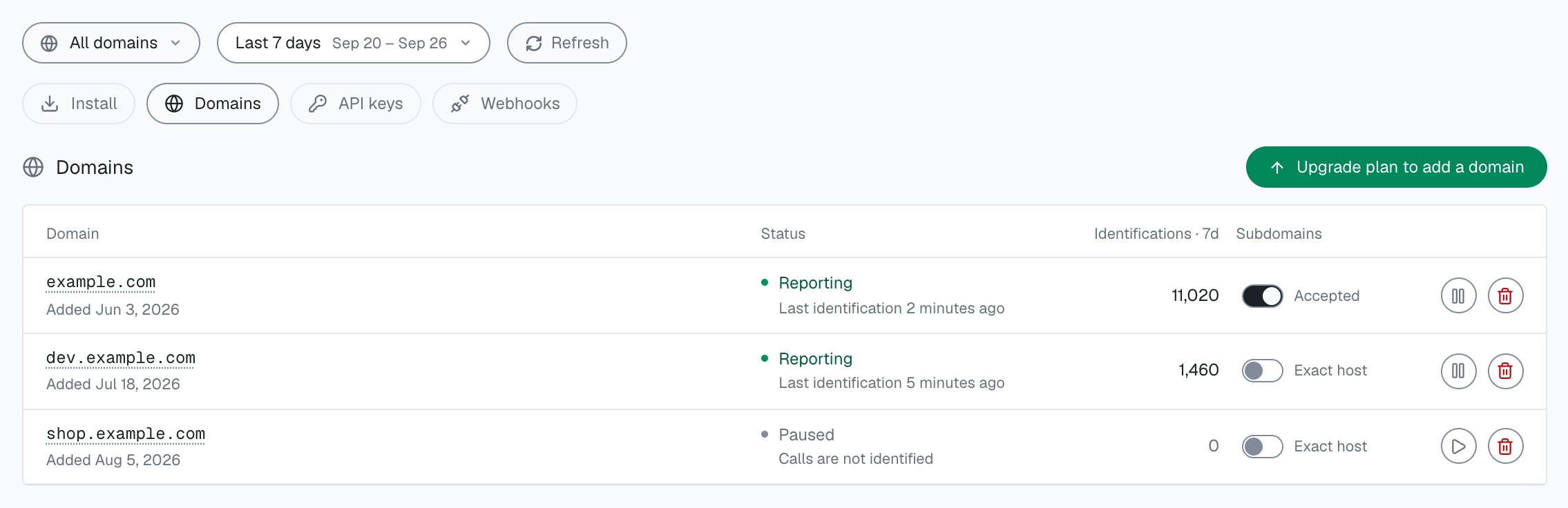
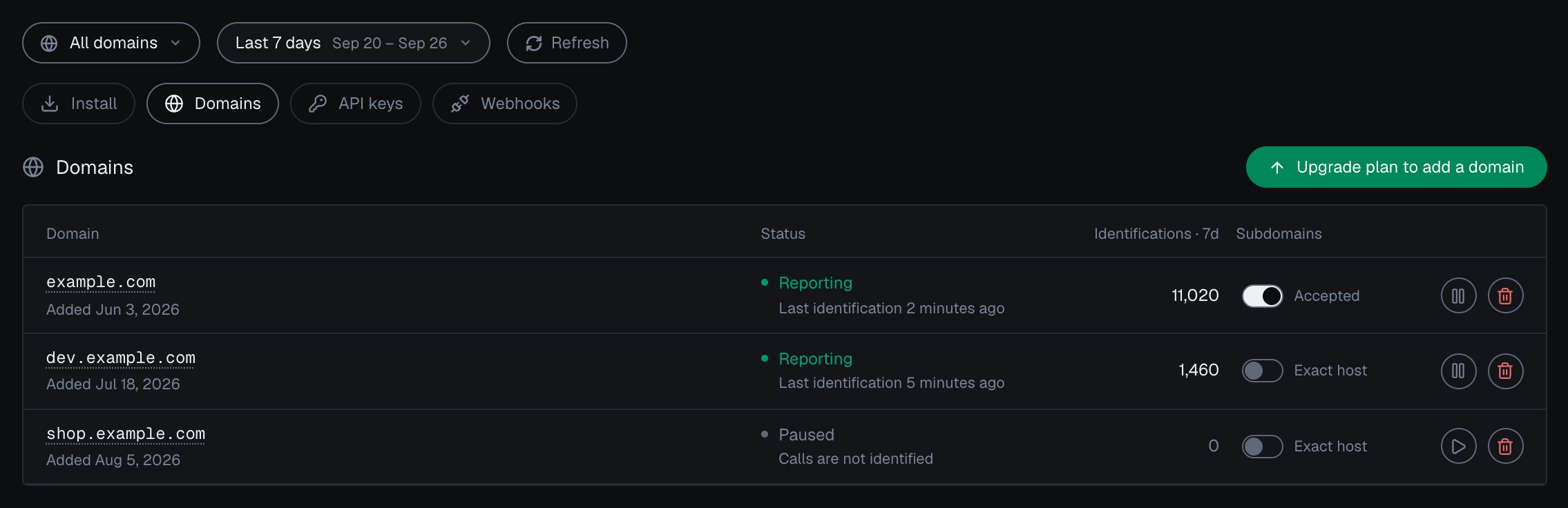
Add domains in the analytics dashboard under **Integration > Domains**. [Integration](/dashboard/integration) describes the screen.
Go to the [analytics dashboard](https://app.shieldlabs.ai/) and open **Integration > Domains**.
Enter the hostname you want to protect, for example `myshop.com`, without `https://` or a path. Subdomains such as `app.myshop.com` are accepted by default; you can switch that off for the domain. Adding it provisions the domain's **Public Key**, **Private API Key** and **Secret Key**.
Drop the snippet onto that domain with its Public Key in the URL, following [Install the snippet](/setup/snippet) for the full client setup. On pages where users are signed in, call `checkAuthenticatedUser` with a hashed User HID instead, as [Identify signed-in users](/setup/snippet#identify-signed-in-users) shows.
```html theme={null}
```
Add one or more webhook endpoints for the domain under **Integration > Webhooks**, so each identification's Risk Score reaches your server. See [Webhooks](/setup/webhooks) for registration, verification, and testing.
Adding a domain mints a fresh key set on the spot. Store the [Secret Key](/setup/keys) and the Private API Key server-side, in environment variables or a secrets manager.
## What every domain carries
| Field | What it is |
| - | - |
| **Public Key** | Goes in the snippet URL as `?publicKey=`, safe to expose in the browser. Identifies which domain an identification belongs to. See [API keys](/setup/keys) for the format. |
| **Private API Key** | Server-side only (`sec_…`). Authenticates the [History API](/api/server-api) on `account.shieldlabs.ai` (`Authorization: Bearer`). |
| **Secret Key** | Server-side only. Authenticates the Management API on `api.shieldlabs.ai` (`Authorization: Bearer` + `X-Shield-Domain`). See [API keys](/setup/keys). |
| **Webhooks** | Up to 10 HTTPS endpoints per domain, each with its own `whsec_…` signing secret. Managed under **Integration > Webhooks** in the analytics dashboard. |
| **Subdomains** | Whether calls from subdomains are accepted and reported under this domain: **Accepted** (the default) or **Exact host**. See [Subdomains and host matching](#subdomains-and-host-matching). |
| **Status** | **Reporting** (identifications are arriving), **Pending** (no identification yet), **Paused** (you paused it) or **Frozen** (at the rate limit, resumes on its own). A paused domain rejects identification calls and Server API auth with `401`; its keys, subdomain setting and webhook endpoints stay as they are. |
| **Remaining volume** (`Weight`) | The remaining included volume on your account, returned by the Profile endpoint. All domains on the account share one plan quota, and each identification counts once. |
 You can read the live configuration for a domain at any time with the [Profile endpoint](/api/server-api). It returns both keys masked (see [API keys](/setup/keys)), so you can confirm a domain without exposing its credentials:
```bash theme={null}
curl "https://api.shieldlabs.ai/v1/profile" \
-H "X-Shield-Domain: myshop.com" \
-H "Authorization: Bearer YOUR_SECRET_KEY"
```
```json theme={null}
{
"Domain": "myshop.com",
"Weight": 148230,
"Callback": "",
"PublicKey": "****************************8c7d",
"Secret": "****************************3847",
"CreatedAt": "2025-11-21T18:00:21Z"
}
```
The Profile call is free: it never counts against your plan. Use it as a quick health check that a domain is enabled.
## Verification is automatic
You do not add a DNS record or upload a file to verify a domain. Verification happens on its own once live snippet traffic is seen.
The Public Key works on the domain it was issued for, and on its subdomains while the domain accepts them. ShieldLabs resolves the domain from the request `Origin`, then `Referer`, then `Host`, and checks it against the Public Key.
Load a page that runs the snippet. The first identification that arrives for that domain verifies it.
Under **Integration > Domains**, the domain's status changes from **Pending** to **Reporting** once that first identification is recorded.
If a Public Key is served from a host it was not issued for, the identification call is rejected with `401`, and the domain stays unverified. A key lifted from your page source works only on the domain it was issued for and, while that domain accepts them, its subdomains.
## Subdomains and host matching
ShieldLabs resolves the host of each call from the request `Origin`, then `Referer`, then `Host`, and strips a leading `www.`, so `www.myshop.com` and `myshop.com` are the same domain. A registered host that matches exactly always wins. Otherwise, while a domain accepts subdomains (the default for every new domain), calls from its subdomains, such as `app.myshop.com` or `checkout.myshop.com`, are accepted with that domain's Public Key and reported under it.
To keep a subdomain apart, with its own key set, webhook endpoints and figures in the analytics dashboard, add it as its own domain: the exact match takes precedence over the parent. Switch off subdomain traffic on the parent when only the exact host should be accepted. Each added domain uses one of your plan's domain slots.
## How many domains you can add
Your plan sets how many active domains one account can hold.
| Plan | Active domains |
| - | :-: |
| Free | 1 |
| Starter | 1 |
| Growth | 3 |
| Scale | 5 |
Adding one past the cap returns an error naming the plan and its limit, for example `starter plan allows at most 1 domain`. Deleting a domain frees its slot, and moving to a higher plan raises the cap right away. If you are already above the cap after a plan change, the domains you have keep running; only new ones are refused.
Each active domain also shares one ingest budget across every visitor IP on that host (Free and Starter **5** requests/second, Growth **10**, Scale **15**). Crossing it returns `429` without banning the domain. After ten saturated seconds in a row the domain shows as **Frozen** in the analytics dashboard: calls get `429`, are not billed, and processing resumes on its own. The full gateway table is on [Rate limits](/rate-limits).
## What is per domain and what is shared
Each domain has its own credentials, webhooks and status. Your account's included identifications are shared by all of them.
Each domain has its own Public Key, Private API Key and Secret Key. A key set issued for one domain authenticates only that domain. Rotating one domain's keys never touches another's.
Each domain can register up to 10 webhook endpoints. Point them at the same handler or different handlers, as you prefer.
All domains draw on your account's included identifications, tracked for the billing cycle on the [Usage](/dashboard/usage) screen. Pick **All domains** or one domain in the analytics dashboard to see its identifications.
Pausing one domain stops its identification calls and Server API access without affecting the others.
## Next steps
With the domain added, wire its Public Key into the [snippet](/setup/snippet) and identify signed-in users with `checkAuthenticatedUser`, keep its Secret Key and Private API Key on your server, and register webhook endpoints that verify `X-Shield-Signature` per the [webhooks](/setup/webhooks) guide.
This documentation is built and hosted on [Mintlify](https://mintlify.com), a developer documentation platform.
You can read the live configuration for a domain at any time with the [Profile endpoint](/api/server-api). It returns both keys masked (see [API keys](/setup/keys)), so you can confirm a domain without exposing its credentials:
```bash theme={null}
curl "https://api.shieldlabs.ai/v1/profile" \
-H "X-Shield-Domain: myshop.com" \
-H "Authorization: Bearer YOUR_SECRET_KEY"
```
```json theme={null}
{
"Domain": "myshop.com",
"Weight": 148230,
"Callback": "",
"PublicKey": "****************************8c7d",
"Secret": "****************************3847",
"CreatedAt": "2025-11-21T18:00:21Z"
}
```
The Profile call is free: it never counts against your plan. Use it as a quick health check that a domain is enabled.
## Verification is automatic
You do not add a DNS record or upload a file to verify a domain. Verification happens on its own once live snippet traffic is seen.
The Public Key works on the domain it was issued for, and on its subdomains while the domain accepts them. ShieldLabs resolves the domain from the request `Origin`, then `Referer`, then `Host`, and checks it against the Public Key.
Load a page that runs the snippet. The first identification that arrives for that domain verifies it.
Under **Integration > Domains**, the domain's status changes from **Pending** to **Reporting** once that first identification is recorded.
If a Public Key is served from a host it was not issued for, the identification call is rejected with `401`, and the domain stays unverified. A key lifted from your page source works only on the domain it was issued for and, while that domain accepts them, its subdomains.
## Subdomains and host matching
ShieldLabs resolves the host of each call from the request `Origin`, then `Referer`, then `Host`, and strips a leading `www.`, so `www.myshop.com` and `myshop.com` are the same domain. A registered host that matches exactly always wins. Otherwise, while a domain accepts subdomains (the default for every new domain), calls from its subdomains, such as `app.myshop.com` or `checkout.myshop.com`, are accepted with that domain's Public Key and reported under it.
To keep a subdomain apart, with its own key set, webhook endpoints and figures in the analytics dashboard, add it as its own domain: the exact match takes precedence over the parent. Switch off subdomain traffic on the parent when only the exact host should be accepted. Each added domain uses one of your plan's domain slots.
## How many domains you can add
Your plan sets how many active domains one account can hold.
| Plan | Active domains |
| - | :-: |
| Free | 1 |
| Starter | 1 |
| Growth | 3 |
| Scale | 5 |
Adding one past the cap returns an error naming the plan and its limit, for example `starter plan allows at most 1 domain`. Deleting a domain frees its slot, and moving to a higher plan raises the cap right away. If you are already above the cap after a plan change, the domains you have keep running; only new ones are refused.
Each active domain also shares one ingest budget across every visitor IP on that host (Free and Starter **5** requests/second, Growth **10**, Scale **15**). Crossing it returns `429` without banning the domain. After ten saturated seconds in a row the domain shows as **Frozen** in the analytics dashboard: calls get `429`, are not billed, and processing resumes on its own. The full gateway table is on [Rate limits](/rate-limits).
## What is per domain and what is shared
Each domain has its own credentials, webhooks and status. Your account's included identifications are shared by all of them.
Each domain has its own Public Key, Private API Key and Secret Key. A key set issued for one domain authenticates only that domain. Rotating one domain's keys never touches another's.
Each domain can register up to 10 webhook endpoints. Point them at the same handler or different handlers, as you prefer.
All domains draw on your account's included identifications, tracked for the billing cycle on the [Usage](/dashboard/usage) screen. Pick **All domains** or one domain in the analytics dashboard to see its identifications.
Pausing one domain stops its identification calls and Server API access without affecting the others.
## Next steps
With the domain added, wire its Public Key into the [snippet](/setup/snippet) and identify signed-in users with `checkAuthenticatedUser`, keep its Secret Key and Private API Key on your server, and register webhook endpoints that verify `X-Shield-Signature` per the [webhooks](/setup/webhooks) guide.
This documentation is built and hosted on [Mintlify](https://mintlify.com), a developer documentation platform.