> ## Documentation Index
> Fetch the complete documentation index at: https://docs.shieldlabs.ai/llms.txt
> Use this file to discover all available pages before exploring further.
# API keys
> What each ShieldLabs key authenticates and where it belongs.
Every domain you add to ShieldLabs gets three keys: a **Public Key**, a **Private API Key** and a **Secret Key**. They are scoped to that single domain and serve different purposes. Each webhook endpoint also carries its own signing secret.
| Key | Format | Where it lives | What it does | Safe in the browser? |
| - | - | - | - | - |
| **Public Key** | 32-char hex | The snippet URL on your site | Identifies the domain so ShieldLabs knows which domain an identification belongs to | Yes |
| **Private API Key** | `sec_xxxxxxxx-xxxxxxxx-xxxxxxxx` | Your server only | Authenticates [History API](/api/server-api) calls on `account.shieldlabs.ai` | No, never |
| **Secret Key** | 32-char hex | Your server only | Authenticates the [Management API](/api/server-api) on `api.shieldlabs.ai` (the profile, with your account's remaining included volume) | No, never |
| **Webhook signing secret** | `whsec_…` per endpoint | Your server only | Verifies the `X-Shield-Signature` header on incoming webhooks | No, never |
 ## Public Key
The Public Key is the only credential that ships to the browser, and exposing it there is by design.
```
a3f8c2d1e9b0476a8c5d2f1e0b9a8c7d
```
* Goes in the snippet URL as the `?publicKey=` query parameter.
* Tells `rest.shieldlabs.ai` which domain an identification belongs to.
* Safe to expose. It is visible in your page source and cannot read data, change settings, or authenticate against any server API.
* The request is only accepted when the Public Key matches the domain it is served from, or a subdomain of it while the domain accepts subdomains (the default; see [Domains](/setup/domains#subdomains-and-host-matching)). The domain is resolved from the `Origin`, `Referer`, or `Host`. A Public Key lifted from your page will not work on someone else's domain.
```html theme={null}
```
[Install the snippet](/setup/snippet) covers the full client setup, including `checkAuthenticatedUser` for signed-in users.
## Private API Key
The **Private API Key** is the credential for the recommended [History API](/api/server-api). In the analytics dashboard, open **Integration > API keys** and select the domain.
```
sec_a1b2c3d4-e5f6a7b8-c9d0e1f2
```
* Send it as `Authorization: Bearer sec_…` to `account.shieldlabs.ai/api/v1/…`.
* Reads identifications from the History API: one by `request_id`, or every identification of one user, device, visitor or IP by `user_hid`, `device_id`, `visitor_id` or `ip`. The key reads only its own domain.
* Stays on your server: it never goes in the snippet or the browser.
* Rotate it on its own, without touching the Public Key and Secret Key, under **Integration > API keys**.
```bash theme={null}
# one identification
curl "https://account.shieldlabs.ai/api/v1/history/request_id/550e8400-e29b-41d4-a716-446655440000?limit=1" \
-H "Authorization: Bearer sec_your_private_api_key"
# every identification of one account, 100 per page (page with offset)
curl "https://account.shieldlabs.ai/api/v1/history/user_hid/a91f3c7e5b2d4086?limit=100&offset=0" \
-H "Authorization: Bearer sec_your_private_api_key"
```
The [Server API](/api/server-api#read-every-identification-of-one-account) reference covers the account read in full.
## Secret Key
The Secret Key authenticates the **Management API** on `api.shieldlabs.ai`: the profile, which includes the remaining included volume on your account.
```
9b74c98e1a3f0d2c5b6a7e8f10293847
```
Recommended: `X-Shield-Domain` + `Authorization: Bearer` headers on `api.shieldlabs.ai/v1/…`.
Each webhook endpoint you register under **Integration > Webhooks** in the analytics dashboard signs with its own `whsec_…` secret, separate from the Secret Key. Verify the `X-Shield-Signature` header over the raw request body with that secret.
Never put the Secret Key or the Private API Key in client-side code, a snippet, a mobile app bundle, a public repository, or any place a browser can reach. Store them in environment variables or a secrets manager. Store each webhook `whsec_…` the same way.
## Check which keys a domain uses
The free [Profile endpoint](/api/server-api) on `api.shieldlabs.ai` returns the Public Key and the Secret Key masked to the last four characters, so you can confirm *which* key a domain uses without exposing it. It never counts against your plan.
```bash theme={null}
curl "https://api.shieldlabs.ai/v1/profile" \
-H "X-Shield-Domain: myshop.com" \
-H "Authorization: Bearer YOUR_SECRET_KEY"
```
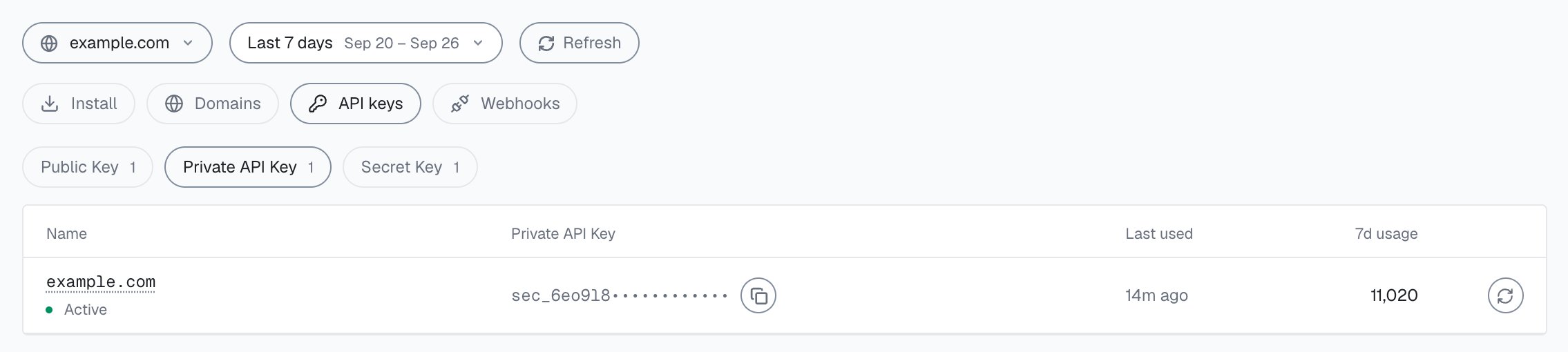
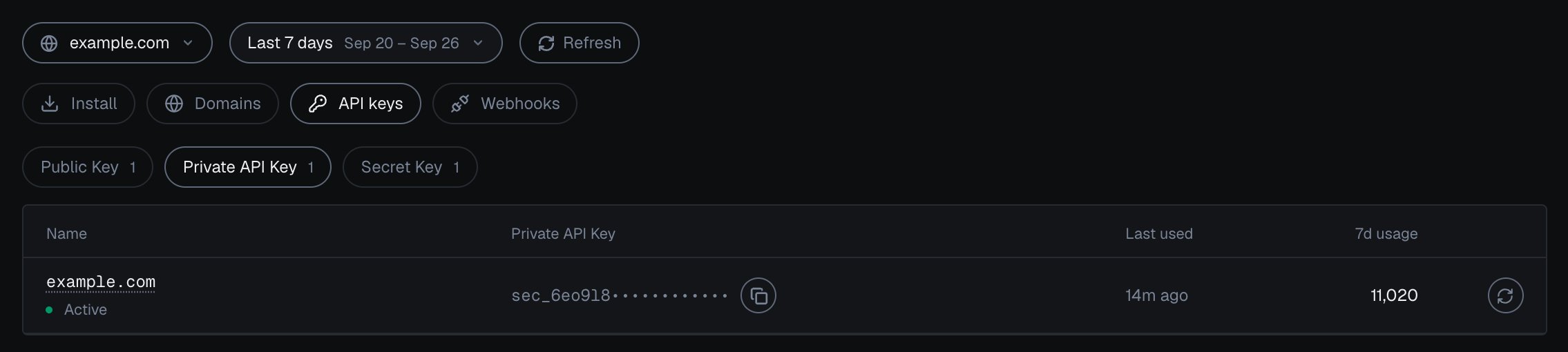
In the analytics dashboard, **Integration > API keys** shows one key type at a time, with a row per domain: the Public Key in full, the Private API Key and the Secret Key masked, each with a copy button that copies the full key. **Rotate** replaces a key, and the previous key stops working. You rotate the Public Key, the Private API Key and the Secret Key separately. If the Secret Key may have been exposed, rotate it and update your server.
## Rotating keys
| Key | Where to rotate | What breaks if you forget to update |
| - | - | - |
| Public Key | **Integration > API keys**, **Rotate** on that key | Snippet stops working |
| Secret Key | **Integration > API keys**, **Rotate** on that key | Management API auth fails |
| Private API Key | **Integration > API keys**, **Rotate** on that key | History API calls return `401` |
| Webhook `whsec_…` | **Integration > Webhooks**, **Rotate secret** on the endpoint | Signature verification fails for that endpoint |
After rotating a key:
Replace the `?publicKey=` value in your snippet (or the environment variable that feeds it) with the new Public Key.
Swap the rotated key on your server: the Private API Key for History API reads, the Secret Key for Management API auth. Keep it in your secrets manager, not in code. Webhook endpoint secrets (`whsec_…`) are managed separately, per endpoint, under **Integration > Webhooks**.
Call the [Profile endpoint](/api/server-api) and check that the masked tails match the new keys.
Rotate keys whenever a credential may have been exposed (a leaked log, a committed `.env`, an offboarded teammate) and on a routine schedule for sensitive domains.
## Where to find your keys
In the analytics dashboard ([app.shieldlabs.ai](https://app.shieldlabs.ai/)), open **Integration** and select your domain ([Integration](/dashboard/integration) describes each tab):
* **Install**: the snippets, with the Public Key already in them
* **API keys**: the Public Key, the Private API Key (History API) and the Secret Key (Management API), each with a copy button and **Rotate**
* **Webhooks**: each endpoint with its `whsec_…` signing secret
## Next steps
Wire the Public Key into the [snippet](/setup/snippet), register webhook endpoints and verify each endpoint's `whsec_…` secret per the [webhooks](/setup/webhooks) guide, and read results, including every identification of one user, through the [History API](/api/server-api#read-every-identification-of-one-account).
This documentation is built and hosted on [Mintlify](https://mintlify.com), a developer documentation platform.
## Public Key
The Public Key is the only credential that ships to the browser, and exposing it there is by design.
```
a3f8c2d1e9b0476a8c5d2f1e0b9a8c7d
```
* Goes in the snippet URL as the `?publicKey=` query parameter.
* Tells `rest.shieldlabs.ai` which domain an identification belongs to.
* Safe to expose. It is visible in your page source and cannot read data, change settings, or authenticate against any server API.
* The request is only accepted when the Public Key matches the domain it is served from, or a subdomain of it while the domain accepts subdomains (the default; see [Domains](/setup/domains#subdomains-and-host-matching)). The domain is resolved from the `Origin`, `Referer`, or `Host`. A Public Key lifted from your page will not work on someone else's domain.
```html theme={null}
```
[Install the snippet](/setup/snippet) covers the full client setup, including `checkAuthenticatedUser` for signed-in users.
## Private API Key
The **Private API Key** is the credential for the recommended [History API](/api/server-api). In the analytics dashboard, open **Integration > API keys** and select the domain.
```
sec_a1b2c3d4-e5f6a7b8-c9d0e1f2
```
* Send it as `Authorization: Bearer sec_…` to `account.shieldlabs.ai/api/v1/…`.
* Reads identifications from the History API: one by `request_id`, or every identification of one user, device, visitor or IP by `user_hid`, `device_id`, `visitor_id` or `ip`. The key reads only its own domain.
* Stays on your server: it never goes in the snippet or the browser.
* Rotate it on its own, without touching the Public Key and Secret Key, under **Integration > API keys**.
```bash theme={null}
# one identification
curl "https://account.shieldlabs.ai/api/v1/history/request_id/550e8400-e29b-41d4-a716-446655440000?limit=1" \
-H "Authorization: Bearer sec_your_private_api_key"
# every identification of one account, 100 per page (page with offset)
curl "https://account.shieldlabs.ai/api/v1/history/user_hid/a91f3c7e5b2d4086?limit=100&offset=0" \
-H "Authorization: Bearer sec_your_private_api_key"
```
The [Server API](/api/server-api#read-every-identification-of-one-account) reference covers the account read in full.
## Secret Key
The Secret Key authenticates the **Management API** on `api.shieldlabs.ai`: the profile, which includes the remaining included volume on your account.
```
9b74c98e1a3f0d2c5b6a7e8f10293847
```
Recommended: `X-Shield-Domain` + `Authorization: Bearer` headers on `api.shieldlabs.ai/v1/…`.
Each webhook endpoint you register under **Integration > Webhooks** in the analytics dashboard signs with its own `whsec_…` secret, separate from the Secret Key. Verify the `X-Shield-Signature` header over the raw request body with that secret.
Never put the Secret Key or the Private API Key in client-side code, a snippet, a mobile app bundle, a public repository, or any place a browser can reach. Store them in environment variables or a secrets manager. Store each webhook `whsec_…` the same way.
## Check which keys a domain uses
The free [Profile endpoint](/api/server-api) on `api.shieldlabs.ai` returns the Public Key and the Secret Key masked to the last four characters, so you can confirm *which* key a domain uses without exposing it. It never counts against your plan.
```bash theme={null}
curl "https://api.shieldlabs.ai/v1/profile" \
-H "X-Shield-Domain: myshop.com" \
-H "Authorization: Bearer YOUR_SECRET_KEY"
```
In the analytics dashboard, **Integration > API keys** shows one key type at a time, with a row per domain: the Public Key in full, the Private API Key and the Secret Key masked, each with a copy button that copies the full key. **Rotate** replaces a key, and the previous key stops working. You rotate the Public Key, the Private API Key and the Secret Key separately. If the Secret Key may have been exposed, rotate it and update your server.
## Rotating keys
| Key | Where to rotate | What breaks if you forget to update |
| - | - | - |
| Public Key | **Integration > API keys**, **Rotate** on that key | Snippet stops working |
| Secret Key | **Integration > API keys**, **Rotate** on that key | Management API auth fails |
| Private API Key | **Integration > API keys**, **Rotate** on that key | History API calls return `401` |
| Webhook `whsec_…` | **Integration > Webhooks**, **Rotate secret** on the endpoint | Signature verification fails for that endpoint |
After rotating a key:
Replace the `?publicKey=` value in your snippet (or the environment variable that feeds it) with the new Public Key.
Swap the rotated key on your server: the Private API Key for History API reads, the Secret Key for Management API auth. Keep it in your secrets manager, not in code. Webhook endpoint secrets (`whsec_…`) are managed separately, per endpoint, under **Integration > Webhooks**.
Call the [Profile endpoint](/api/server-api) and check that the masked tails match the new keys.
Rotate keys whenever a credential may have been exposed (a leaked log, a committed `.env`, an offboarded teammate) and on a routine schedule for sensitive domains.
## Where to find your keys
In the analytics dashboard ([app.shieldlabs.ai](https://app.shieldlabs.ai/)), open **Integration** and select your domain ([Integration](/dashboard/integration) describes each tab):
* **Install**: the snippets, with the Public Key already in them
* **API keys**: the Public Key, the Private API Key (History API) and the Secret Key (Management API), each with a copy button and **Rotate**
* **Webhooks**: each endpoint with its `whsec_…` signing secret
## Next steps
Wire the Public Key into the [snippet](/setup/snippet), register webhook endpoints and verify each endpoint's `whsec_…` secret per the [webhooks](/setup/webhooks) guide, and read results, including every identification of one user, through the [History API](/api/server-api#read-every-identification-of-one-account).
This documentation is built and hosted on [Mintlify](https://mintlify.com), a developer documentation platform.