> ## Documentation Index
> Fetch the complete documentation index at: https://docs.shieldlabs.ai/llms.txt
> Use this file to discover all available pages before exploring further.
# Webhook setup
> Receive the Risk Score and risk signals of every identification the moment it is scored.
A webhook pushes the Risk Score and the risk signals behind it to your backend the moment ShieldLabs finishes scoring an identification. Register one or more endpoints per domain, verify the signature on the `X-Shield-Signature` header, and choose the action for each case in your backend.
This page is the how-to. The [Webhooks API reference](/api/webhooks) has the exact field-by-field payload schema.
Webhooks are optional. If you do not register an endpoint, identifications still run and still count against your plan, and their results are in the analytics dashboard and the [History API](/api/server-api). An endpoint is what makes results real-time.
## Register an endpoint
You can configure up to **10 endpoints per domain**. Each endpoint has its own name, HTTPS URL, and a unique signing secret (`whsec_…`). Manage them in the analytics dashboard under **Integration > Webhooks**.
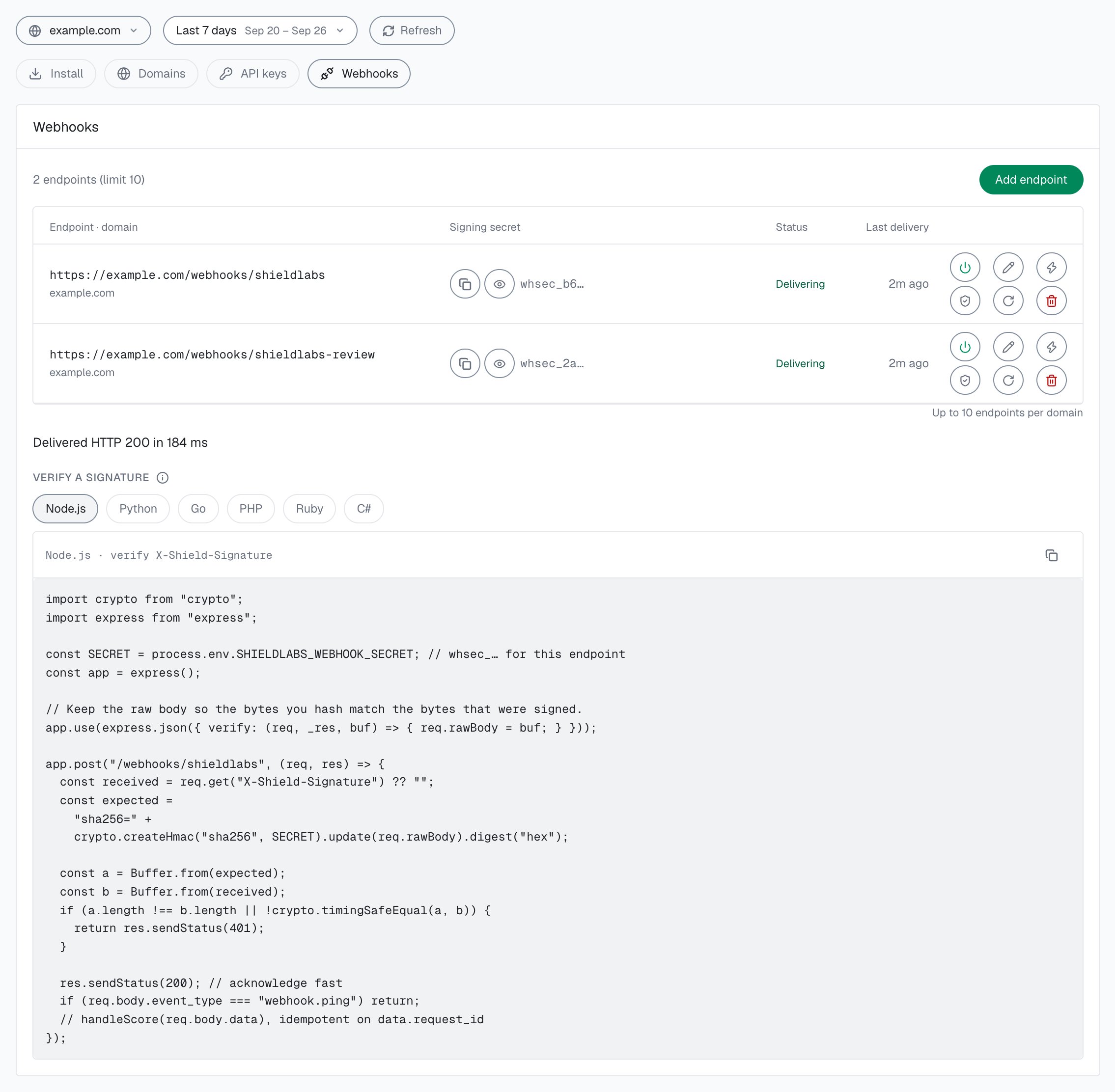
 In the [analytics dashboard](https://app.shieldlabs.ai/), open **Integration > Webhooks** and select your domain. [Integration](/dashboard/integration) describes the screen.
Click **Add endpoint**, give it a name and a public **HTTPS** URL on a route your backend controls, and save. ShieldLabs generates a dedicated signing secret (`whsec_…`) for that endpoint.
Use **Verify** to send a signed `webhook.ping`. When your endpoint answers with a `2xx`, its status changes from **Waiting for the first event** to **Delivering**. Use **Test** on the endpoint to send a sample `identification.scored` delivery at any time; the row shows the result, for example "Delivered HTTP 200 in 84 ms". The test sample always carries the same `request_id` and a `null` `user_hid`, so a handler that deduplicates on `request_id` processes it once.
Each endpoint signs with its **own** `whsec_…` secret. Copy the secret from the endpoint row and store it as a backend-only environment variable, never in the browser or in a URL. Rotating a secret invalidates the old one immediately.
Pause an endpoint and resume it later without losing its configuration; while it is **Paused** it receives no deliveries. Each row shows the endpoint's status and its **Last delivery**. **Rotate secret** issues a new `whsec_…` for one endpoint and invalidates the old one.
## What a delivery looks like
ShieldLabs sends a `POST` with `Content-Type: application/json` to each enabled endpoint. The body is a signed **envelope** (snake\_case), and the signature travels in the `X-Shield-Signature` header.
```http theme={null}
POST https://myshop.com/webhooks/shieldlabs
Content-Type: application/json
X-Shield-Signature: sha256=9b74c98e1a3f0d2c5b6a7e8f1029384756abcdef0123456789abcdef01234567
{
"event_type": "identification.scored",
"schema_version": "2026-06-01",
"created_at": "2026-06-26T14:20:42Z",
"data": {
"request_id": "6c0e2a9d-3b41-4f7e-8a25-91d7c4e0b3f8",
"visitor_id": "161dfbad-8e7f-4a6b-9c5d-0e1f2a3b4c5d",
"device_id": "5eb7fd5c-2a1b-4c3d-9e8f-7a6b5c4d3e2f",
"session_id": "7a1b2c3d-4e5f-6789-abcd-ef0123456789",
"cookie_id": "3f2e1d0c-9b8a-7654-3210-fedcba987654",
"user_hid": "a91f3c7e5b2d4086",
"domain": "example.com",
"public_ip": { "ip": "203.0.113.42", "country": "US" },
"local_ip": { "ip": "198.51.100.23", "country": "DE" },
"connection_type": "proxy",
"os": "Windows",
"browser": "Chrome",
"device_type": "desktop",
"traffic_source": {
"channel": "Google Ads",
"referrer_domain": "google.com",
"landing_url": "https://example.com/lp?gclid=abc123",
"click_id_type": "gclid",
"utm_source": "google",
"utm_medium": "cpc",
"utm_campaign": "summer_sale",
"utm_content": "ad_a",
"utm_term": "buy shoes"
},
"risk_score": 30,
"signals": [
{ "name": "proxy", "weight": 10 },
{ "name": "datacenter_ip", "weight": 10 },
{ "name": "abuser", "weight": 10 }
],
"detection_flags": {
"vpn": false,
"privacy_relay": false,
"browser_vpn_proxy": false,
"tor": false,
"proxy": true,
"datacenter_ip": true,
"abuser": true,
"os_mismatch": false,
"os_not_detected": false,
"timezone_mismatch": false,
"anti_detect_browser": false,
"browser_automation": false,
"javascript_disabled": false,
"incognito": false,
"search_bot": false,
"suspicious_paid_click": false,
"stun_not_checked": false,
"ip_mismatch": true,
"check_incomplete": false
},
"observed_at": "2026-06-26T14:20:42Z"
}
}
```
Correlate the delivery to the original identification by `data.request_id`. The full field list is in the [Webhooks API reference](/api/webhooks).
This identification is masked: `data.public_ip` is a US proxy exit (`203.0.113.42`) while `data.local_ip` is the address the browser itself reports, in Germany (`198.51.100.23`). The two addresses differ, so `data.detection_flags.ip_mismatch` is `true`. ShieldLabs returns both IPs so you can compare them; compare the two countries rather than branching on the flag. The difference is informational and adds nothing to the Risk Score, which here comes from the proxy, datacenter and abuser signals.
Branch on `data.risk_score`, signal `name` slugs and `detection_flags`. A slug can appear more than once with a partial weight, so never assume one entry per slug.
### Tie deliveries to your users
Each `identification.scored` delivery is one identification, the [event layer](/concepts/accounts-and-identifications) under your users. Store `data.user_hid` (your hashed User HID, or `"anonymous"` for a `checkAnonymous` call), `data.device_id`, `data.visitor_id` and the IPs in `data.public_ip` and `data.local_ip` with your own records, so you can act on the user and not only on this identification. The [History API](/api/server-api#read-every-identification-of-one-account) returns every identification of one user, device, visitor or IP by `user_hid`, `device_id`, `visitor_id` or `ip`. [High-Risk Events](/features/high-risk-events) are available in the analytics dashboard, the API and webhooks; when one arrives for a user, act on the account.
### One webhook per identification
Each identification produces **exactly one** scored webhook per enabled endpoint, joined by `request_id`.
ShieldLabs waits for follow-up network checks when they apply to the identification. The webhook is sent as soon as those checks finish, or **at most about 10 seconds** after the check, whichever comes first. If a follow-up never arrives, you still get one webhook with the best Risk Score available at that point.
Typical timing:
* **Identifications without a follow-up network check**: about **300 ms** after the check.
* **Chrome with a follow-up network check**: usually within a few seconds, at most about **10 seconds**.
Do not hold your UX waiting for the webhook. The snippet's `onInitialized` handler receives `{ status, requestID }` as soon as the check starts: use the `requestID` as the join key, and treat the webhook (or the History API) as the scored result for server-side decisions.
## Verify the signature
Every delivery is signed. The `X-Shield-Signature` header is the hex-encoded HMAC-SHA256 of the **raw request body**, keyed with that endpoint's signing secret, prefixed with `sha256=`:
```
X-Shield-Signature = "sha256=" + hex( HMAC-SHA256( key = whsec_…, msg = raw request body ) )
```
To verify: read the raw request body bytes exactly as received, compute HMAC-SHA256 over those bytes with the endpoint secret, hex-encode the result, prefix it with `sha256=`, and compare it to the `X-Shield-Signature` header using a **constant-time** comparison. Reject the request (respond `401`) on a mismatch, and do not process the body.
Under **Integration > Webhooks** in the analytics dashboard, **Verify a signature** has the same check ready to copy in six languages.
```javascript Node.js theme={null}
import crypto from "crypto";
import express from "express";
const SECRET = process.env.SHIELDLABS_WEBHOOK_SECRET; // whsec_… for this endpoint
const app = express();
// Keep the raw body so the bytes you hash match the bytes that were signed.
app.use(express.json({ verify: (req, _res, buf) => { req.rawBody = buf; } }));
app.post("/webhooks/shieldlabs", (req, res) => {
const received = req.get("X-Shield-Signature") ?? "";
const expected =
"sha256=" +
crypto.createHmac("sha256", SECRET).update(req.rawBody).digest("hex");
const a = Buffer.from(expected);
const b = Buffer.from(received);
if (a.length !== b.length || !crypto.timingSafeEqual(a, b)) {
return res.sendStatus(401);
}
res.sendStatus(200); // acknowledge fast
if (req.body.event_type === "webhook.ping") return;
handleScore(req.body.data); // idempotent on request_id
});
```
```go Go theme={null}
package main
import (
"crypto/hmac"
"crypto/sha256"
"encoding/hex"
"encoding/json"
"io"
"net/http"
"os"
)
var secret = []byte(os.Getenv("SHIELDLABS_WEBHOOK_SECRET")) // whsec_… for this endpoint
func webhook(w http.ResponseWriter, r *http.Request) {
body, err := io.ReadAll(r.Body)
if err != nil {
w.WriteHeader(http.StatusBadRequest)
return
}
mac := hmac.New(sha256.New, secret)
mac.Write(body) // HMAC over the raw request body
expected := "sha256=" + hex.EncodeToString(mac.Sum(nil))
if !hmac.Equal([]byte(expected), []byte(r.Header.Get("X-Shield-Signature"))) {
w.WriteHeader(http.StatusUnauthorized)
return
}
w.WriteHeader(http.StatusOK) // acknowledge fast
var envelope struct {
EventType string `json:"event_type"`
Data json.RawMessage `json:"data"`
}
if err := json.Unmarshal(body, &envelope); err != nil || envelope.EventType == "webhook.ping" {
return
}
handleScore(envelope.Data) // idempotent on request_id
}
```
```python Python theme={null}
import hashlib
import hmac
import os
from flask import Flask, request, abort
SECRET = os.environ["SHIELDLABS_WEBHOOK_SECRET"].encode() # whsec_… for this endpoint
app = Flask(__name__)
@app.post("/webhooks/shieldlabs")
def webhook():
# Read the raw request body bytes exactly as received.
raw = request.get_data()
received = request.headers.get("X-Shield-Signature", "")
expected = "sha256=" + hmac.new(SECRET, raw, hashlib.sha256).hexdigest()
if not hmac.compare_digest(expected, received):
abort(401)
payload = request.get_json()
if payload.get("event_type") == "webhook.ping":
return "", 200
handle_score(payload.get("data")) # idempotent on request_id
return "", 200
```
HMAC the raw request body bytes as received. Re-serializing the parsed JSON can reorder keys or change spacing, which changes the bytes you hash, so the signature will not match.
## Delivery guarantees
Webhook delivery is **at-most-once**.
There are **no retries** and the send has a **\~1 second timeout**. If your endpoint is slow, down, or returns a non-2xx response, that delivery is dropped and not resent. Do not rely on webhooks for guaranteed delivery: for guaranteed reads, use the [History API](/api/server-api). It returns one identification by `request_id`, or every identification of one user, device, visitor or IP by `user_hid`, `device_id`, `visitor_id` or `ip` (also by `session_id` and `cookie_id`).
A practical handler pattern:
Constant-time compare the `X-Shield-Signature` header. Reject with `401` on a mismatch.
Return `200` immediately once the signature is valid and the body is parsed.
Upsert on `request_id`. A redelivery for the same id should be a no-op.
Store the identification against `data.user_hid` and `data.device_id`, then choose the action for each case (allow, step up, review or block) from `data.risk_score` and `data.signals`.
## Next steps
Field-by-field payload schema, timing, and signature details.
Choose the action for each band: allow, step up, review or block.
Read one identification, or every identification of one user, for guaranteed reads.
Where your Public Key, Private API Key and Secret Key come from.
This documentation is built and hosted on [Mintlify](https://mintlify.com), a developer documentation platform.
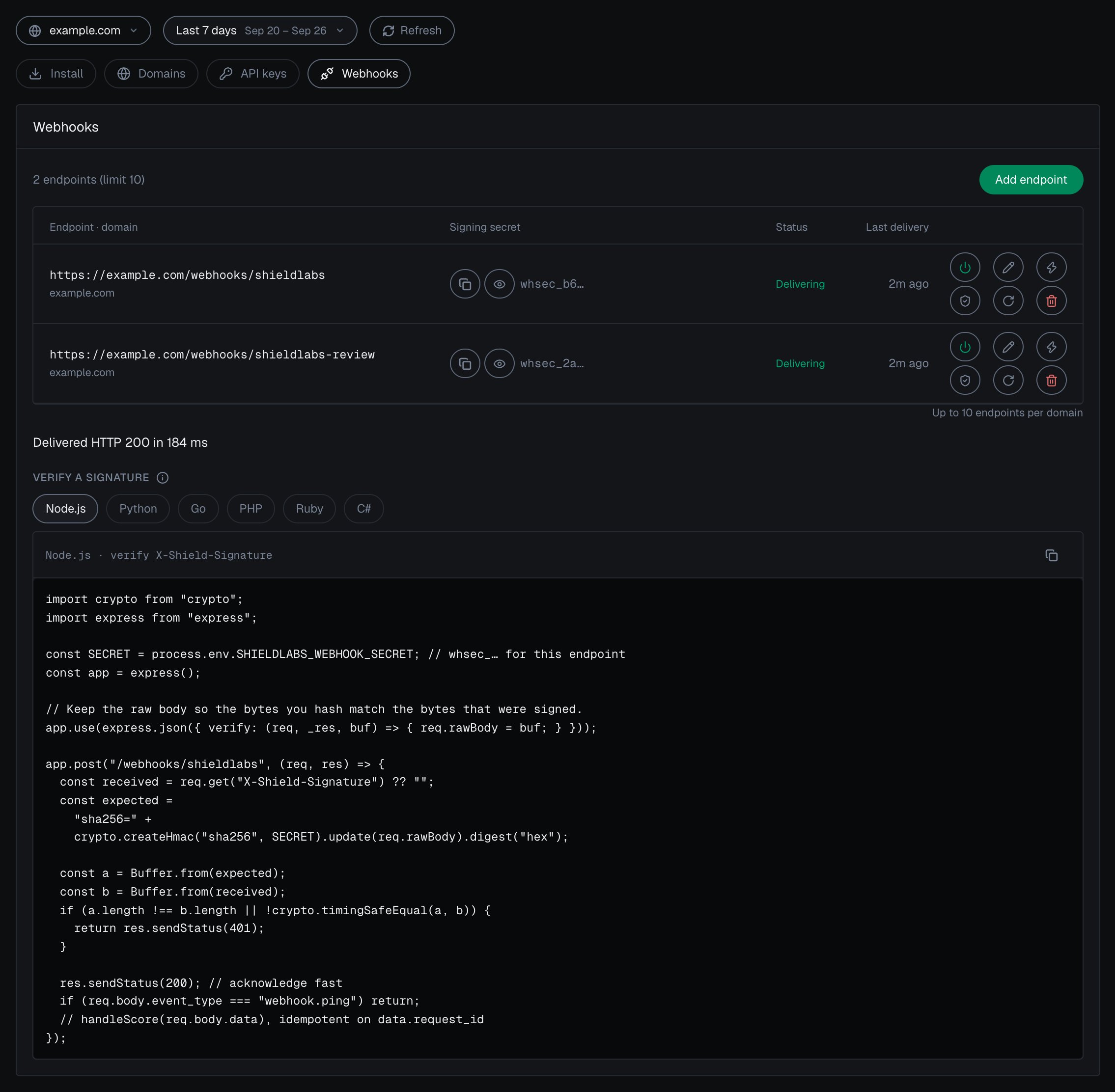
In the [analytics dashboard](https://app.shieldlabs.ai/), open **Integration > Webhooks** and select your domain. [Integration](/dashboard/integration) describes the screen.
Click **Add endpoint**, give it a name and a public **HTTPS** URL on a route your backend controls, and save. ShieldLabs generates a dedicated signing secret (`whsec_…`) for that endpoint.
Use **Verify** to send a signed `webhook.ping`. When your endpoint answers with a `2xx`, its status changes from **Waiting for the first event** to **Delivering**. Use **Test** on the endpoint to send a sample `identification.scored` delivery at any time; the row shows the result, for example "Delivered HTTP 200 in 84 ms". The test sample always carries the same `request_id` and a `null` `user_hid`, so a handler that deduplicates on `request_id` processes it once.
Each endpoint signs with its **own** `whsec_…` secret. Copy the secret from the endpoint row and store it as a backend-only environment variable, never in the browser or in a URL. Rotating a secret invalidates the old one immediately.
Pause an endpoint and resume it later without losing its configuration; while it is **Paused** it receives no deliveries. Each row shows the endpoint's status and its **Last delivery**. **Rotate secret** issues a new `whsec_…` for one endpoint and invalidates the old one.
## What a delivery looks like
ShieldLabs sends a `POST` with `Content-Type: application/json` to each enabled endpoint. The body is a signed **envelope** (snake\_case), and the signature travels in the `X-Shield-Signature` header.
```http theme={null}
POST https://myshop.com/webhooks/shieldlabs
Content-Type: application/json
X-Shield-Signature: sha256=9b74c98e1a3f0d2c5b6a7e8f1029384756abcdef0123456789abcdef01234567
{
"event_type": "identification.scored",
"schema_version": "2026-06-01",
"created_at": "2026-06-26T14:20:42Z",
"data": {
"request_id": "6c0e2a9d-3b41-4f7e-8a25-91d7c4e0b3f8",
"visitor_id": "161dfbad-8e7f-4a6b-9c5d-0e1f2a3b4c5d",
"device_id": "5eb7fd5c-2a1b-4c3d-9e8f-7a6b5c4d3e2f",
"session_id": "7a1b2c3d-4e5f-6789-abcd-ef0123456789",
"cookie_id": "3f2e1d0c-9b8a-7654-3210-fedcba987654",
"user_hid": "a91f3c7e5b2d4086",
"domain": "example.com",
"public_ip": { "ip": "203.0.113.42", "country": "US" },
"local_ip": { "ip": "198.51.100.23", "country": "DE" },
"connection_type": "proxy",
"os": "Windows",
"browser": "Chrome",
"device_type": "desktop",
"traffic_source": {
"channel": "Google Ads",
"referrer_domain": "google.com",
"landing_url": "https://example.com/lp?gclid=abc123",
"click_id_type": "gclid",
"utm_source": "google",
"utm_medium": "cpc",
"utm_campaign": "summer_sale",
"utm_content": "ad_a",
"utm_term": "buy shoes"
},
"risk_score": 30,
"signals": [
{ "name": "proxy", "weight": 10 },
{ "name": "datacenter_ip", "weight": 10 },
{ "name": "abuser", "weight": 10 }
],
"detection_flags": {
"vpn": false,
"privacy_relay": false,
"browser_vpn_proxy": false,
"tor": false,
"proxy": true,
"datacenter_ip": true,
"abuser": true,
"os_mismatch": false,
"os_not_detected": false,
"timezone_mismatch": false,
"anti_detect_browser": false,
"browser_automation": false,
"javascript_disabled": false,
"incognito": false,
"search_bot": false,
"suspicious_paid_click": false,
"stun_not_checked": false,
"ip_mismatch": true,
"check_incomplete": false
},
"observed_at": "2026-06-26T14:20:42Z"
}
}
```
Correlate the delivery to the original identification by `data.request_id`. The full field list is in the [Webhooks API reference](/api/webhooks).
This identification is masked: `data.public_ip` is a US proxy exit (`203.0.113.42`) while `data.local_ip` is the address the browser itself reports, in Germany (`198.51.100.23`). The two addresses differ, so `data.detection_flags.ip_mismatch` is `true`. ShieldLabs returns both IPs so you can compare them; compare the two countries rather than branching on the flag. The difference is informational and adds nothing to the Risk Score, which here comes from the proxy, datacenter and abuser signals.
Branch on `data.risk_score`, signal `name` slugs and `detection_flags`. A slug can appear more than once with a partial weight, so never assume one entry per slug.
### Tie deliveries to your users
Each `identification.scored` delivery is one identification, the [event layer](/concepts/accounts-and-identifications) under your users. Store `data.user_hid` (your hashed User HID, or `"anonymous"` for a `checkAnonymous` call), `data.device_id`, `data.visitor_id` and the IPs in `data.public_ip` and `data.local_ip` with your own records, so you can act on the user and not only on this identification. The [History API](/api/server-api#read-every-identification-of-one-account) returns every identification of one user, device, visitor or IP by `user_hid`, `device_id`, `visitor_id` or `ip`. [High-Risk Events](/features/high-risk-events) are available in the analytics dashboard, the API and webhooks; when one arrives for a user, act on the account.
### One webhook per identification
Each identification produces **exactly one** scored webhook per enabled endpoint, joined by `request_id`.
ShieldLabs waits for follow-up network checks when they apply to the identification. The webhook is sent as soon as those checks finish, or **at most about 10 seconds** after the check, whichever comes first. If a follow-up never arrives, you still get one webhook with the best Risk Score available at that point.
Typical timing:
* **Identifications without a follow-up network check**: about **300 ms** after the check.
* **Chrome with a follow-up network check**: usually within a few seconds, at most about **10 seconds**.
Do not hold your UX waiting for the webhook. The snippet's `onInitialized` handler receives `{ status, requestID }` as soon as the check starts: use the `requestID` as the join key, and treat the webhook (or the History API) as the scored result for server-side decisions.
## Verify the signature
Every delivery is signed. The `X-Shield-Signature` header is the hex-encoded HMAC-SHA256 of the **raw request body**, keyed with that endpoint's signing secret, prefixed with `sha256=`:
```
X-Shield-Signature = "sha256=" + hex( HMAC-SHA256( key = whsec_…, msg = raw request body ) )
```
To verify: read the raw request body bytes exactly as received, compute HMAC-SHA256 over those bytes with the endpoint secret, hex-encode the result, prefix it with `sha256=`, and compare it to the `X-Shield-Signature` header using a **constant-time** comparison. Reject the request (respond `401`) on a mismatch, and do not process the body.
Under **Integration > Webhooks** in the analytics dashboard, **Verify a signature** has the same check ready to copy in six languages.
```javascript Node.js theme={null}
import crypto from "crypto";
import express from "express";
const SECRET = process.env.SHIELDLABS_WEBHOOK_SECRET; // whsec_… for this endpoint
const app = express();
// Keep the raw body so the bytes you hash match the bytes that were signed.
app.use(express.json({ verify: (req, _res, buf) => { req.rawBody = buf; } }));
app.post("/webhooks/shieldlabs", (req, res) => {
const received = req.get("X-Shield-Signature") ?? "";
const expected =
"sha256=" +
crypto.createHmac("sha256", SECRET).update(req.rawBody).digest("hex");
const a = Buffer.from(expected);
const b = Buffer.from(received);
if (a.length !== b.length || !crypto.timingSafeEqual(a, b)) {
return res.sendStatus(401);
}
res.sendStatus(200); // acknowledge fast
if (req.body.event_type === "webhook.ping") return;
handleScore(req.body.data); // idempotent on request_id
});
```
```go Go theme={null}
package main
import (
"crypto/hmac"
"crypto/sha256"
"encoding/hex"
"encoding/json"
"io"
"net/http"
"os"
)
var secret = []byte(os.Getenv("SHIELDLABS_WEBHOOK_SECRET")) // whsec_… for this endpoint
func webhook(w http.ResponseWriter, r *http.Request) {
body, err := io.ReadAll(r.Body)
if err != nil {
w.WriteHeader(http.StatusBadRequest)
return
}
mac := hmac.New(sha256.New, secret)
mac.Write(body) // HMAC over the raw request body
expected := "sha256=" + hex.EncodeToString(mac.Sum(nil))
if !hmac.Equal([]byte(expected), []byte(r.Header.Get("X-Shield-Signature"))) {
w.WriteHeader(http.StatusUnauthorized)
return
}
w.WriteHeader(http.StatusOK) // acknowledge fast
var envelope struct {
EventType string `json:"event_type"`
Data json.RawMessage `json:"data"`
}
if err := json.Unmarshal(body, &envelope); err != nil || envelope.EventType == "webhook.ping" {
return
}
handleScore(envelope.Data) // idempotent on request_id
}
```
```python Python theme={null}
import hashlib
import hmac
import os
from flask import Flask, request, abort
SECRET = os.environ["SHIELDLABS_WEBHOOK_SECRET"].encode() # whsec_… for this endpoint
app = Flask(__name__)
@app.post("/webhooks/shieldlabs")
def webhook():
# Read the raw request body bytes exactly as received.
raw = request.get_data()
received = request.headers.get("X-Shield-Signature", "")
expected = "sha256=" + hmac.new(SECRET, raw, hashlib.sha256).hexdigest()
if not hmac.compare_digest(expected, received):
abort(401)
payload = request.get_json()
if payload.get("event_type") == "webhook.ping":
return "", 200
handle_score(payload.get("data")) # idempotent on request_id
return "", 200
```
HMAC the raw request body bytes as received. Re-serializing the parsed JSON can reorder keys or change spacing, which changes the bytes you hash, so the signature will not match.
## Delivery guarantees
Webhook delivery is **at-most-once**.
There are **no retries** and the send has a **\~1 second timeout**. If your endpoint is slow, down, or returns a non-2xx response, that delivery is dropped and not resent. Do not rely on webhooks for guaranteed delivery: for guaranteed reads, use the [History API](/api/server-api). It returns one identification by `request_id`, or every identification of one user, device, visitor or IP by `user_hid`, `device_id`, `visitor_id` or `ip` (also by `session_id` and `cookie_id`).
A practical handler pattern:
Constant-time compare the `X-Shield-Signature` header. Reject with `401` on a mismatch.
Return `200` immediately once the signature is valid and the body is parsed.
Upsert on `request_id`. A redelivery for the same id should be a no-op.
Store the identification against `data.user_hid` and `data.device_id`, then choose the action for each case (allow, step up, review or block) from `data.risk_score` and `data.signals`.
## Next steps
Field-by-field payload schema, timing, and signature details.
Choose the action for each band: allow, step up, review or block.
Read one identification, or every identification of one user, for guaranteed reads.
Where your Public Key, Private API Key and Secret Key come from.
This documentation is built and hosted on [Mintlify](https://mintlify.com), a developer documentation platform.