> ## Documentation Index
> Fetch the complete documentation index at: https://docs.shieldlabs.ai/llms.txt
> Use this file to discover all available pages before exploring further.
# Use Case Tutorials
> End-to-end tutorials that detect and stop fraud and abuse on your users and accounts, from signup and login to checkout.
Each tutorial protects your users and accounts at one moment that matters (signup, login, a reward claim, checkout): where to call the snippet, how to read the account behind the action (its devices, visitors and IP addresses and its worst band), and how to act on the Risk Score and named risk signals of the identification in front of you. ShieldLabs returns a Risk Score and every named risk signal on each identification, and detects [High-Risk Events](/features/high-risk-events) on your users out of the box. You choose the action for each case (allow, step up, review or block) and act on the result in your backend. ShieldLabs stops fraud and abuse and helps block fraudulent and abusive traffic.
The tutorials share the same building blocks:
* Pass a hashed User HID with `checkAuthenticatedUser` on every signed-in page. Users, account-level risk and all four [High-Risk Events](/features/high-risk-events) are built on it.
* The [snippet](/setup/snippet) runs an identification at the action: 300+ device and network signals, checked together, bots and automation included.
* A [webhook](/setup/webhooks) delivers each identification about 300 ms after the check: the User HID, Device ID, Visitor ID, public and local IP, and the **Risk Score (0-100)** with every named risk signal and its weight. The [History API](/api/server-api) returns the same identification by `request_id`, and [every identification of one account](/api/server-api#read-every-identification-of-one-account) by `user_hid`.
* Map the Risk Score to the [three bands](/features/risk-scoring) in your backend: **Trusted (0-29)**, **Suspicious (30-59)**, **Dangerous (60-100)**. A user, device, visitor or IP address takes [the worst band of its identifications](/features/risk-scoring#risk-of-a-user-device-visitor-or-ip).
* [High-Risk Events](/features/high-risk-events) (Multi-accounting, Account sharing, Impossible travel, Account takeover) are detected on your users, each at **Medium** or **High** confidence, and are available in the [analytics dashboard](/dashboard/overview), the API and webhooks.
[Users, devices, visitors and IPs](/concepts/entities) explains how these identities link, and [Accounts and identifications](/concepts/accounts-and-identifications) explains which layer to read at each step. Read [Acting on results](/guides/acting-on-risk-score) first if you want the decision skeleton these tutorials reuse.
## The logic every tutorial follows
Every tutorial is the same four moves; only the action and your cutoffs change:
1. **Tie the action to the account.** Identify at the action (signup, login, checkout) and pass the hashed User HID once the user is signed in; a login attempt is identified before the password check, so it carries no User HID. Each identification links the account to a Device ID, a Visitor ID and its IP addresses, and the Device ID holds through cleared cookies, incognito and IP changes.
2. **Read the account.** Read the account's identifications by `user_hid` from the History API: its devices, visitors and IP addresses, and its worst band (the `accountView` helper below). When a High-Risk Event arrives for a user through the API or webhooks, or when you review it in the analytics dashboard, act on the account: mark it in your own system, so its next action reads the mark.
3. **Read the identification.** The Risk Score and its named risk signals tell you whether this login, signup or payment is masked or automated right now. They remain the input at signup, login, checkout or withdrawal.
4. **Act in your backend.** Choose the action for each case (allow, step up, review or block) from the band of this identification, the account's history and any mark you keep for a High-Risk Event on the account.
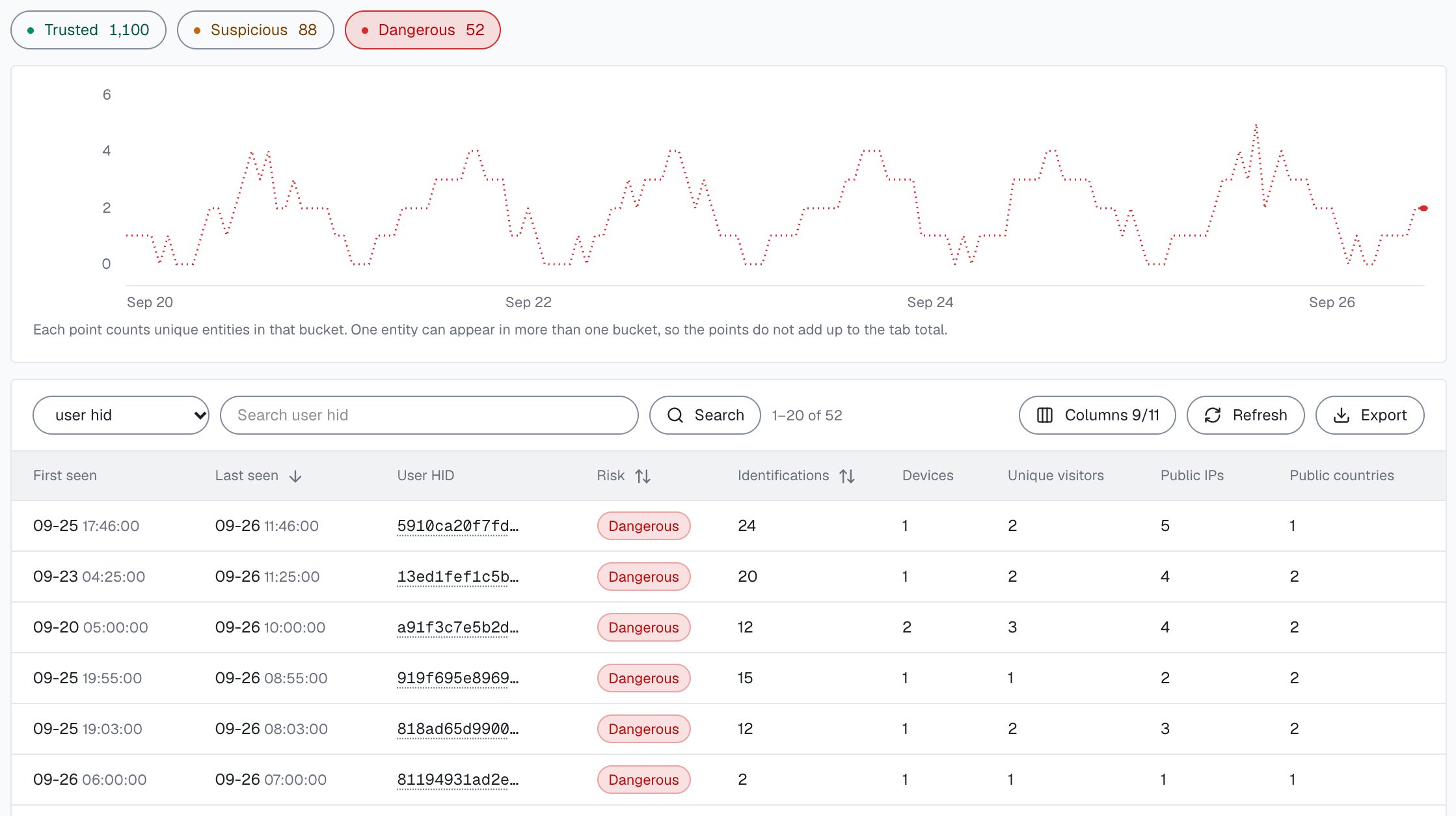
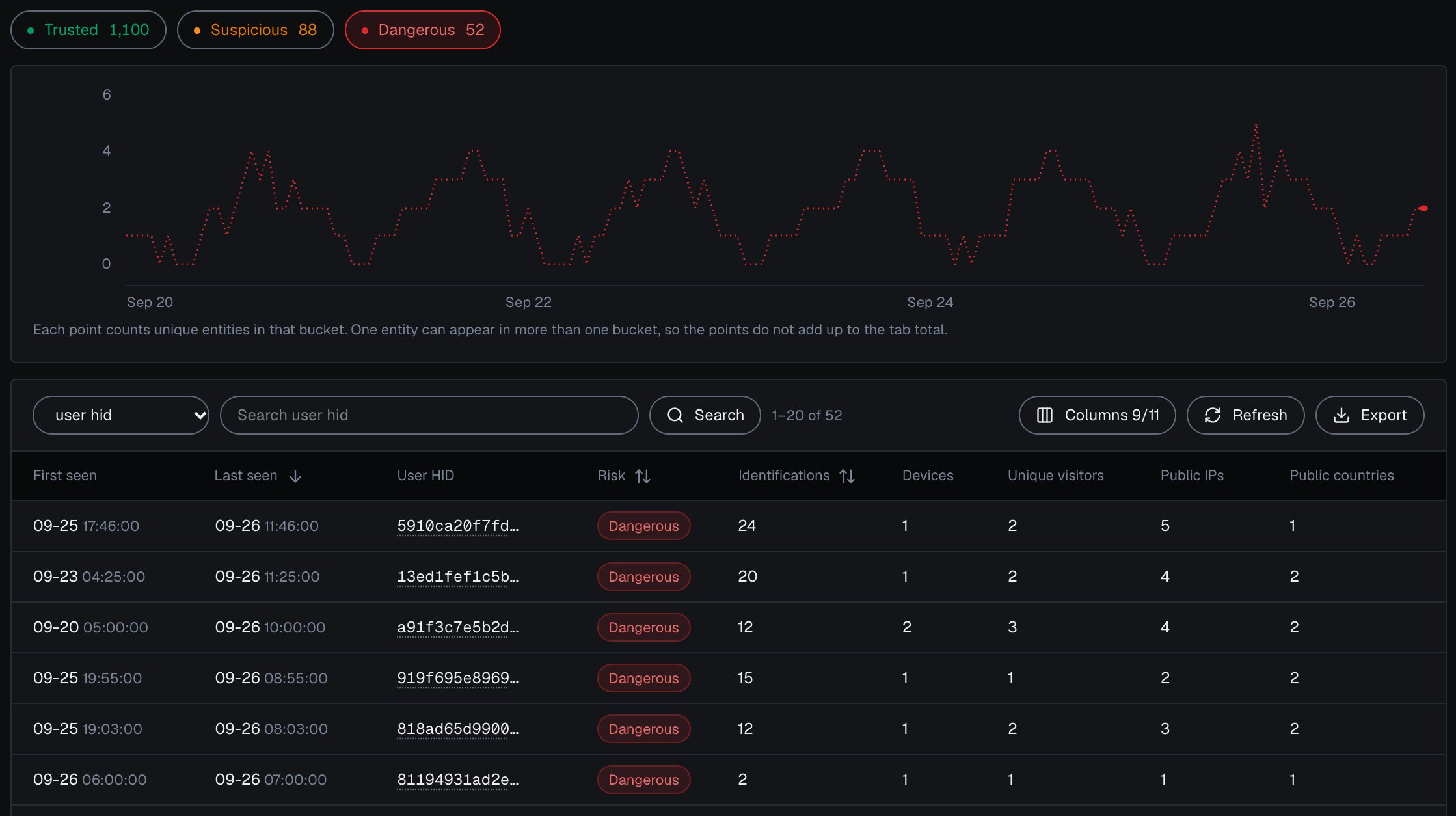 In [Analytics](/dashboard/analytics), filter by **High-Risk Events** and select **Export**: the CSV holds every identification in the filter, up to 10,000 rows, each with its User HID and Device ID. [Investigate a risky user](/use-case/investigate-a-user) walks through the review, from the Overview to the user's card.
New here? Start with the [Quickstart](/quickstart) to install the snippet and receive your first Risk Score, then [Acting on results](/guides/acting-on-risk-score) for the decision pattern every tutorial below reuses.
### Investigate
Find a risky user in the analytics dashboard, see what it is linked to and why, and act on it in your backend.
### Accounts
Detect one person running several accounts with the Multi-accounting event, the shape behind bonus, trial and loyalty abuse.
See one account used from many devices with the Account sharing event, and enforce your sharing policy.
Step up at login when a known account arrives on an unfamiliar device, and watch the accounts with an Account takeover event.
Catch fake signups at registration with the Risk Score, the Device ID and the accounts already linked to that device.
Ban every device a banned account used, so a cleared cookie or a fresh account does not let someone back in.
Throttle logins on the durable Device ID and add friction on bots and masked logins, so rotated IPs stop resetting your limits.
Identify every login attempt and step up to 2FA when the login or the account behind it is risky.
Cap verification SMS per Device ID and local IP so one device cannot flood your messaging bill with OTP toll fraud.
### Promotions and rewards
Count the accounts and redemptions tied to one device to stop signup-bonus and free-trial farming.
Catch repeat signup and deposit bonuses claimed through duplicate accounts on the same device.
Spot new accounts cycling the same device to re-claim free trials and free-tier quotas.
See points and tier rewards farmed across many linked accounts instead of genuine activity.
Rank partners by the accounts they bring and the risky-traffic share of their clicks, so masked conversions do not get paid out.
Tie many wallets or identities back to one actor before an airdrop, vote, or quota pays out.
Tie each redemption to the account and its Device ID to enforce one-per-customer codes and refuse reused single-use coupons.
### Payments and content
Re-identify right before payment, then challenge or hold orders carrying strong risk signals or a risky buyer account.
Reconstruct a buyer account's devices and orders into evidence against friendly-fraud chargebacks.
Meter free views on the Device ID, which clearing cookies or opening incognito cannot reset.
Read the risk signals and the IP countries to catch VPN-masked region switching before you discount.
Anchor each checkout attempt to the durable Device ID so you can throttle card attempts and gate automated or masked checkouts.
### Traffic and experience
Grade each source, channel and campaign by the users and devices it brings, to measure cost per real visitor, not per click.
Recognize a trusted account on a device it has used before and cut friction for it, the inverse of the fraud checks.
## How every tutorial is shaped
Load the [snippet](/setup/snippet) on the relevant page. Pass a hashed User HID with `checkAuthenticatedUser` on every signed-in page. Users, account-level risk and all four High-Risk Events are built on it. Pass a hashed or pseudonymous account id, never a raw email.
Within one visit (while a page of your site stays open in the browser, across route changes in a single-page app and across open tabs), `checkAnonymous` and `checkAuthenticatedUser` run at most one identification every five minutes for the same user. A call inside that window posts nothing, counts nothing, and its `onInitialized` handler receives `{ status: "not_initialized" }`. On a multi-page site, a full page load in the only open tab can start a new visit with its own identification. At a sensitive action (signup, login, payment, withdrawal) call `forceCheckAuthenticatedUser`, or `forceCheckAnonymous` before sign-in: they run an identification every time, keep the current Session ID and restart the five-minute window, so the action always posts a fresh request ID to your backend. Start the forced check when the user begins the action (the first focus of the form, or when the page with the action opens) and let the form submit normally: `onInitialized` fires when the check starts, before the snippet has sent the identification, so do not navigate away inside it.
Each identification carries the Device ID, Visitor ID and User HID with the public and local IP, alongside the explainable **Risk Score** and its `signals`. Most tutorials key on the Device ID and the User HID together, not the score alone: the Device ID links the "new" accounts a farm creates, and the User HID ties every identification to its account. The [webhook](/setup/webhooks) arrives about 300 ms after the check; when follow-up network checks run, it is sent once they finish, at most about 10 seconds after the check. Each identification produces one webhook. If a webhook is missed, read the same identification from the [History API](/api/server-api) by `request_id`. Verify `X-Shield-Signature` on the raw body and make your handler idempotent on `request_id`.
Map the Risk Score to its band, read each named signal and its `weight`, and add what you know about the account: its devices, its worst band and any mark you keep for a High-Risk Event on it. Persist `request_id` with your decision so every action is auditable.
A typical identification the tutorials act on (the webhook `data` object, shortened; all 18 keys are in the [webhook reference](/api/webhooks)):
```json theme={null}
{
"request_id": "8f1d0c2a-7b3e-4a9c-9d2f-1e6a5b4c3d21",
"visitor_id": "c4a2e9b1-5f8d-4c3a-8e7b-2a1f0d9c8b76",
"device_id": "a1b2c3d4-e5f6-4a7b-8c9d-0e1f2a3b4c5d",
"user_hid": "a91f3c7e5b2d4086",
"public_ip": { "ip": "203.0.113.24", "country": "US" },
"local_ip": { "ip": "198.51.100.23", "country": "US" },
"connection_type": "proxy",
"os": "Mac OS X",
"browser": "Chrome",
"risk_score": 70,
"signals": [
{ "name": "antidetect_browser", "weight": 60 },
{ "name": "proxy", "weight": 10 }
],
"detection_flags": { "anti_detect_browser": true, "proxy": true, "ip_mismatch": true },
"observed_at": "2026-06-16T10:00:00Z"
}
```
Here the Risk Score is 70, in the Dangerous band, because two signals add up: an anti-detect browser (60) and a proxy (10).
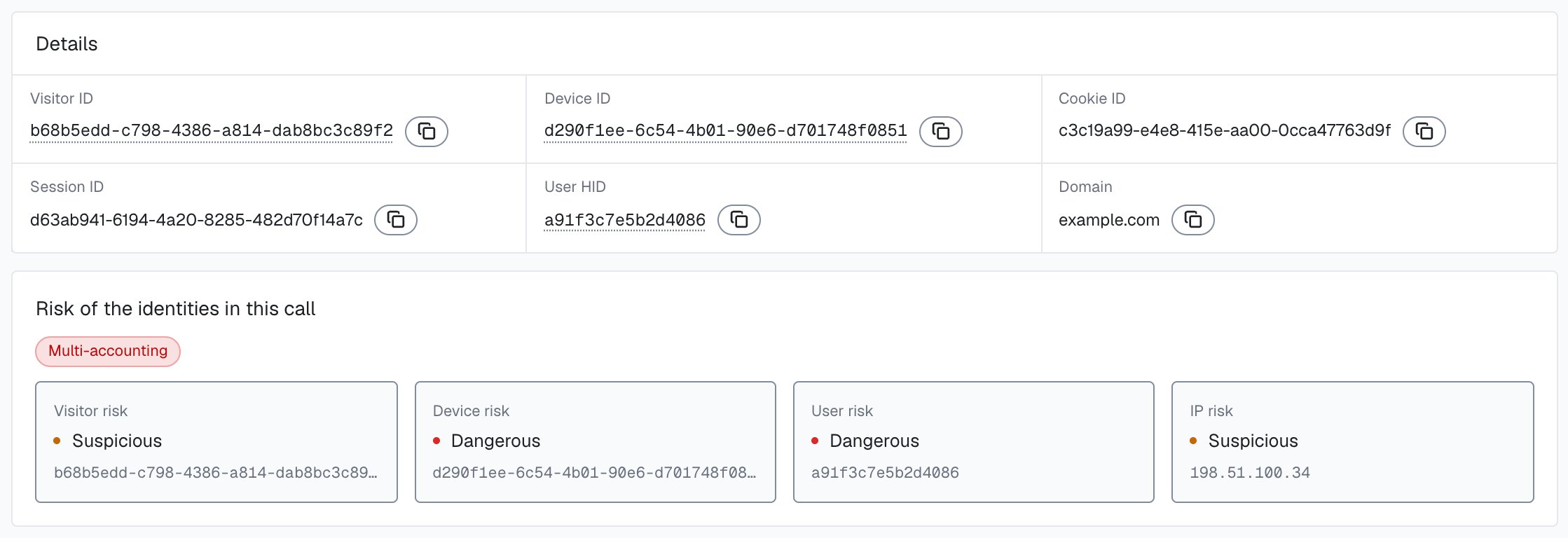
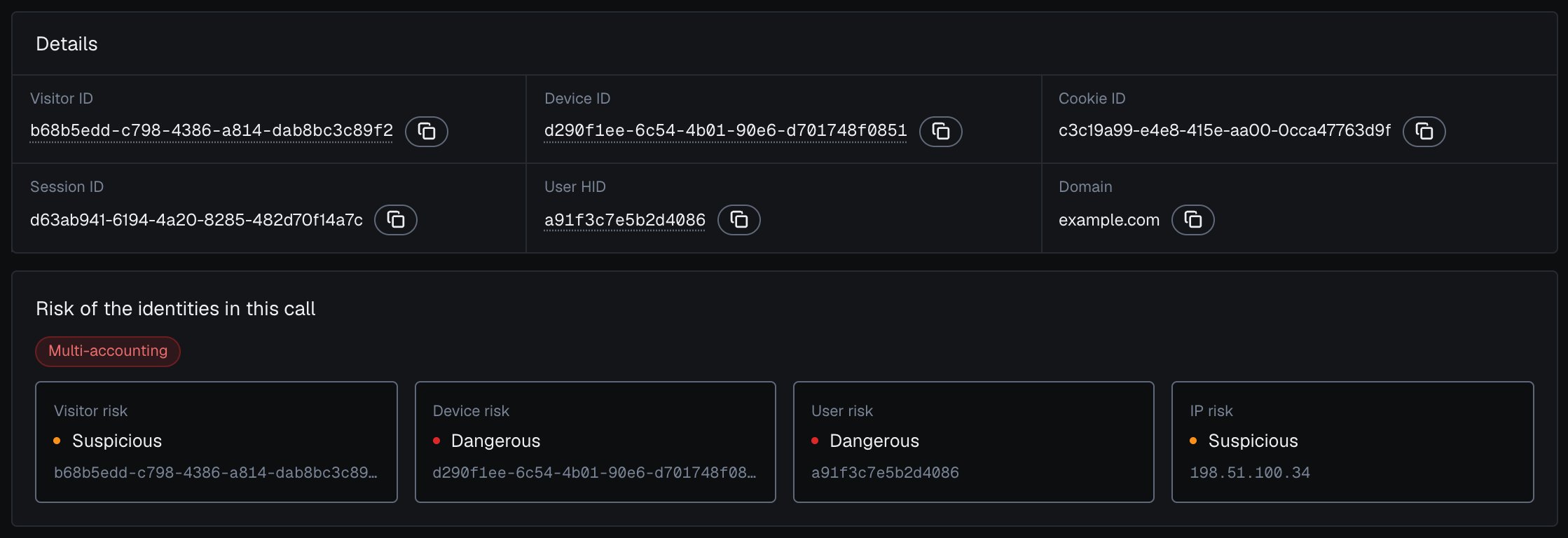
In the analytics dashboard, the [identification card](/dashboard/identification-card) adds the account context: the band of the user, device, visitor and IP behind each identification, as in this example from another identification.
In [Analytics](/dashboard/analytics), filter by **High-Risk Events** and select **Export**: the CSV holds every identification in the filter, up to 10,000 rows, each with its User HID and Device ID. [Investigate a risky user](/use-case/investigate-a-user) walks through the review, from the Overview to the user's card.
New here? Start with the [Quickstart](/quickstart) to install the snippet and receive your first Risk Score, then [Acting on results](/guides/acting-on-risk-score) for the decision pattern every tutorial below reuses.
### Investigate
Find a risky user in the analytics dashboard, see what it is linked to and why, and act on it in your backend.
### Accounts
Detect one person running several accounts with the Multi-accounting event, the shape behind bonus, trial and loyalty abuse.
See one account used from many devices with the Account sharing event, and enforce your sharing policy.
Step up at login when a known account arrives on an unfamiliar device, and watch the accounts with an Account takeover event.
Catch fake signups at registration with the Risk Score, the Device ID and the accounts already linked to that device.
Ban every device a banned account used, so a cleared cookie or a fresh account does not let someone back in.
Throttle logins on the durable Device ID and add friction on bots and masked logins, so rotated IPs stop resetting your limits.
Identify every login attempt and step up to 2FA when the login or the account behind it is risky.
Cap verification SMS per Device ID and local IP so one device cannot flood your messaging bill with OTP toll fraud.
### Promotions and rewards
Count the accounts and redemptions tied to one device to stop signup-bonus and free-trial farming.
Catch repeat signup and deposit bonuses claimed through duplicate accounts on the same device.
Spot new accounts cycling the same device to re-claim free trials and free-tier quotas.
See points and tier rewards farmed across many linked accounts instead of genuine activity.
Rank partners by the accounts they bring and the risky-traffic share of their clicks, so masked conversions do not get paid out.
Tie many wallets or identities back to one actor before an airdrop, vote, or quota pays out.
Tie each redemption to the account and its Device ID to enforce one-per-customer codes and refuse reused single-use coupons.
### Payments and content
Re-identify right before payment, then challenge or hold orders carrying strong risk signals or a risky buyer account.
Reconstruct a buyer account's devices and orders into evidence against friendly-fraud chargebacks.
Meter free views on the Device ID, which clearing cookies or opening incognito cannot reset.
Read the risk signals and the IP countries to catch VPN-masked region switching before you discount.
Anchor each checkout attempt to the durable Device ID so you can throttle card attempts and gate automated or masked checkouts.
### Traffic and experience
Grade each source, channel and campaign by the users and devices it brings, to measure cost per real visitor, not per click.
Recognize a trusted account on a device it has used before and cut friction for it, the inverse of the fraud checks.
## How every tutorial is shaped
Load the [snippet](/setup/snippet) on the relevant page. Pass a hashed User HID with `checkAuthenticatedUser` on every signed-in page. Users, account-level risk and all four High-Risk Events are built on it. Pass a hashed or pseudonymous account id, never a raw email.
Within one visit (while a page of your site stays open in the browser, across route changes in a single-page app and across open tabs), `checkAnonymous` and `checkAuthenticatedUser` run at most one identification every five minutes for the same user. A call inside that window posts nothing, counts nothing, and its `onInitialized` handler receives `{ status: "not_initialized" }`. On a multi-page site, a full page load in the only open tab can start a new visit with its own identification. At a sensitive action (signup, login, payment, withdrawal) call `forceCheckAuthenticatedUser`, or `forceCheckAnonymous` before sign-in: they run an identification every time, keep the current Session ID and restart the five-minute window, so the action always posts a fresh request ID to your backend. Start the forced check when the user begins the action (the first focus of the form, or when the page with the action opens) and let the form submit normally: `onInitialized` fires when the check starts, before the snippet has sent the identification, so do not navigate away inside it.
Each identification carries the Device ID, Visitor ID and User HID with the public and local IP, alongside the explainable **Risk Score** and its `signals`. Most tutorials key on the Device ID and the User HID together, not the score alone: the Device ID links the "new" accounts a farm creates, and the User HID ties every identification to its account. The [webhook](/setup/webhooks) arrives about 300 ms after the check; when follow-up network checks run, it is sent once they finish, at most about 10 seconds after the check. Each identification produces one webhook. If a webhook is missed, read the same identification from the [History API](/api/server-api) by `request_id`. Verify `X-Shield-Signature` on the raw body and make your handler idempotent on `request_id`.
Map the Risk Score to its band, read each named signal and its `weight`, and add what you know about the account: its devices, its worst band and any mark you keep for a High-Risk Event on it. Persist `request_id` with your decision so every action is auditable.
A typical identification the tutorials act on (the webhook `data` object, shortened; all 18 keys are in the [webhook reference](/api/webhooks)):
```json theme={null}
{
"request_id": "8f1d0c2a-7b3e-4a9c-9d2f-1e6a5b4c3d21",
"visitor_id": "c4a2e9b1-5f8d-4c3a-8e7b-2a1f0d9c8b76",
"device_id": "a1b2c3d4-e5f6-4a7b-8c9d-0e1f2a3b4c5d",
"user_hid": "a91f3c7e5b2d4086",
"public_ip": { "ip": "203.0.113.24", "country": "US" },
"local_ip": { "ip": "198.51.100.23", "country": "US" },
"connection_type": "proxy",
"os": "Mac OS X",
"browser": "Chrome",
"risk_score": 70,
"signals": [
{ "name": "antidetect_browser", "weight": 60 },
{ "name": "proxy", "weight": 10 }
],
"detection_flags": { "anti_detect_browser": true, "proxy": true, "ip_mismatch": true },
"observed_at": "2026-06-16T10:00:00Z"
}
```
Here the Risk Score is 70, in the Dangerous band, because two signals add up: an anti-detect browser (60) and a proxy (10).
In the analytics dashboard, the [identification card](/dashboard/identification-card) adds the account context: the band of the user, device, visitor and IP behind each identification, as in this example from another identification.
 Branch on the band, on the `signals[].name` slugs (for example `antidetect_browser`, `browser_automation`, `tor`), or on the boolean [`detection_flags`](/glossary#detection-flags). Slugs are stable. A slug can repeat with a partial weight when an earlier verdict is carried forward, so test for presence rather than counting entries. Weigh what each one means for your case: a 30 from one signal is not the same as a 30 from another.
The shared decision skeleton, in your backend. It starts with the guard every tutorial handler uses, then reads the account and the identification:
```js protected-action.js theme={null}
import { app, waitForScore, accountView, band, NIL_DEVICE } from './shieldlabs-helpers.js';
// The API returns only the number. Bands: Trusted 0-29, Suspicious 30-59, Dangerous 60-100.
function actionFor(score, flags, account) {
// Automation is worth a challenge on its own; the flags work on the webhook
// and on the History fallback alike.
const automated = flags.browser_automation || flags.javascript_disabled;
if (band(score) === 'Dangerous' || automated) return 'challenge'; // block, review or require verification
if (band(score) === 'Suspicious') return 'review'; // step-up challenge or a second look
if (account?.worstBand === 'Dangerous') return 'review'; // Trusted now, Dangerous history
return 'allow'; // Trusted: pass through, no friction
}
app.post('/api/protected-action', async (req, res) => {
const { shieldlabsRequestId } = req.body;
const userHid = req.user?.hashedId; // the hashed id you pass to the snippet; absent for guests
// The guard every tutorial handler starts with.
const risk = await waitForScore(shieldlabsRequestId, 2000);
if (!risk) return res.status(202).json({ status: 'review', reason: 'no_identification' });
if (userHid && risk.user_hid !== userHid) {
return res.status(202).json({ status: 'review', reason: 'identification_mismatch' });
}
if (risk.risk_score > 100) {
return res.status(202).json({ status: 'review', reason: 'rate_limit_marker' }); // the 999 marker
}
if (risk.device_id === NIL_DEVICE) {
return res.status(202).json({ status: 'review', reason: 'no_usable_device' }); // no usable device signals
}
const flags = risk.detection_flags ?? {};
const signals = risk.signals ?? []; // null on the History fallback; log them with your decision
// The account behind the action, without the identification being decided.
// A failed History read is unverified, so route the action to review.
let account = null;
if (userHid) {
try {
account = await accountView(userHid, { excludeRequestId: risk.request_id });
} catch {
return res.status(202).json({ status: 'review', reason: 'history_unavailable' });
}
}
const action = actionFor(risk.risk_score, flags, account);
await saveDecision(risk.request_id, action, signals); // your own audit record
return res.status(action === 'allow' ? 200 : 202).json({ status: action });
});
```
The Risk Score runs from **0** to **100** in three bands: **Trusted (0-29)**, **Suspicious (30-59)**, **Dangerous (60-100)**; the only value above 100 is the 999 rate-limit marker. The API returns the number, so map it to a band in your backend. Read a high Risk Score together with its named risk signals and the user's history. A real customer on a corporate VPN can reach the Suspicious band; the signals show why, and you choose the action for each case. An all-zero Device ID (`00000000-0000-0000-0000-000000000000`) means no usable device signals reached ShieldLabs for that identification; the rate-limit marker (Risk Score 999) is one such case. Route it to review rather than allowing it.
Webhooks are at-most-once, with no retries and a 1-second timeout. Make handlers idempotent on `request_id`, and for guaranteed reads use the [History API](/api/server-api) instead of relying on a single delivery. Webhook delivery is free, and History reads through `account.shieldlabs.ai` never count against your included identifications.
## The shared helpers
Every tutorial receives the Risk Score the same way: verify `X-Shield-Signature` on the raw body, respond fast, store the identification by `request_id`, and let the request path read it back with a short timeout. The same file holds the History API read, the band mapping and the two account helpers. The individual tutorials call these helpers instead of repeating them.
* `waitForScore(requestId, timeoutMs)` returns the webhook `data` object, or a History row mapped to the same field names, or `null` when the request ID is empty, nothing is found or the read fails. Treat `null` as unverified, never as clean.
* `shieldlabsHistory(searchType, value, limit, offset)` returns the History `data` array: flat rows with `score`, `score_details`, `ip`, `country` and `is_*` flags, newest first. `limit` is 1 to 100; page with `offset` until fewer than `limit` rows come back.
* `band(score)` maps a Risk Score to Trusted, Suspicious or Dangerous. Guard `score > 100` before you call it.
* `accountView(userHid, { excludeRequestId, excludeSessionId })` rolls up the newest 100 identifications of one user: their count, the worst band, and the sets of devices, visitors, public IPs and countries. It skips the 999 marker, never counts the all-zero Device ID as a device, and can leave out the identification being decided (`excludeRequestId`) or the whole current session (`excludeSessionId`).
* `accountsBehindDevice(deviceId)` counts the distinct accounts seen on one device. `"anonymous"` is not an account. Both account helpers throw when the History read fails; catch the error and route the action to review, since a failed read is unverified.
```js shieldlabs-helpers.js theme={null}
import crypto from 'crypto';
import express from 'express';
const scoreCache = new Map(); // use a shared store or your datastore in production
const SECRET = process.env.SHIELDLABS_WEBHOOK_SECRET; // whsec_… for this endpoint
// Keep the raw body so the bytes you hash match the bytes that were signed.
const app = express();
app.use(express.json({ verify: (req, _res, buf) => { req.rawBody = buf; } }));
app.use(express.urlencoded({ extended: false })); // the tutorials' HTML forms post urlencoded bodies
// Webhook handler: verify, respond fast, then store keyed by request_id.
app.post('/shieldlabs/webhook', (req, res) => {
const received = req.get('X-Shield-Signature') ?? '';
const expected =
'sha256=' +
crypto.createHmac('sha256', SECRET).update(req.rawBody).digest('hex');
const a = Buffer.from(expected);
const b = Buffer.from(received);
if (a.length !== b.length || !crypto.timingSafeEqual(a, b)) {
return res.status(401).end();
}
res.status(200).end();
const envelope = req.body; // { event_type, schema_version, created_at, data }
// Only identification.scored carries an identification; skip service events.
if (envelope.event_type !== 'identification.scored') return;
const identification = envelope.data; // the identification lives under `data`
// Idempotent on request_id: storing the same identification twice is safe,
// but do not double-apply business effects.
scoreCache.set(identification.request_id, identification);
setTimeout(() => scoreCache.delete(identification.request_id), 5 * 60 * 1000);
});
const sleep = (ms) => new Promise((resolve) => setTimeout(resolve, ms));
// Returns the webhook `data` for requestId, or a History row mapped by
// fromHistoryRow, or null when requestId is empty, nothing is found or the read fails.
async function waitForScore(requestId, timeoutMs) {
if (!requestId) return null; // the snippet did not run, or the check was skipped
const deadline = Date.now() + timeoutMs;
while (Date.now() < deadline) {
if (scoreCache.has(requestId)) return scoreCache.get(requestId);
await sleep(100);
}
// The webhook has not arrived in time: read the identification from the History API.
try {
const [row] = await shieldlabsHistory('request_id', requestId, 1);
return row ? fromHistoryRow(row) : null;
} catch {
return null; // a failed read is unverified, never clean
}
}
// History rows are flat. Map the fields the tutorials read to the webhook names.
function fromHistoryRow(r) {
return {
request_id: r.request_id,
session_id: r.session_id,
cookie_id: r.cookie_id,
visitor_id: r.visitor_id,
device_id: r.device_id,
user_hid: r.user_hid,
domain: r.domain,
risk_score: r.score,
public_ip: { ip: r.ip, country: r.country },
local_ip: null, // History has no local_ip object: treat it as unknown, not clean
connection_type: r.connection_type,
os: r.os,
browser: r.browser,
device_type: r.device_type,
signals: null, // History carries score_details (a JSON string), not signals[]
// History has no browser_vpn_proxy or ip_mismatch flag.
detection_flags: {
vpn: r.is_vpn,
privacy_relay: r.is_privacy_relay,
tor: r.is_tor,
proxy: r.is_proxy,
datacenter_ip: r.is_datacenter,
abuser: r.is_abuser,
os_mismatch: r.is_os_mismatch,
os_not_detected: r.is_os_not_detected,
timezone_mismatch: r.is_timezone_mismatch,
anti_detect_browser: r.is_antidetect,
browser_automation: r.is_browser_automation,
javascript_disabled: r.is_js_disabled,
incognito: r.is_incognito,
search_bot: r.is_search_bot,
suspicious_paid_click: Boolean(r.is_suspicious_paid_click),
stun_not_checked: r.is_stun_not_checked,
check_incomplete: r.check_incomplete,
},
traffic_source: {
channel: r.traffic_channel,
referrer_domain: r.referrer_domain,
landing_url: r.entry_url,
utm_source: r.utm_source,
utm_medium: r.utm_medium,
utm_campaign: r.utm_campaign,
utm_content: r.utm_content,
utm_term: r.utm_term,
click_id_type: r.click_id_type,
},
source: 'history',
};
}
// Host without /api; every path starts with /api/v1/.
const HISTORY_BASE = process.env.SHIELDLABS_API_URL ?? 'https://account.shieldlabs.ai';
const API_KEY = process.env.SHIELDLABS_API_KEY; // sec_… Private API Key of this domain
// Returns the History `data` array (rows are flat: score, score_details, ip, country, is_* flags).
// limit is 1-100, newest first; page with offset until fewer than `limit` rows come back.
async function shieldlabsHistory(searchType, value, limit = 20, offset = 0) {
const url = new URL(
`${HISTORY_BASE}/api/v1/history/${searchType}/${encodeURIComponent(value)}`
);
url.searchParams.set('limit', String(limit));
url.searchParams.set('offset', String(offset));
const res = await fetch(url, {
headers: { Authorization: `Bearer ${API_KEY}` },
});
if (!res.ok) throw new Error(`history lookup failed: ${res.status}`);
const body = await res.json();
return body.data ?? [];
}
// 'Trusted' | 'Suspicious' | 'Dangerous'. Callers guard score > 100 (the 999 marker).
function band(score) {
if (score >= 60) return 'Dangerous';
if (score >= 30) return 'Suspicious';
return 'Trusted';
}
const NIL_DEVICE = '00000000-0000-0000-0000-000000000000';
// The account view: the newest 100 identifications of one user, rolled up.
// Skips the 999 rate-limit marker and, optionally, the identification being decided
// or the whole current session; the all-zero Device ID is never counted as a device.
// Page with offset for longer histories.
async function accountView(userHid, { excludeRequestId, excludeSessionId } = {}) {
const rows = (await shieldlabsHistory('user_hid', userHid, 100)).filter(
(r) =>
r.score <= 100 &&
r.request_id !== excludeRequestId &&
(!excludeSessionId || r.session_id !== excludeSessionId)
);
const worst = rows.length ? Math.max(...rows.map((r) => r.score)) : null;
return {
identifications: rows.length,
worstBand: worst === null ? null : band(worst),
devices: new Set(rows.map((r) => r.device_id).filter((d) => d && d !== NIL_DEVICE)),
visitors: new Set(rows.map((r) => r.visitor_id).filter(Boolean)),
publicIps: new Set(rows.map((r) => r.ip).filter(Boolean)),
countries: new Set(rows.map((r) => r.country).filter(Boolean)),
};
}
// Distinct accounts seen on one device (newest 100 identifications).
// Anonymous checks carry "anonymous" as user_hid, which is not an account.
async function accountsBehindDevice(deviceId) {
if (!deviceId || deviceId === NIL_DEVICE) return 0;
const rows = await shieldlabsHistory('device_id', deviceId, 100);
const hids = rows.map((r) => r.user_hid).filter((h) => h && h !== 'anonymous');
return new Set(hids).size;
}
export {
app,
waitForScore,
fromHistoryRow,
shieldlabsHistory,
band,
accountView,
accountsBehindDevice,
NIL_DEVICE,
};
```
## Where to go next
If you have not wired up the snippet and a webhook yet, start with the [Quickstart](/quickstart) and [Setup](/setup). To understand what the Risk Score and its risk signals mean, read [Risk Score](/features/risk-scoring), [Risk signals](/features/risk-signals) and [High-Risk Events](/features/high-risk-events). [Users, devices, visitors and IPs](/concepts/entities) covers the identities every tutorial reads, and the [API overview](/api/overview) has the full payloads and endpoints behind these tutorials.
This documentation is built and hosted on [Mintlify](https://mintlify.com), a developer documentation platform.
Branch on the band, on the `signals[].name` slugs (for example `antidetect_browser`, `browser_automation`, `tor`), or on the boolean [`detection_flags`](/glossary#detection-flags). Slugs are stable. A slug can repeat with a partial weight when an earlier verdict is carried forward, so test for presence rather than counting entries. Weigh what each one means for your case: a 30 from one signal is not the same as a 30 from another.
The shared decision skeleton, in your backend. It starts with the guard every tutorial handler uses, then reads the account and the identification:
```js protected-action.js theme={null}
import { app, waitForScore, accountView, band, NIL_DEVICE } from './shieldlabs-helpers.js';
// The API returns only the number. Bands: Trusted 0-29, Suspicious 30-59, Dangerous 60-100.
function actionFor(score, flags, account) {
// Automation is worth a challenge on its own; the flags work on the webhook
// and on the History fallback alike.
const automated = flags.browser_automation || flags.javascript_disabled;
if (band(score) === 'Dangerous' || automated) return 'challenge'; // block, review or require verification
if (band(score) === 'Suspicious') return 'review'; // step-up challenge or a second look
if (account?.worstBand === 'Dangerous') return 'review'; // Trusted now, Dangerous history
return 'allow'; // Trusted: pass through, no friction
}
app.post('/api/protected-action', async (req, res) => {
const { shieldlabsRequestId } = req.body;
const userHid = req.user?.hashedId; // the hashed id you pass to the snippet; absent for guests
// The guard every tutorial handler starts with.
const risk = await waitForScore(shieldlabsRequestId, 2000);
if (!risk) return res.status(202).json({ status: 'review', reason: 'no_identification' });
if (userHid && risk.user_hid !== userHid) {
return res.status(202).json({ status: 'review', reason: 'identification_mismatch' });
}
if (risk.risk_score > 100) {
return res.status(202).json({ status: 'review', reason: 'rate_limit_marker' }); // the 999 marker
}
if (risk.device_id === NIL_DEVICE) {
return res.status(202).json({ status: 'review', reason: 'no_usable_device' }); // no usable device signals
}
const flags = risk.detection_flags ?? {};
const signals = risk.signals ?? []; // null on the History fallback; log them with your decision
// The account behind the action, without the identification being decided.
// A failed History read is unverified, so route the action to review.
let account = null;
if (userHid) {
try {
account = await accountView(userHid, { excludeRequestId: risk.request_id });
} catch {
return res.status(202).json({ status: 'review', reason: 'history_unavailable' });
}
}
const action = actionFor(risk.risk_score, flags, account);
await saveDecision(risk.request_id, action, signals); // your own audit record
return res.status(action === 'allow' ? 200 : 202).json({ status: action });
});
```
The Risk Score runs from **0** to **100** in three bands: **Trusted (0-29)**, **Suspicious (30-59)**, **Dangerous (60-100)**; the only value above 100 is the 999 rate-limit marker. The API returns the number, so map it to a band in your backend. Read a high Risk Score together with its named risk signals and the user's history. A real customer on a corporate VPN can reach the Suspicious band; the signals show why, and you choose the action for each case. An all-zero Device ID (`00000000-0000-0000-0000-000000000000`) means no usable device signals reached ShieldLabs for that identification; the rate-limit marker (Risk Score 999) is one such case. Route it to review rather than allowing it.
Webhooks are at-most-once, with no retries and a 1-second timeout. Make handlers idempotent on `request_id`, and for guaranteed reads use the [History API](/api/server-api) instead of relying on a single delivery. Webhook delivery is free, and History reads through `account.shieldlabs.ai` never count against your included identifications.
## The shared helpers
Every tutorial receives the Risk Score the same way: verify `X-Shield-Signature` on the raw body, respond fast, store the identification by `request_id`, and let the request path read it back with a short timeout. The same file holds the History API read, the band mapping and the two account helpers. The individual tutorials call these helpers instead of repeating them.
* `waitForScore(requestId, timeoutMs)` returns the webhook `data` object, or a History row mapped to the same field names, or `null` when the request ID is empty, nothing is found or the read fails. Treat `null` as unverified, never as clean.
* `shieldlabsHistory(searchType, value, limit, offset)` returns the History `data` array: flat rows with `score`, `score_details`, `ip`, `country` and `is_*` flags, newest first. `limit` is 1 to 100; page with `offset` until fewer than `limit` rows come back.
* `band(score)` maps a Risk Score to Trusted, Suspicious or Dangerous. Guard `score > 100` before you call it.
* `accountView(userHid, { excludeRequestId, excludeSessionId })` rolls up the newest 100 identifications of one user: their count, the worst band, and the sets of devices, visitors, public IPs and countries. It skips the 999 marker, never counts the all-zero Device ID as a device, and can leave out the identification being decided (`excludeRequestId`) or the whole current session (`excludeSessionId`).
* `accountsBehindDevice(deviceId)` counts the distinct accounts seen on one device. `"anonymous"` is not an account. Both account helpers throw when the History read fails; catch the error and route the action to review, since a failed read is unverified.
```js shieldlabs-helpers.js theme={null}
import crypto from 'crypto';
import express from 'express';
const scoreCache = new Map(); // use a shared store or your datastore in production
const SECRET = process.env.SHIELDLABS_WEBHOOK_SECRET; // whsec_… for this endpoint
// Keep the raw body so the bytes you hash match the bytes that were signed.
const app = express();
app.use(express.json({ verify: (req, _res, buf) => { req.rawBody = buf; } }));
app.use(express.urlencoded({ extended: false })); // the tutorials' HTML forms post urlencoded bodies
// Webhook handler: verify, respond fast, then store keyed by request_id.
app.post('/shieldlabs/webhook', (req, res) => {
const received = req.get('X-Shield-Signature') ?? '';
const expected =
'sha256=' +
crypto.createHmac('sha256', SECRET).update(req.rawBody).digest('hex');
const a = Buffer.from(expected);
const b = Buffer.from(received);
if (a.length !== b.length || !crypto.timingSafeEqual(a, b)) {
return res.status(401).end();
}
res.status(200).end();
const envelope = req.body; // { event_type, schema_version, created_at, data }
// Only identification.scored carries an identification; skip service events.
if (envelope.event_type !== 'identification.scored') return;
const identification = envelope.data; // the identification lives under `data`
// Idempotent on request_id: storing the same identification twice is safe,
// but do not double-apply business effects.
scoreCache.set(identification.request_id, identification);
setTimeout(() => scoreCache.delete(identification.request_id), 5 * 60 * 1000);
});
const sleep = (ms) => new Promise((resolve) => setTimeout(resolve, ms));
// Returns the webhook `data` for requestId, or a History row mapped by
// fromHistoryRow, or null when requestId is empty, nothing is found or the read fails.
async function waitForScore(requestId, timeoutMs) {
if (!requestId) return null; // the snippet did not run, or the check was skipped
const deadline = Date.now() + timeoutMs;
while (Date.now() < deadline) {
if (scoreCache.has(requestId)) return scoreCache.get(requestId);
await sleep(100);
}
// The webhook has not arrived in time: read the identification from the History API.
try {
const [row] = await shieldlabsHistory('request_id', requestId, 1);
return row ? fromHistoryRow(row) : null;
} catch {
return null; // a failed read is unverified, never clean
}
}
// History rows are flat. Map the fields the tutorials read to the webhook names.
function fromHistoryRow(r) {
return {
request_id: r.request_id,
session_id: r.session_id,
cookie_id: r.cookie_id,
visitor_id: r.visitor_id,
device_id: r.device_id,
user_hid: r.user_hid,
domain: r.domain,
risk_score: r.score,
public_ip: { ip: r.ip, country: r.country },
local_ip: null, // History has no local_ip object: treat it as unknown, not clean
connection_type: r.connection_type,
os: r.os,
browser: r.browser,
device_type: r.device_type,
signals: null, // History carries score_details (a JSON string), not signals[]
// History has no browser_vpn_proxy or ip_mismatch flag.
detection_flags: {
vpn: r.is_vpn,
privacy_relay: r.is_privacy_relay,
tor: r.is_tor,
proxy: r.is_proxy,
datacenter_ip: r.is_datacenter,
abuser: r.is_abuser,
os_mismatch: r.is_os_mismatch,
os_not_detected: r.is_os_not_detected,
timezone_mismatch: r.is_timezone_mismatch,
anti_detect_browser: r.is_antidetect,
browser_automation: r.is_browser_automation,
javascript_disabled: r.is_js_disabled,
incognito: r.is_incognito,
search_bot: r.is_search_bot,
suspicious_paid_click: Boolean(r.is_suspicious_paid_click),
stun_not_checked: r.is_stun_not_checked,
check_incomplete: r.check_incomplete,
},
traffic_source: {
channel: r.traffic_channel,
referrer_domain: r.referrer_domain,
landing_url: r.entry_url,
utm_source: r.utm_source,
utm_medium: r.utm_medium,
utm_campaign: r.utm_campaign,
utm_content: r.utm_content,
utm_term: r.utm_term,
click_id_type: r.click_id_type,
},
source: 'history',
};
}
// Host without /api; every path starts with /api/v1/.
const HISTORY_BASE = process.env.SHIELDLABS_API_URL ?? 'https://account.shieldlabs.ai';
const API_KEY = process.env.SHIELDLABS_API_KEY; // sec_… Private API Key of this domain
// Returns the History `data` array (rows are flat: score, score_details, ip, country, is_* flags).
// limit is 1-100, newest first; page with offset until fewer than `limit` rows come back.
async function shieldlabsHistory(searchType, value, limit = 20, offset = 0) {
const url = new URL(
`${HISTORY_BASE}/api/v1/history/${searchType}/${encodeURIComponent(value)}`
);
url.searchParams.set('limit', String(limit));
url.searchParams.set('offset', String(offset));
const res = await fetch(url, {
headers: { Authorization: `Bearer ${API_KEY}` },
});
if (!res.ok) throw new Error(`history lookup failed: ${res.status}`);
const body = await res.json();
return body.data ?? [];
}
// 'Trusted' | 'Suspicious' | 'Dangerous'. Callers guard score > 100 (the 999 marker).
function band(score) {
if (score >= 60) return 'Dangerous';
if (score >= 30) return 'Suspicious';
return 'Trusted';
}
const NIL_DEVICE = '00000000-0000-0000-0000-000000000000';
// The account view: the newest 100 identifications of one user, rolled up.
// Skips the 999 rate-limit marker and, optionally, the identification being decided
// or the whole current session; the all-zero Device ID is never counted as a device.
// Page with offset for longer histories.
async function accountView(userHid, { excludeRequestId, excludeSessionId } = {}) {
const rows = (await shieldlabsHistory('user_hid', userHid, 100)).filter(
(r) =>
r.score <= 100 &&
r.request_id !== excludeRequestId &&
(!excludeSessionId || r.session_id !== excludeSessionId)
);
const worst = rows.length ? Math.max(...rows.map((r) => r.score)) : null;
return {
identifications: rows.length,
worstBand: worst === null ? null : band(worst),
devices: new Set(rows.map((r) => r.device_id).filter((d) => d && d !== NIL_DEVICE)),
visitors: new Set(rows.map((r) => r.visitor_id).filter(Boolean)),
publicIps: new Set(rows.map((r) => r.ip).filter(Boolean)),
countries: new Set(rows.map((r) => r.country).filter(Boolean)),
};
}
// Distinct accounts seen on one device (newest 100 identifications).
// Anonymous checks carry "anonymous" as user_hid, which is not an account.
async function accountsBehindDevice(deviceId) {
if (!deviceId || deviceId === NIL_DEVICE) return 0;
const rows = await shieldlabsHistory('device_id', deviceId, 100);
const hids = rows.map((r) => r.user_hid).filter((h) => h && h !== 'anonymous');
return new Set(hids).size;
}
export {
app,
waitForScore,
fromHistoryRow,
shieldlabsHistory,
band,
accountView,
accountsBehindDevice,
NIL_DEVICE,
};
```
## Where to go next
If you have not wired up the snippet and a webhook yet, start with the [Quickstart](/quickstart) and [Setup](/setup). To understand what the Risk Score and its risk signals mean, read [Risk Score](/features/risk-scoring), [Risk signals](/features/risk-signals) and [High-Risk Events](/features/high-risk-events). [Users, devices, visitors and IPs](/concepts/entities) covers the identities every tutorial reads, and the [API overview](/api/overview) has the full payloads and endpoints behind these tutorials.
This documentation is built and hosted on [Mintlify](https://mintlify.com), a developer documentation platform.