> ## Documentation Index
> Fetch the complete documentation index at: https://docs.shieldlabs.ai/llms.txt
> Use this file to discover all available pages before exploring further.
# Affiliate Fraud (Click & Lead Inflation)
> Pay affiliates for real users and hold payouts on leads from risky accounts, devices and sources.
Affiliate and paid-acquisition programs pay per click, install or conversion, so the incentive to inflate them with masked, recycled or coordinated traffic is built in. ShieldLabs ties each lead and conversion to the account behind it, to the device and network that account uses, and to the source it came from. The [Device ID](/features/identification) holds through cleared cookies, incognito mode and IP changes, so clearing cookies, going incognito or rotating IPs does not turn one device into many new leads, and each identification carries a [Risk Score](/features/risk-scoring) from 0 to 100 with every risk signal named. You rank partners by the users they bring and choose the action for each case: pay, hold or review.
## What is affiliate fraud?
Affiliate fraud is the inflation of clicks, leads, installs or conversions in a partner or paid-acquisition program so a fraudster collects payouts on traffic that has no real value, often through masked IPs, recycled devices or a single person posing as many new leads. Each padded event looks like an independent customer but traces back to a small number of real devices or networks.
## How ShieldLabs surfaces it
ShieldLabs answers the questions affiliate quality turns on, starting with the accounts a partner brings:
| Question | What answers it | Where |
| - | - | - |
| "Are this partner's leads real users?" | Each new account's worst band | [History API](/api/server-api#read-every-identification-of-one-account) by `user_hid` |
| "Is one person behind several of them?" | The **Multi-accounting** [High-Risk Event](/features/high-risk-events#multi-accounting) on those accounts, at Medium or High confidence | The analytics dashboard, the API and webhooks |
| "Is one device posing as many leads?" | Accounts and conversions per [Device ID](/features/identification) | [History API](/api/server-api) by `device_id`; `device_id` on the [webhook](/setup/webhooks) |
| "Which source sends risky traffic?" | Risk Score by channel, source and campaign | `traffic_source` on the webhook; [traffic analytics](/features/traffic-analytics) in the analytics dashboard |
The Risk Score answers "which risk signals fired on this identification?" The Device ID answers "have I seen this device before, however many cookies and IPs it cycled through?" A cleared cookie mints a new Cookie ID and Visitor ID, and a VPN or proxy gives a new public IP; the Device ID holds through both. When a lead masks its location, the Local IP, the address the browser itself reports, can expose the network behind the exit.
Read a high Risk Score together with its named risk signals and the user's history. A real customer on a corporate VPN can reach the Suspicious band; the signals show why, and you choose the action for each case. For affiliate quality you read the **distribution across a partner's users**: a partner whose accounts are 95% Trusted and one whose accounts are 45% Dangerous can report identical click counts, and ShieldLabs is what separates them.
## Prevent affiliate fraud
The payout policy: on every conversion, identify the account, then read the identification's `risk_score` and `signals`, the `device_id`, the `traffic_source` of the landing, and `public_ip.country` against `local_ip.country` for the masked-network case. Then:
* **Dedup on `device_id`** inside your attribution window, so one device cannot be paid as a crowd.
* **Withhold or queue Dangerous-band conversions** for review, and approve Suspicious ones on a clawback delay.
* **Rank each affiliate** by the share of its conversions scored Suspicious or Dangerous or left unverified, by accounts per device, and by accounts with a Multi-accounting event, so a partner sending risky or recycled users moves from auto-pay to manual review.
ShieldLabs stops affiliate fraud by linking every lead to its account, device and source; you choose withhold, review or pay for each case in your payout flow. The steps below build that flow.
## Build it
Install the [snippet](/setup/snippet) on the landing pages affiliate and paid traffic arrive on, and call `checkAnonymous` there. ShieldLabs records the channel, referrer and UTM parameters of each identification from the page it runs on and returns them in the webhook's `traffic_source` object, and the analytics dashboard breaks traffic down by channel, source and campaign. Stash the `requestID` so a later conversion ties back to the landing and its source.
```html landing.html theme={null}
```
Make sure inbound affiliate links carry UTM parameters. `traffic_source` carries `channel`, `referrer_domain`, `landing_url` and the `utm_*` fields; for paid traffic it also records `click_id_type` (for example `gclid`). Affiliate links tagged with UTM parameters land under the **Other** channel (unless the tags match a paid ad platform), and untagged partner links under **Referral**. In both cases `utm_source` or the referrer domain names the partner.
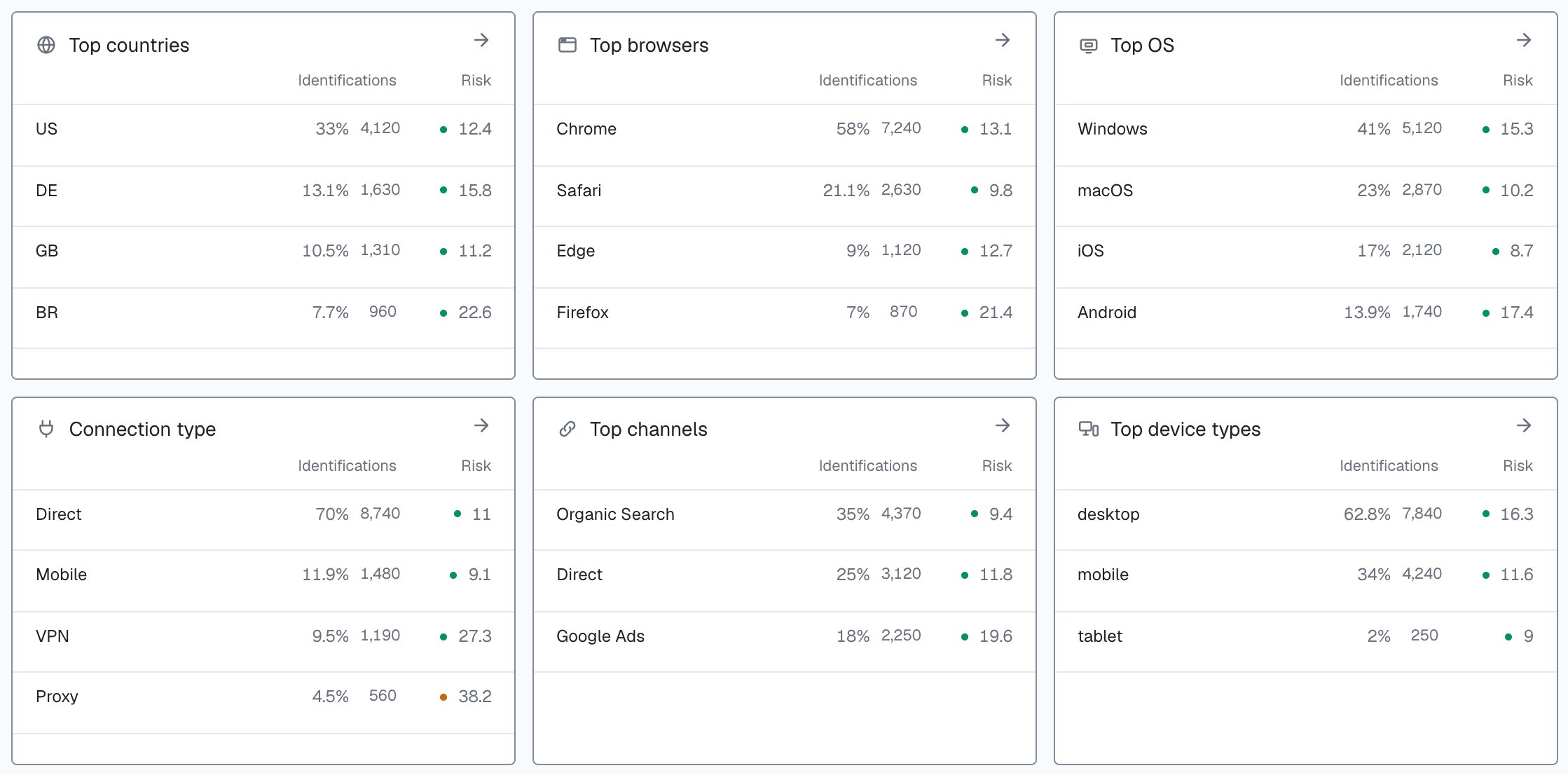
Rank each source by the share of its identifications in the Suspicious and Dangerous bands, so you measure cost per real user instead of cost per click. On [Overview](/dashboard/overview), **Top channels** lists each channel with its identifications and average risk; in [Analytics](/dashboard/analytics), the **Channel**, **Source** and **Campaign** filters narrow the **Identifications** tab to one partner's traffic. [Measure Traffic Quality](/use-case/traffic-quality) walks through the source breakdown and the export; this page covers the payout decision built on top of it.
 When the lead signs up, identify the new account when the first signed-in page opens, such as the welcome screen or the first checkout page: call `forceCheckAuthenticatedUser` with its hashed id and post that request ID with the conversion. It runs an identification every time, keeps the current Session ID and restarts the five-minute window, so the conversion always gets its own request ID. `onInitialized` fires when the check starts, before the snippet has sent the identification, so do not navigate away inside it: store the request ID and let the form submit normally. The lead is now a user in ShieldLabs, with its own risk, its linked devices and IPs, and High-Risk Events. From then on, pass a hashed User HID with `checkAuthenticatedUser` on every signed-in page. Users, account-level risk and all four High-Risk Events are built on it. Within one visit (while a page of your site stays open in the browser, across route changes in a single-page app and across open tabs), `checkAnonymous` and `checkAuthenticatedUser` run at most one identification every five minutes for the same user. A call inside that window posts nothing, counts nothing, and its `onInitialized` handler receives `{ status: "not_initialized" }`. On a multi-page site, a full page load in the only open tab can start a new visit with its own identification. That window is why the conversion itself uses `forceCheckAuthenticatedUser`.
```html welcome.html theme={null}
```
When the conversion posts, read two identifications: the conversion's own, for the account, the device and the Risk Score, and the landing's, for the source. Both arrive on the [webhook](/setup/webhooks); cache them by `request_id` and read them back with the shared `waitForScore` helper from the [Use Case Tutorials](/use-case), which falls back to a [History API](/api/server-api) read by `request_id`. The webhook `data` carries `risk_score`, the named `signals` array, `device_id`, `public_ip`, `local_ip` and `traffic_source`. A History row carries the same identification with flat fields (`score`, `score_details`, `ip`, `country`, `traffic_channel`, `utm_source`), and the helper maps them to the webhook names, so the handler reads one shape. Your payout logic then withholds or routes to review instead of paying automatically.
```js api/conversion.js theme={null}
import { app, waitForScore, band, NIL_DEVICE } from '../shieldlabs-helpers.js';
import { isRepeatDevice } from '../lib/dedup.js';
app.post('/api/conversion', async (req, res) => {
const { eventType, shieldlabsRequestId } = req.body; // request ID of the conversion
const accountHid = req.user.hashedId; // the new account's hashed id
const affiliateId = req.cookies.affiliate_id; // your own attribution cookie
const landingRequestId = req.cookies.shieldlabs_rid; // stashed on the landing page
// The conversion's identification (account, device, Risk Score) and the
// landing's (source). Either can be null: a missing one is unverified.
const risk = await waitForScore(shieldlabsRequestId, 2000);
const landing = landingRequestId ? await waitForScore(landingRequestId, 500) : null;
const verified = Boolean(
risk && risk.user_hid === accountHid && risk.risk_score <= 100
&& risk.device_id !== NIL_DEVICE
);
// Record every conversion with its quality context, paid or not.
const conversion = await db.conversions.create({
affiliateId,
eventType,
accountHid,
requestId: risk?.request_id ?? null,
riskScore: verified ? risk.risk_score : null,
band: verified ? band(risk.risk_score) : null,
signals: risk?.signals ?? [], // null on the History fallback
deviceId: verified ? risk.device_id : null,
channel: landing?.traffic_source?.channel ?? null,
utmSource: landing?.traffic_source?.utm_source ?? null,
});
if (!verified) {
await holdForReview(conversion.id, 'unverified'); // nothing to verify: hold
} else if (await isRepeatDevice(affiliateId, risk.device_id, risk.request_id)) {
await holdForReview(conversion.id, 'repeat_device'); // one device, many leads
} else if (band(risk.risk_score) === 'Dangerous') {
await holdForReview(conversion.id, 'dangerous_identification'); // Dangerous: withhold
} else if (band(risk.risk_score) === 'Suspicious') {
await approveWithClawbackWindow(conversion.id); // Suspicious: delayed
} else {
await approvePayout(conversion.id); // Trusted: pay
}
return res.json({ ok: true });
});
```
Store the Risk Score and its `signals` on every conversion, even the ones you pay. A single Suspicious identification is noise, but a partner whose new accounts are 40% Suspicious or Dangerous is a reweighting decision, and you cannot rank sources you did not record. The webhook's [`detection_flags`](/glossary#detection-flags) also gives boolean shortcuts (`suspicious_paid_click`, `anti_detect_browser`, `browser_automation`) for fast routing without re-deriving from `signals`.
The hardest abuse to see is a single device that clears cookies and rotates its public IP between events, so each lead looks like a new user from a new location. Cookie- and IP-based dedup both fail. The durable `device_id` holds: the same browser produces the same Device ID after a cookie clear, an incognito window or an IP change. Dedup conversions on `device_id` inside your attribution window, not on IP or cookie. The conversion handler above calls this check:
```js lib/dedup.js theme={null}
// Has this exact device already converted for this affiliate inside the window?
// The first conversion claims the key; a later one is a repeat device.
export async function isRepeatDevice(affiliateId, deviceId, requestId) {
const key = `affiliate:${affiliateId}:device:${deviceId}`;
const firstSeen = await store.setIfAbsent(key, requestId, { ttlSeconds: 86400 });
if (!firstSeen) {
// Same device, same affiliate, inside the window: a repeat device, not a
// new lead. Mark it so payout does not double-count.
await db.conversions.markRepeatDevice(requestId, deviceId);
}
return !firstSeen;
}
```
For one network behind rotated IPs, compare the two addresses on the webhook: two conversions with different `public_ip` values but the same `local_ip.ip` are a strong sign that one person is rotating exit IPs from one network. `detection_flags.ip_mismatch` marks two different addresses and is informational, so compare the countries rather than branching on the flag alone. A person who uses several separate browsers shows up as several devices, so pair device dedup with the partner-level ranking to surface coordinated traffic.
With the Risk Score, the account and the Device ID stored on every conversion, a daily job ranks each affiliate by the users it actually delivered. This feeds your manual review queue and payout terms; you choose the action for each partner.
```js jobs/rank-affiliates.js theme={null}
// Daily: summarize each affiliate's conversions of the last 7 days.
async function rankAffiliates() {
const affiliates = await db.conversions.groupBy('affiliateId', {
last7d: true,
select: {
total: true,
avgScore: true,
riskyConversions: { where: { band: { in: ['Suspicious', 'Dangerous'] } } },
unverified: { where: { band: null } }, // no usable identification
markedAccounts: { where: { markedMultiAccounting: true } }, // set when a Multi-accounting event arrives
distinctAccounts: { distinct: 'accountHid' },
distinctDevices: { distinct: 'deviceId' },
},
});
return affiliates
.map((a) => ({
affiliateId: a.affiliateId,
conversions: a.total,
avgScore: a.avgScore, // average Risk Score
riskyShare: (a.riskyConversions + a.unverified) / a.total, // Suspicious, Dangerous or unverified
markedShare: a.markedAccounts / Math.max(a.distinctAccounts, 1), // accounts with the event
accountsPerDevice: a.distinctAccounts / Math.max(a.distinctDevices, 1),
deviceInflation: 1 - a.distinctDevices / a.total, // repeat-device rate
}))
.sort((x, y) => y.riskyShare - x.riskyShare); // worst sources first
}
```
A partner at the top of that list, with a high risky share, many accounts per device or accounts with a Multi-accounting event, is the one to move from auto-pay to manual review, renegotiate or hold.
Cross-check in the analytics dashboard before you act. If a `utm_source` ranks badly in your job, filter [Analytics](/dashboard/analytics) by that **Source** to see its traffic, then search Analytics for each User HID your job recorded for the partner: each account opens with its band for the period and any **Multi-accounting** [High-Risk Event](/features/high-risk-events#multi-accounting). The source sits on the landing identification and the account on the conversion's, so your conversion record is what joins them. Two independent views landing on the same partner is a far stronger basis for a payout change than one number.
For a borderline source, reconstruct what a single device has been doing across your whole site. Read the [History API](/api/server-api) by `device_id`.
```bash Read a device's history theme={null}
curl "https://account.shieldlabs.ai/api/v1/history/device_id/5eb7fd5c-1c5e-4a9f-9b21-7d2e8c0a1234?limit=100" \
-H "Authorization: Bearer sec_your_private_api_key"
```
The response is `{ "data": [ ... ], "total": N }`, newest first in snake\_case. Distinct `user_hid` values on one Device ID can mean one device behind many accounts (leave out `"anonymous"`, which is not an account). Many countries on one Device ID can mean a single person masking location: History rows carry the public IP and its `country`, and the Local IP country is on the webhook, so compare it with the `local_ip.country` you stored before you read it as real spread. For identified accounts, the **Multi-accounting** [High-Risk Event](/features/high-risk-events#multi-accounting) detects the first shape directly: several accounts run by one person, linked through the devices and network they share. High-Risk Events are available in the analytics dashboard, the API and webhooks.
History API reads never count against your included identifications, and neither do webhook deliveries or the analytics dashboard. For high-volume affiliate flows, lean on the webhook stream.
## Test it
Click through one of your affiliate links and complete a test signup. Then repeat with a new test account after clearing cookies, again in an incognito window, and once in a second browser on the same machine. The `cookie_id` and `visitor_id` change each time, but the `device_id` on the webhook stays the same across the incognito and cleared-cookie runs, so the dedup above counts those conversions as one device. The second browser returns its own `device_id`, and so does a separate machine: that is the line your payout logic relies on.
Then search Analytics in the [analytics dashboard](/dashboard/analytics) for that Device ID and open it: **Linked accounts** lists every test account that converted from it, each with the band of its identifications on that device.
## Where this fits
Compute cost per real user by source, the reporting layer this payout logic sits on top of.
Rank channels, sources and campaigns by the risk of the traffic they send.
Multi-accounting and the other events ShieldLabs detects on your users, each at Medium or High confidence.
The full per-band decision playbook, including signal-aware decisioning.
This documentation is built and hosted on [Mintlify](https://mintlify.com), a developer documentation platform.
When the lead signs up, identify the new account when the first signed-in page opens, such as the welcome screen or the first checkout page: call `forceCheckAuthenticatedUser` with its hashed id and post that request ID with the conversion. It runs an identification every time, keeps the current Session ID and restarts the five-minute window, so the conversion always gets its own request ID. `onInitialized` fires when the check starts, before the snippet has sent the identification, so do not navigate away inside it: store the request ID and let the form submit normally. The lead is now a user in ShieldLabs, with its own risk, its linked devices and IPs, and High-Risk Events. From then on, pass a hashed User HID with `checkAuthenticatedUser` on every signed-in page. Users, account-level risk and all four High-Risk Events are built on it. Within one visit (while a page of your site stays open in the browser, across route changes in a single-page app and across open tabs), `checkAnonymous` and `checkAuthenticatedUser` run at most one identification every five minutes for the same user. A call inside that window posts nothing, counts nothing, and its `onInitialized` handler receives `{ status: "not_initialized" }`. On a multi-page site, a full page load in the only open tab can start a new visit with its own identification. That window is why the conversion itself uses `forceCheckAuthenticatedUser`.
```html welcome.html theme={null}
```
When the conversion posts, read two identifications: the conversion's own, for the account, the device and the Risk Score, and the landing's, for the source. Both arrive on the [webhook](/setup/webhooks); cache them by `request_id` and read them back with the shared `waitForScore` helper from the [Use Case Tutorials](/use-case), which falls back to a [History API](/api/server-api) read by `request_id`. The webhook `data` carries `risk_score`, the named `signals` array, `device_id`, `public_ip`, `local_ip` and `traffic_source`. A History row carries the same identification with flat fields (`score`, `score_details`, `ip`, `country`, `traffic_channel`, `utm_source`), and the helper maps them to the webhook names, so the handler reads one shape. Your payout logic then withholds or routes to review instead of paying automatically.
```js api/conversion.js theme={null}
import { app, waitForScore, band, NIL_DEVICE } from '../shieldlabs-helpers.js';
import { isRepeatDevice } from '../lib/dedup.js';
app.post('/api/conversion', async (req, res) => {
const { eventType, shieldlabsRequestId } = req.body; // request ID of the conversion
const accountHid = req.user.hashedId; // the new account's hashed id
const affiliateId = req.cookies.affiliate_id; // your own attribution cookie
const landingRequestId = req.cookies.shieldlabs_rid; // stashed on the landing page
// The conversion's identification (account, device, Risk Score) and the
// landing's (source). Either can be null: a missing one is unverified.
const risk = await waitForScore(shieldlabsRequestId, 2000);
const landing = landingRequestId ? await waitForScore(landingRequestId, 500) : null;
const verified = Boolean(
risk && risk.user_hid === accountHid && risk.risk_score <= 100
&& risk.device_id !== NIL_DEVICE
);
// Record every conversion with its quality context, paid or not.
const conversion = await db.conversions.create({
affiliateId,
eventType,
accountHid,
requestId: risk?.request_id ?? null,
riskScore: verified ? risk.risk_score : null,
band: verified ? band(risk.risk_score) : null,
signals: risk?.signals ?? [], // null on the History fallback
deviceId: verified ? risk.device_id : null,
channel: landing?.traffic_source?.channel ?? null,
utmSource: landing?.traffic_source?.utm_source ?? null,
});
if (!verified) {
await holdForReview(conversion.id, 'unverified'); // nothing to verify: hold
} else if (await isRepeatDevice(affiliateId, risk.device_id, risk.request_id)) {
await holdForReview(conversion.id, 'repeat_device'); // one device, many leads
} else if (band(risk.risk_score) === 'Dangerous') {
await holdForReview(conversion.id, 'dangerous_identification'); // Dangerous: withhold
} else if (band(risk.risk_score) === 'Suspicious') {
await approveWithClawbackWindow(conversion.id); // Suspicious: delayed
} else {
await approvePayout(conversion.id); // Trusted: pay
}
return res.json({ ok: true });
});
```
Store the Risk Score and its `signals` on every conversion, even the ones you pay. A single Suspicious identification is noise, but a partner whose new accounts are 40% Suspicious or Dangerous is a reweighting decision, and you cannot rank sources you did not record. The webhook's [`detection_flags`](/glossary#detection-flags) also gives boolean shortcuts (`suspicious_paid_click`, `anti_detect_browser`, `browser_automation`) for fast routing without re-deriving from `signals`.
The hardest abuse to see is a single device that clears cookies and rotates its public IP between events, so each lead looks like a new user from a new location. Cookie- and IP-based dedup both fail. The durable `device_id` holds: the same browser produces the same Device ID after a cookie clear, an incognito window or an IP change. Dedup conversions on `device_id` inside your attribution window, not on IP or cookie. The conversion handler above calls this check:
```js lib/dedup.js theme={null}
// Has this exact device already converted for this affiliate inside the window?
// The first conversion claims the key; a later one is a repeat device.
export async function isRepeatDevice(affiliateId, deviceId, requestId) {
const key = `affiliate:${affiliateId}:device:${deviceId}`;
const firstSeen = await store.setIfAbsent(key, requestId, { ttlSeconds: 86400 });
if (!firstSeen) {
// Same device, same affiliate, inside the window: a repeat device, not a
// new lead. Mark it so payout does not double-count.
await db.conversions.markRepeatDevice(requestId, deviceId);
}
return !firstSeen;
}
```
For one network behind rotated IPs, compare the two addresses on the webhook: two conversions with different `public_ip` values but the same `local_ip.ip` are a strong sign that one person is rotating exit IPs from one network. `detection_flags.ip_mismatch` marks two different addresses and is informational, so compare the countries rather than branching on the flag alone. A person who uses several separate browsers shows up as several devices, so pair device dedup with the partner-level ranking to surface coordinated traffic.
With the Risk Score, the account and the Device ID stored on every conversion, a daily job ranks each affiliate by the users it actually delivered. This feeds your manual review queue and payout terms; you choose the action for each partner.
```js jobs/rank-affiliates.js theme={null}
// Daily: summarize each affiliate's conversions of the last 7 days.
async function rankAffiliates() {
const affiliates = await db.conversions.groupBy('affiliateId', {
last7d: true,
select: {
total: true,
avgScore: true,
riskyConversions: { where: { band: { in: ['Suspicious', 'Dangerous'] } } },
unverified: { where: { band: null } }, // no usable identification
markedAccounts: { where: { markedMultiAccounting: true } }, // set when a Multi-accounting event arrives
distinctAccounts: { distinct: 'accountHid' },
distinctDevices: { distinct: 'deviceId' },
},
});
return affiliates
.map((a) => ({
affiliateId: a.affiliateId,
conversions: a.total,
avgScore: a.avgScore, // average Risk Score
riskyShare: (a.riskyConversions + a.unverified) / a.total, // Suspicious, Dangerous or unverified
markedShare: a.markedAccounts / Math.max(a.distinctAccounts, 1), // accounts with the event
accountsPerDevice: a.distinctAccounts / Math.max(a.distinctDevices, 1),
deviceInflation: 1 - a.distinctDevices / a.total, // repeat-device rate
}))
.sort((x, y) => y.riskyShare - x.riskyShare); // worst sources first
}
```
A partner at the top of that list, with a high risky share, many accounts per device or accounts with a Multi-accounting event, is the one to move from auto-pay to manual review, renegotiate or hold.
Cross-check in the analytics dashboard before you act. If a `utm_source` ranks badly in your job, filter [Analytics](/dashboard/analytics) by that **Source** to see its traffic, then search Analytics for each User HID your job recorded for the partner: each account opens with its band for the period and any **Multi-accounting** [High-Risk Event](/features/high-risk-events#multi-accounting). The source sits on the landing identification and the account on the conversion's, so your conversion record is what joins them. Two independent views landing on the same partner is a far stronger basis for a payout change than one number.
For a borderline source, reconstruct what a single device has been doing across your whole site. Read the [History API](/api/server-api) by `device_id`.
```bash Read a device's history theme={null}
curl "https://account.shieldlabs.ai/api/v1/history/device_id/5eb7fd5c-1c5e-4a9f-9b21-7d2e8c0a1234?limit=100" \
-H "Authorization: Bearer sec_your_private_api_key"
```
The response is `{ "data": [ ... ], "total": N }`, newest first in snake\_case. Distinct `user_hid` values on one Device ID can mean one device behind many accounts (leave out `"anonymous"`, which is not an account). Many countries on one Device ID can mean a single person masking location: History rows carry the public IP and its `country`, and the Local IP country is on the webhook, so compare it with the `local_ip.country` you stored before you read it as real spread. For identified accounts, the **Multi-accounting** [High-Risk Event](/features/high-risk-events#multi-accounting) detects the first shape directly: several accounts run by one person, linked through the devices and network they share. High-Risk Events are available in the analytics dashboard, the API and webhooks.
History API reads never count against your included identifications, and neither do webhook deliveries or the analytics dashboard. For high-volume affiliate flows, lean on the webhook stream.
## Test it
Click through one of your affiliate links and complete a test signup. Then repeat with a new test account after clearing cookies, again in an incognito window, and once in a second browser on the same machine. The `cookie_id` and `visitor_id` change each time, but the `device_id` on the webhook stays the same across the incognito and cleared-cookie runs, so the dedup above counts those conversions as one device. The second browser returns its own `device_id`, and so does a separate machine: that is the line your payout logic relies on.
Then search Analytics in the [analytics dashboard](/dashboard/analytics) for that Device ID and open it: **Linked accounts** lists every test account that converted from it, each with the band of its identifications on that device.
## Where this fits
Compute cost per real user by source, the reporting layer this payout logic sits on top of.
Rank channels, sources and campaigns by the risk of the traffic they send.
Multi-accounting and the other events ShieldLabs detects on your users, each at Medium or High confidence.
The full per-band decision playbook, including signal-aware decisioning.
This documentation is built and hosted on [Mintlify](https://mintlify.com), a developer documentation platform.