> ## Documentation Index
> Fetch the complete documentation index at: https://docs.shieldlabs.ai/llms.txt
> Use this file to discover all available pages before exploring further.
# Chargeback Fraud and Disputes
> Build dispute evidence from the account and device history behind a charged order.
A chargeback is the opposite problem from a real-time fraud check. The sale already happened, the goods already shipped, and weeks later the cardholder tells their bank the charge was unauthorized. When that "friendly fraud" claim lands, the burden flips to you: prove the purchase was the genuine account holder. This tutorial builds that case from the buyer's account and device history, so your dispute team has a defensible evidence package.
## What is chargeback fraud and disputes?
A chargeback dispute is a cardholder asking their issuing bank to reverse a settled charge; chargeback fraud (often "friendly fraud") is when the cardholder made the purchase themselves, then disputes it anyway to keep the goods and recover the money. Winning a representment means showing the bank that the disputed order came from the genuine buyer, not a stranger with a stolen card.
## How ShieldLabs surfaces it
ShieldLabs stamps each order with the buyer's account, device and [Risk Score (0-100)](/features/risk-scoring) at buy time, so a dispute can be answered with a record of the same account on the same device making the disputed order and earlier undisputed ones. Cookies and IP alone do not survive a real buyer's habits: a cleared cookie gives a new Visitor ID, and a phone on cellular versus home Wi-Fi changes the IP between purchases. The User HID ties every order to the account through cleared cookies and browser switches, and the Device ID holds through cleared cookies, incognito mode and IP changes, which is exactly the continuity a dispute response needs.
ShieldLabs supplies the account and device record, your dispute team writes the representment, and the cardholder's bank rules on it. Account and device continuity strengthen a case; pair them with the rest of your evidence, listed at the end of this page.
This is the after-the-sale play. For scoring the payment as it happens and gating the charge in the moment, see the [checkout tutorial](/use-case/payment-fraud).
## Build the chargeback evidence
Read the User HID, the Device ID, the IP country and the Risk Score you stamped on every order. The evidence rule: when a dispute lands, read the identification of every order that account placed, then keep the rows where the same account on the same device, from a consistent country with a Trusted Risk Score (0-29) on each, made both the disputed order and earlier undisputed ones. The outcome is a CSV package your dispute team attaches to the representment that shows a relationship, not a one-off stranger with a stolen card.
## Build it
The real-time Risk Score belongs to the [checkout tutorial](/use-case/payment-fraud). Here the only extra work is durable: when the order is confirmed, save the identifiers from that order's identification alongside the order. The shared [`waitForScore` helper](/use-case) hands you the identification: `device_id`, `user_hid`, the Risk Score and the IP countries. Pair it with the `request_id` you already hold so each order stamp ties back to one identification.
```js order-stamp.js theme={null}
// Inside your order-confirmation handler, after the charge succeeds.
// `risk` is what the shared waitForScore helper returns: the webhook `data`
// object, a History row mapped to the same field names when the webhook was late,
// or null. `userHid` is the hashed id you pass to the snippet; null for a guest.
async function recordOrder(order, requestId, risk, userHid) {
// No identification: keep the request ID only.
if (!risk) {
await db.orders.update(order.id, { shieldlabs_request_id: requestId || null });
return;
}
// Another account's identification: stamp nothing, so a dispute never replays it.
if (userHid && risk.user_hid !== userHid) return;
await db.orders.update(order.id, {
// The identity stamp you will replay if this charge is ever disputed.
shieldlabs_request_id: requestId, // the exact identification
shieldlabs_user_hid: risk.user_hid, // the hashed account id you passed in
shieldlabs_device_id: risk.device_id, // holds through cleared cookies and incognito
shieldlabs_score: risk.risk_score, // 0 to 100 at buy time
shieldlabs_country: risk.public_ip?.country, // public IP country at buy time
shieldlabs_local_country: risk.local_ip?.country || null, // Local IP country, webhook only
// Named risk signals at buy time: webhook only, null on the History fallback.
shieldlabs_signals: risk.signals ? risk.signals.map((s) => s.name) : null,
});
}
```
Nothing else happens until a chargeback arrives. The evidence sits in your own store, costing nothing, until you need it.
When the chargeback notification arrives, look up the disputed order and every other order the same account placed, then read each order's own identification from the [History API](/api/server-api) by the `request_id` you stamped. That read is exact, however many identifications the account made since. Lead with the account: the User HID is your own hashed account id, so it holds through cleared cookies and browser switches. Then mark which orders also share the disputed order's `device_id` as a stronger supporting layer.
```js dispute-evidence.js theme={null}
const sleep = (ms) => new Promise((resolve) => setTimeout(resolve, ms));
// `dispute` carries the order id your processor (Stripe, Adyen, etc.) reported.
async function buildEvidence(dispute) {
const order = await db.orders.get(dispute.orderId);
// Every order this account placed, the disputed one included, from your own store.
// Guest orders carry "anonymous", which is not an account: gather them by device
// instead, and keep the disputed order alone when it has no usable Device ID.
const hid = order.shieldlabs_user_hid;
const dev = order.shieldlabs_device_id;
const isAccount = hid && hid !== 'anonymous';
const orders = isAccount
? await db.orders.byUserHid(hid)
: dev && dev !== NIL_DEVICE
? await db.orders.byDeviceId(dev)
: [order];
const rows = [];
for (const o of orders) {
if (!o.shieldlabs_request_id) continue; // no identification stamped for this order
await sleep(100); // the History API allows 15 requests per second per domain
let s;
try {
// Each order's own identification, by the request_id stamped at purchase.
[s] = await shieldlabsHistory('request_id', o.shieldlabs_request_id, 1);
} catch {
continue; // a failed read (a 429, for example): leave this order out, keep building
}
if (!s) continue;
rows.push({
order: o.id,
disputed: o.id === order.id,
when: s.created_at,
account: s.user_hid,
device: s.device_id,
country: s.country,
score: s.score, // History rows carry `score`
browser: s.browser,
device_type: s.device_type,
signals: o.shieldlabs_signals, // named risk signals stamped at buy time
// Same device as the disputed order. The all-zero Device ID carries
// no device continuity, so it never counts.
same_device: s.device_id === order.shieldlabs_device_id && s.device_id !== NIL_DEVICE,
});
}
return rows;
}
```
To show the account's activity around the orders (sign-ins, browsing, earlier purchases), page through [its identifications by `user_hid`](/api/server-api#read-every-identification-of-one-account). The History API returns up to 100 rows per call, newest first; step `offset` until a page comes back short. Skip this read for a guest order: its User HID is `"anonymous"`, which is not an account, so the evidence rests on device continuity alone, and on the rest of your evidence when the disputed order carries the all-zero Device ID.
```js Page through the account's identifications theme={null}
async function accountIdentifications(userHid) {
if (!userHid || userHid === 'anonymous') return []; // not an account
const all = [];
for (let offset = 0; ; offset += 100) {
const page = await shieldlabsHistory('user_hid', userHid, 100, offset);
all.push(...page);
if (page.length < 100) return all; // the last page
await sleep(100);
}
}
```
Each History row carries `score` and `score_details` (a JSON string of `{ Value, Description }` entries), plus `device_id`, `visitor_id`, `user_hid`, `ip`, `country`, `browser`, `device_type` and `created_at`. Read `score` and each entry's numeric `Value`, never the human-readable `Description` label, and skip entries whose `Value` is 0: they are informational. A run of Trusted identifications from one account on one device, across the disputed order and earlier undisputed ones, is what makes the package persuasive.
Exclude the all-zero `device_id` (`00000000-0000-0000-0000-000000000000`, `NIL_DEVICE` in the [shared helpers](/use-case)) before you lean on device continuity. An all-zero Device ID means no usable device signals reached ShieldLabs for that identification; the rate-limit marker (Risk Score 999) is one such case. Many unrelated identifications share that value, so matching on it would bundle strangers into the "same device" set. The `same_device` filter above already drops it. If the disputed order itself carries it, fall back to User HID continuity.
For a chargeback the risk signals work in reverse from a real-time check: the strongest evidence is the **absence** of risk signals. A buyer whose purchases scored Trusted, with no [VPN, Proxy, Tor, Privacy Relay, Datacenter IP, Abuser Flag, Anti-detect Browser, OS Mismatch or Timezone Mismatch](/features/risk-signals) firing, looks like an ordinary person on their own device. If they had hidden behind a VPN, proxy or Tor, those risk signals would have fired on the order's identification, and the countries of its public IP and Local IP would likely disagree. Both are on the webhook at buy time, which is why the order stamp keeps the named signals and the Local IP country. The User HID ties the orders to one account, the Device ID ties them to one browser on one device, and a steady country shows no sudden geography change.
You do not have to script the export. On **Analytics** in the [analytics dashboard](/dashboard/analytics), pick the **Identifications** tab, search the User HID (or a Visitor ID or Device ID), narrow the period and the band, and use **Export**: the CSV holds every identification in the current filter, up to 10,000 rows. Exports never count against your included identifications, and the file is the attachment your dispute team hands to the processor. The period selector covers the last 90 days; for older orders, rely on the stamp in your own store. For an automated pipeline, serialize the rows from the previous step into the format your representment workflow expects.
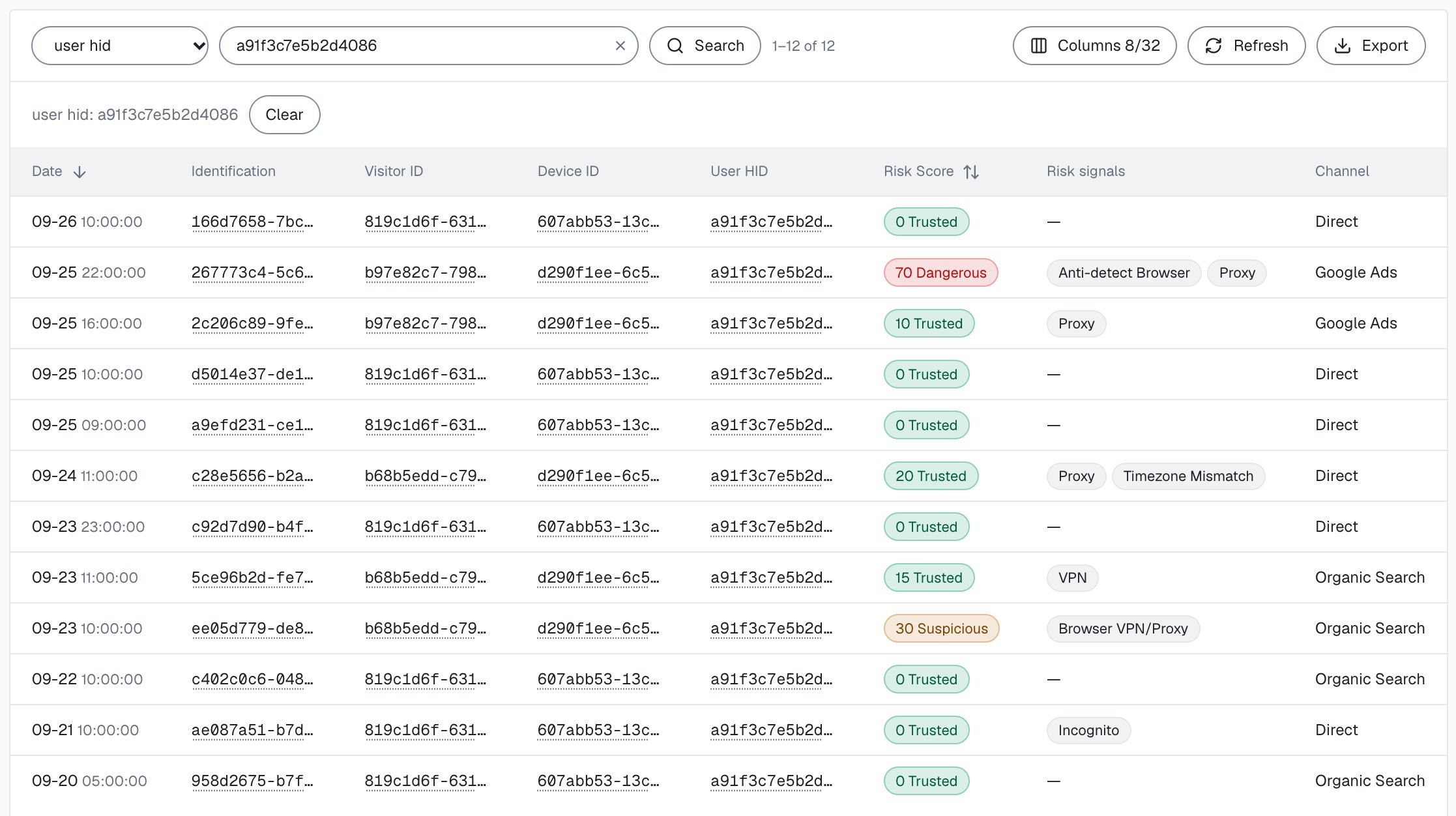
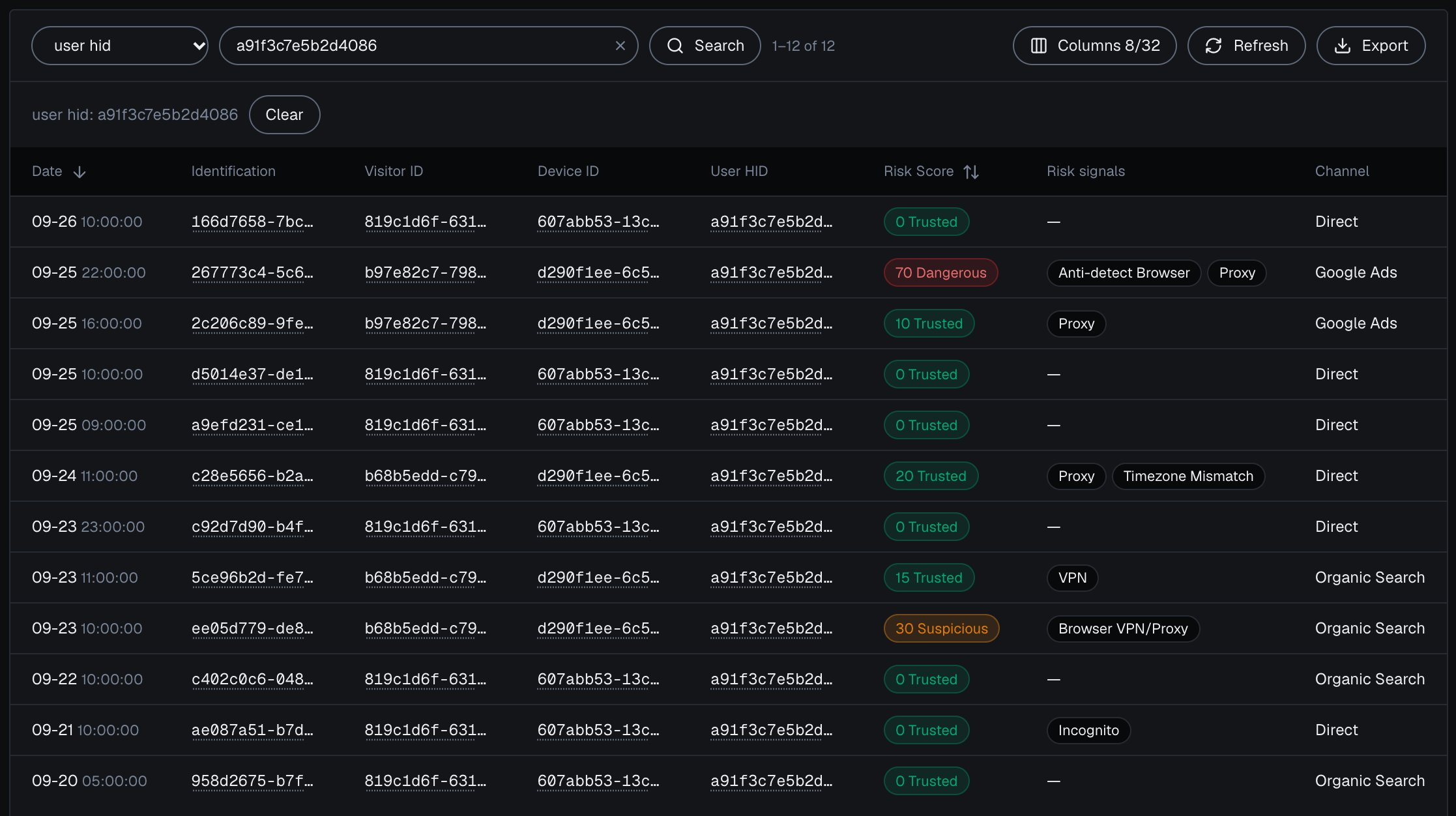 The account's own [user card](/dashboard/entity-card) shows its band for the period, every linked device and IP with the band of the identifications it shares with the account, and its High-Risk Events. The **Risk signals** column of the table also names informational flags such as Incognito, which add nothing to the Risk Score.
A package that holds up tends to show, side by side:
| Evidence in the package | What it argues |
| - | - |
| Same User HID on the disputed order and prior orders | One account made the purchases, through cookie clears and browser switches. |
| Same Device ID on the disputed order and prior orders | The same browser on the same device made the purchases, not a stranger. |
| Consistent country across those identifications | No sudden geography change that would suggest a stolen card. |
| Trusted Risk Score (0-29) on each identification | None of these purchases carried strong risk signals. |
| Earlier orders that were never disputed | A history of legitimate use from this account and device. |
| `created_at` spanning weeks or months | A relationship, not a one-off hit-and-run. |
Reads through the History API on `account.shieldlabs.ai` never count against your included identifications. Set `limit` to the smallest value that covers what you need to cite: `1` for one order's identification. Webhook delivery and analytics dashboard exports never count either; the [Billing](/billing) page has the full breakdown.
## Test it
Confirm the continuity holds before you rely on it in a representment. Place a test order, note the `device_id` on its identification, then clear cookies (or open an incognito window) on the same browser and place a second order. Both identifications return the **same** `device_id` even though the cookie, and therefore the `visitor_id`, changed. Open the same site in a different browser or on a second machine and you will see a **new** `device_id`: that is the honest limit, and a genuine buyer who switched devices between purchases will not show device continuity. Signed in on both, the two orders still carry the same User HID.
## How far device evidence goes
Account and device continuity strengthen a representment alongside the rest of your evidence.
* **It ties activity to a browser on a device.** A Device ID identifies the browser, and the same household member or a borrowed laptop produces the same Device ID, so name the account holder through the rest of your evidence.
* **A different browser is a different Device ID.** The same buyer in Chrome and Safari on one laptop produces two Device IDs with no continuity between them, so read missing device continuity as inconclusive on its own. To span a buyer's browsers, lead with the User HID, which stays the same in every browser the account signs in from.
* **The cardholder's bank rules on the dispute.** ShieldLabs supplies the account and device record, and your team writes the representment.
Pair the account and device history with the rest of your case (the AVS and CVV result, delivery confirmation, login history, prior order fulfillment) so the package argues from several angles, not one. [High-Risk Events](/features/high-risk-events) add triage context. ShieldLabs detects [Multi-accounting](/features/high-risk-events#multi-accounting) directly: several accounts run by one person, linked through the devices and network they share, so a Multi-accounting event means the buyer runs more accounts than the one that disputed. It also detects [Account takeover](/features/high-risk-events#account-takeover): an existing account appearing in a new environment that points to someone else using it, so an Account takeover event on the buyer's account supports a taken-over account rather than friendly fraud. Each event carries Medium or High confidence. High-Risk Events are available in the analytics dashboard, the API and webhooks, so check the buyer's account for them as soon as the dispute lands.
## Next
The real-time companion to this tutorial is the [payment fraud](/use-case/payment-fraud) checkout play, which scores the charge in the moment so fewer disputes ever reach this stage. Because a fraudulent purchase often starts with an [account takeover](/use-case/account-takeover), catching the new-device login earlier cuts off the charge before it happens. For the mechanics behind the evidence, [Users, devices, visitors and IPs](/concepts/entities) explains how an account links to its devices, the [Identifiers](/features/identification) reference explains why the Device ID holds, and the [History API](/api/server-api) and [Webhooks](/api/webhooks) references give the exact payload your dispute pipeline reads.
The real-time half: score the payment and read the buyer's account before the charge.
Catch the new-device login that often precedes the fraudulent purchase in the first place.
This documentation is built and hosted on [Mintlify](https://mintlify.com), a developer documentation platform.
The account's own [user card](/dashboard/entity-card) shows its band for the period, every linked device and IP with the band of the identifications it shares with the account, and its High-Risk Events. The **Risk signals** column of the table also names informational flags such as Incognito, which add nothing to the Risk Score.
A package that holds up tends to show, side by side:
| Evidence in the package | What it argues |
| - | - |
| Same User HID on the disputed order and prior orders | One account made the purchases, through cookie clears and browser switches. |
| Same Device ID on the disputed order and prior orders | The same browser on the same device made the purchases, not a stranger. |
| Consistent country across those identifications | No sudden geography change that would suggest a stolen card. |
| Trusted Risk Score (0-29) on each identification | None of these purchases carried strong risk signals. |
| Earlier orders that were never disputed | A history of legitimate use from this account and device. |
| `created_at` spanning weeks or months | A relationship, not a one-off hit-and-run. |
Reads through the History API on `account.shieldlabs.ai` never count against your included identifications. Set `limit` to the smallest value that covers what you need to cite: `1` for one order's identification. Webhook delivery and analytics dashboard exports never count either; the [Billing](/billing) page has the full breakdown.
## Test it
Confirm the continuity holds before you rely on it in a representment. Place a test order, note the `device_id` on its identification, then clear cookies (or open an incognito window) on the same browser and place a second order. Both identifications return the **same** `device_id` even though the cookie, and therefore the `visitor_id`, changed. Open the same site in a different browser or on a second machine and you will see a **new** `device_id`: that is the honest limit, and a genuine buyer who switched devices between purchases will not show device continuity. Signed in on both, the two orders still carry the same User HID.
## How far device evidence goes
Account and device continuity strengthen a representment alongside the rest of your evidence.
* **It ties activity to a browser on a device.** A Device ID identifies the browser, and the same household member or a borrowed laptop produces the same Device ID, so name the account holder through the rest of your evidence.
* **A different browser is a different Device ID.** The same buyer in Chrome and Safari on one laptop produces two Device IDs with no continuity between them, so read missing device continuity as inconclusive on its own. To span a buyer's browsers, lead with the User HID, which stays the same in every browser the account signs in from.
* **The cardholder's bank rules on the dispute.** ShieldLabs supplies the account and device record, and your team writes the representment.
Pair the account and device history with the rest of your case (the AVS and CVV result, delivery confirmation, login history, prior order fulfillment) so the package argues from several angles, not one. [High-Risk Events](/features/high-risk-events) add triage context. ShieldLabs detects [Multi-accounting](/features/high-risk-events#multi-accounting) directly: several accounts run by one person, linked through the devices and network they share, so a Multi-accounting event means the buyer runs more accounts than the one that disputed. It also detects [Account takeover](/features/high-risk-events#account-takeover): an existing account appearing in a new environment that points to someone else using it, so an Account takeover event on the buyer's account supports a taken-over account rather than friendly fraud. Each event carries Medium or High confidence. High-Risk Events are available in the analytics dashboard, the API and webhooks, so check the buyer's account for them as soon as the dispute lands.
## Next
The real-time companion to this tutorial is the [payment fraud](/use-case/payment-fraud) checkout play, which scores the charge in the moment so fewer disputes ever reach this stage. Because a fraudulent purchase often starts with an [account takeover](/use-case/account-takeover), catching the new-device login earlier cuts off the charge before it happens. For the mechanics behind the evidence, [Users, devices, visitors and IPs](/concepts/entities) explains how an account links to its devices, the [Identifiers](/features/identification) reference explains why the Device ID holds, and the [History API](/api/server-api) and [Webhooks](/api/webhooks) references give the exact payload your dispute pipeline reads.
The real-time half: score the payment and read the buyer's account before the charge.
Catch the new-device login that often precedes the fraudulent purchase in the first place.
This documentation is built and hosted on [Mintlify](https://mintlify.com), a developer documentation platform.