> ## Documentation Index
> Fetch the complete documentation index at: https://docs.shieldlabs.ai/llms.txt
> Use this file to discover all available pages before exploring further.
# New Account Fraud (Fake Signups)
> Learn how to detect and prevent new account fraud and fake signups by linking each new account to the device and the accounts behind it.
Account farms and fake signups share one tell on the wire: many accounts created from the same device or the same network, often through a VPN, proxy, an anti-detect browser, or a cleared-cookie incognito session that tries to look new every time. ShieldLabs gives you five layers to catch this at registration, and you choose the action for each case at your signup endpoint.
## What is new account fraud?
New account fraud, also called fake signup fraud, is the mass creation of bogus or duplicate accounts by one person to abuse signup-bound perks (free trials, promos, referral payouts) or to seed downstream abuse. The accounts look distinct on the surface but trace back to a small number of real devices or networks.
## How ShieldLabs surfaces it
ShieldLabs gives you five things at each signup:
| Layer | What it answers | Where you read it | Latency |
| - | - | - | - |
| **Account** | "Which accounts has this device already created or signed in to?" | The [History API](/api/server-api) by `device_id`: the distinct `user_hid` values | On demand |
| **Identification** | "Is this the same device behind a 'new' signup, even after cleared cookies, incognito or a fresh IP?" | The durable `device_id` on the [webhook](/setup/webhooks) / [History API](/api/server-api) | About 300 ms |
| **Risk signals** | "Is this signup masked, spoofed or automated right now?" | The `signals` array on the [webhook](/setup/webhooks) / `score_details` on the [History API](/api/server-api) | About 300 ms |
| **Risk Score** | "How risky is this identification overall, as one 0-100 number?" | `risk_score` on the [webhook](/setup/webhooks) / `score` on the [History API](/api/server-api) | About 300 ms |
| **High-Risk Events** | "Are the accounts on this device run by one person?" | [Multi-accounting](/features/high-risk-events#multi-accounting) on those users, in the analytics dashboard, the API and webhooks | When detected |
Identification is the anchor the others ride on: the naive keys reset on demand (a fresh `cookie_id` and `visitor_id` per cleared-cookie or incognito session, and a new IP each time the VPN exit node changes), but the server-derived **Device ID** does not, so it collapses those "new" signups back to one device. The Risk Score flags the masked or automated signup the moment it happens, so you can stop it, and the Multi-accounting event catches the slow farm that spreads account creation over hours or days, each signup looking clean on its own. You want all five.
Read a high [Risk Score (0-100)](/features/risk-scoring) together with its named risk signals and the user's history. A real customer on a corporate VPN can reach the Suspicious band; the signals show why, and you choose the action for each case.
## Prevent fake signups
The rule to apply: read the Risk Score and named signals of the signup's identification at your signup endpoint, before you activate the account. A Dangerous-band score (60-100) requires a second factor, a Suspicious-band score (30-59) holds the account for email verification, a Trusted score (0-29) passes through. Layer the account view on top: when the device behind the signup is already linked to other accounts, or to a user with a Multi-accounting event, escalate one step. The outcome is that the obviously masked signup, and the farm spreading creation across sessions, both meet friction while a real first-time customer signs up without friction.
Two signal sources drive that decision:
* **Per identification (the Risk Score):** the [Risk Score (0-100)](/features/risk-scoring) and the [risk signals](/features/risk-signals) behind it: bot and automation signals (Browser Automation, JavaScript Disabled), masking signals (VPN, Proxy, Tor, Privacy Relay, Browser VPN/Proxy, Datacenter IP, Abuser Flag), consistency signals (OS Mismatch, Timezone Mismatch) and Anti-detect Browser. Each signal adds its weight: Browser Automation, JavaScript Disabled, Anti-detect Browser and OS Mismatch weigh 60 to 90, so one alone puts a signup in the Dangerous band, while most network signals are light (VPN 15, Privacy Relay 15, Proxy 10, Datacenter IP 10, Abuser Flag 10), so a VPN-only or Datacenter-only signup stays Trusted until they stack. Tor (99) is the exception and puts a signup in the Dangerous band on its own, and Browser VPN/Proxy (30) reaches the Suspicious band on its own. You map the Risk Score to a band and read each signal's weight for context.
* **Across the account (High-Risk Events):** ShieldLabs detects **Multi-accounting** on your users: several accounts run by one person, linked through the devices and network they share, each at **Medium** or **High** confidence. It links the farm that a single identification cannot show, and it is available in the analytics dashboard, the API and webhooks.
A scripted or headless farm raises Browser Automation or JavaScript Disabled on its signups (see [Bots and automation](/features/risk-signals#bots-and-automation)), and the accounts it creates link together in the Multi-accounting event.
## Build it
[Start Free](https://app.shieldlabs.ai/) with 5,000 identifications, one time, no credit card, or log in. In the analytics dashboard, add the domain you want to protect under **Integration > Domains**, then open **Integration > API keys** and copy its keys with the copy button next to each. The **Public Key** loads the snippet in the browser. Keep the server credentials on your backend: the **Private API Key** reads the [History API](/api/server-api), and each webhook endpoint has its own `whsec_…` signing secret. See [API keys](/setup/keys) and [Integration](/dashboard/integration).
Add the [snippet](/setup/snippet) to your signup page and call `forceCheckAnonymous` when the user starts filling the form (its first focus). It runs a fresh identification for this signup even if the visitor was checked on another page a moment ago; without `force`, a repeat check in the same visit within five minutes is skipped. `onInitialized` fires when the check starts, before the snippet has sent the identification, so do not navigate away inside it: store the request ID and let the form submit normally. The callback receives `{ status: "initialized", requestID }` or `{ status: "not_initialized" }`; `requestID` is the join key, not a Risk Score. The Risk Score arrives by webhook.
```html signup.html theme={null}
```
Receive the [webhook](/setup/webhooks), verify its HMAC, and cache the result keyed by `request_id`. At the signup endpoint, read the identification with the shared [`waitForScore` helper](/use-case#the-shared-helpers) (your webhook cache, with a short timeout, falling back to a [History API](/api/server-api) read by `request_id`), then branch on its band. A missing identification is unverified, never clean.
```js api/signup.js theme={null}
app.post('/api/signup', async (req, res) => {
const { email, password, shieldlabsRequestId } = req.body;
// 1. Your normal validation first.
if (await emailExists(email)) {
return res.status(409).json({ error: 'Email already in use' });
}
// 2. The guard. A signup is a guest flow, so there is no User HID to match yet.
const risk = await waitForScore(shieldlabsRequestId, 2000);
if (!risk) {
return res.status(200).json({ requireVerification: true, reason: 'no_identification' });
}
if (risk.risk_score > 100 || risk.device_id === NIL_DEVICE) {
// The 999 rate-limit marker, or no usable device signals: review, never allow.
return res.status(200).json({ requireVerification: true, reason: 'unverified_device' });
}
const flags = risk.detection_flags ?? {}; // booleans for quick branching
// 3. Map the score to a band and choose the action.
if (band(risk.risk_score) === 'Dangerous') {
// Strong risk signals. Require email + a second factor.
return res.status(200).json({ requireVerification: true, reason: 'extra_verification' });
}
if (band(risk.risk_score) === 'Suspicious') {
// Email-verify before activating.
return createPendingAccount(email, password, res);
}
// Trusted: create the account normally.
return createAccount(email, password, res);
});
```
Branch on the band, on the `signals[].name` slugs (for example `antidetect_browser`, `browser_automation`, `tor`), or on the boolean [`detection_flags`](/glossary#detection-flags) (`vpn`, `proxy`, `tor`, `anti_detect_browser`, `browser_automation`, `javascript_disabled` and more). Slugs are stable. A slug can repeat with a partial weight when an earlier verdict is carried forward, so test for presence rather than counting entries.
**Read the network behind the mask.** The webhook carries two IP objects. `public_ip` is the public address and its country, which a VPN or proxy can put anywhere. `local_ip` is the Local IP: the address the browser itself reports, which can differ from the public IP behind a VPN or proxy and can expose the network behind the mask. `local_ip.ip` is empty when the Local IP was not captured. `detection_flags.ip_mismatch` is `true` whenever the two are different addresses. It is informational, adds nothing to the Risk Score and can be ordinary on mobile networks, so compare `local_ip.country` with `public_ip.country` rather than branching on the flag alone. For a farm rotating fresh public IPs, a `local_ip.ip` shared across accounts is often the durable network tell.
A single masked signup is easy to score. The harder problem is the farm that creates 50 accounts over a week, each one clean in isolation. ShieldLabs detects this as the **Multi-accounting** [High-Risk Event](/features/high-risk-events#multi-accounting) on those users: several accounts run by one person, linked through the devices and network they share, at **Medium** or **High** confidence. Your signup handler can still count the accounts on a device live, as the code below shows.
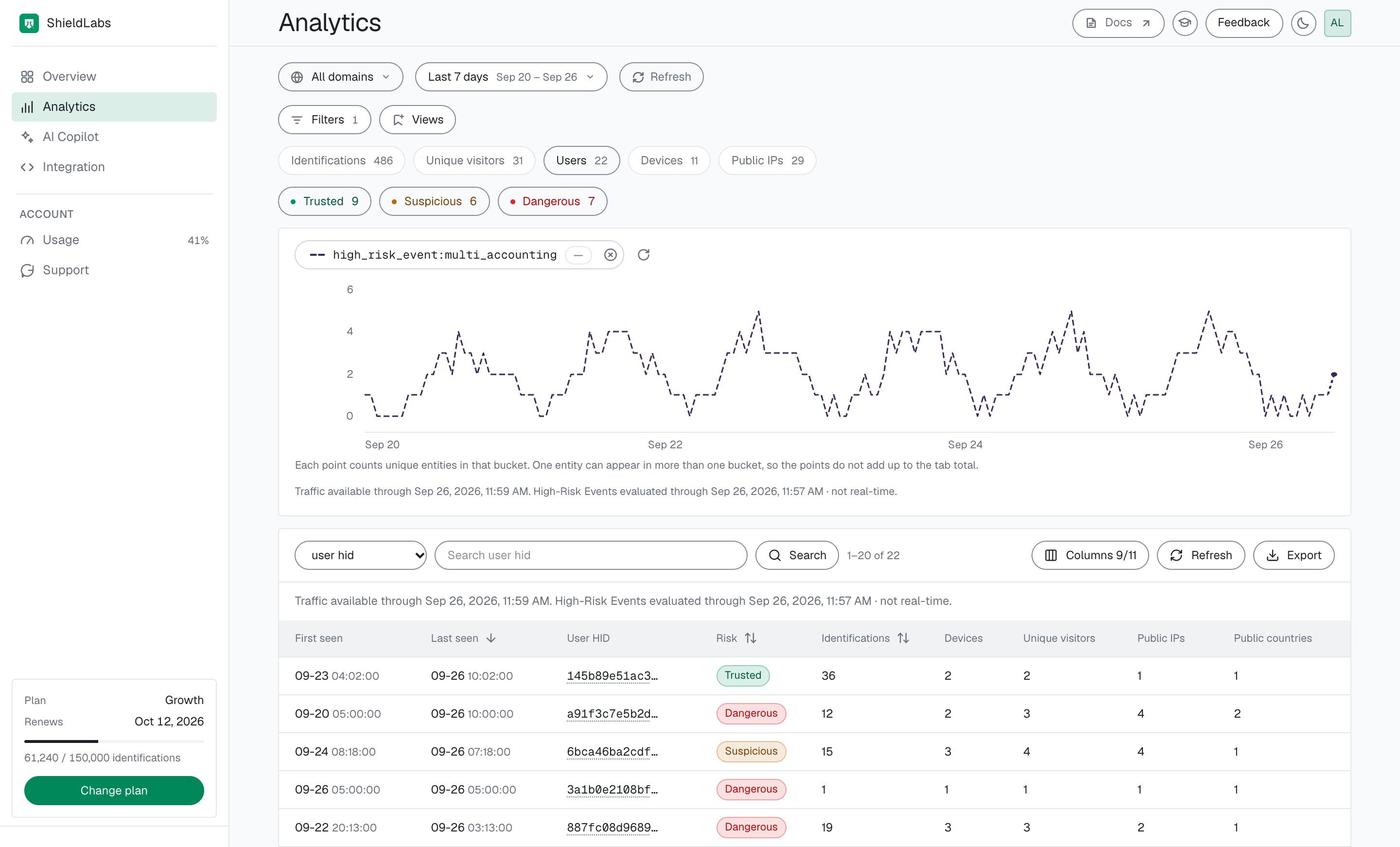
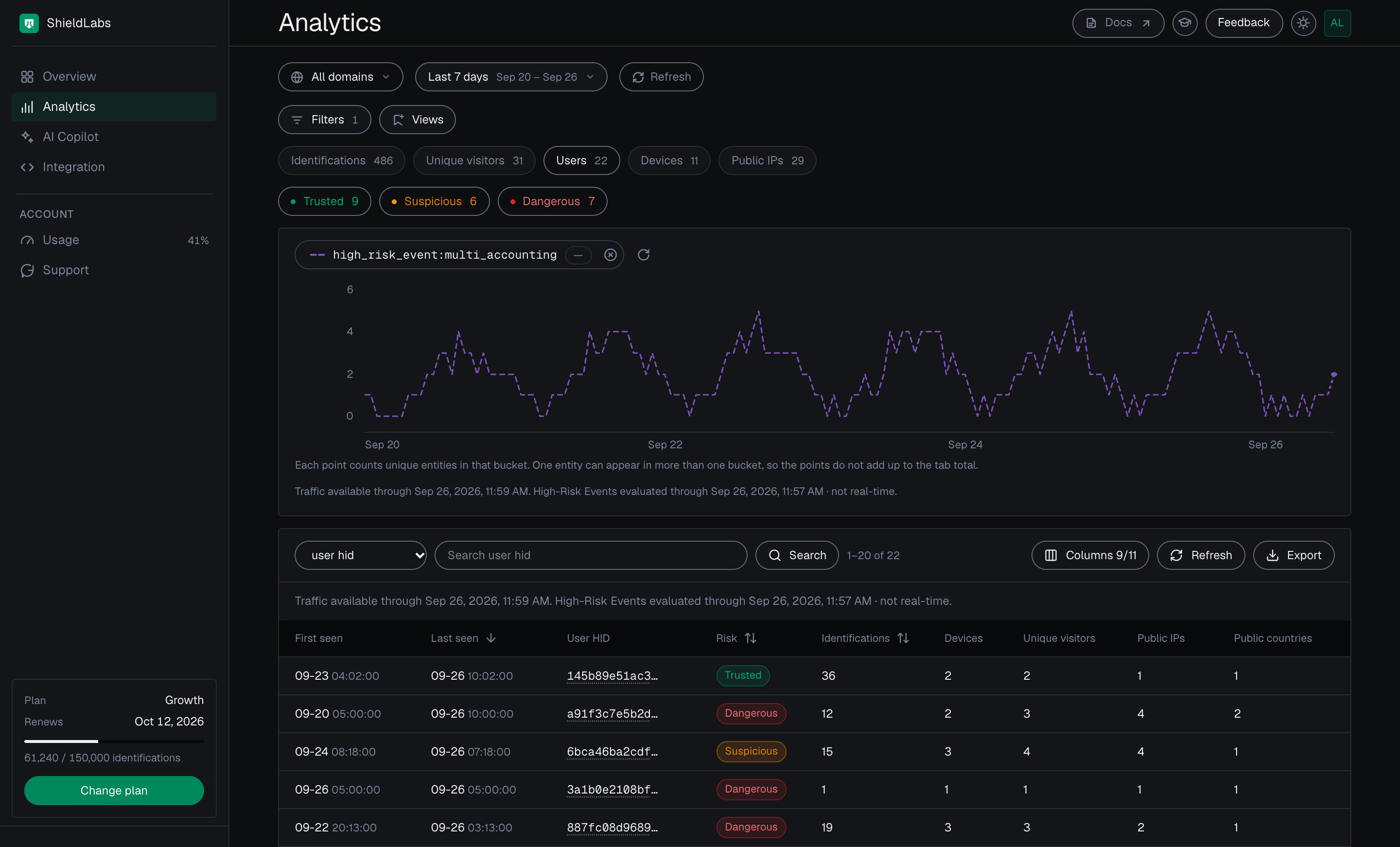
 The event is keyed on the account, so as soon as the new account exists, call `checkAuthenticatedUser` with its hashed User HID (on the first signed-in page, for example); every account the farm creates is then tied to the device behind it. Multi-accounting is detected out of the box, without building rules or training a fraud model. High-Risk Events are available in the analytics dashboard, the API and webhooks. When a Multi-accounting event arrives for a user through the API or webhooks, or when you review it in the analytics dashboard, act on the account: add the User HID, with the devices and local IPs linked to it, to a watchlist in your datastore, and at the signup check the incoming `device_id` against it. You choose the action for each case. The History API returns every device an account has used, by `user_hid`. The [acting guide](/guides/acting-on-risk-score#acting-on-high-risk-events) gives a starting point for each event.
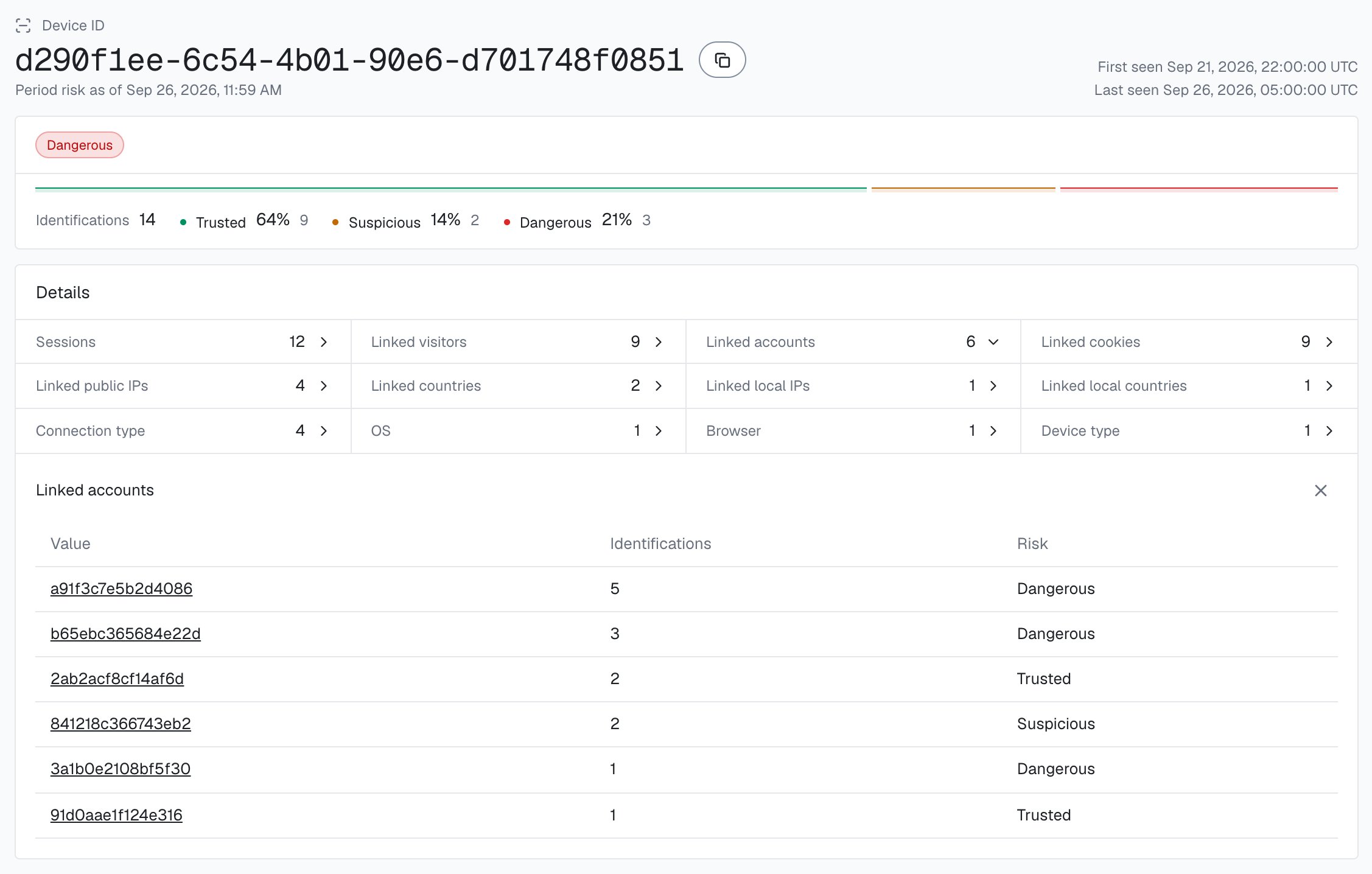
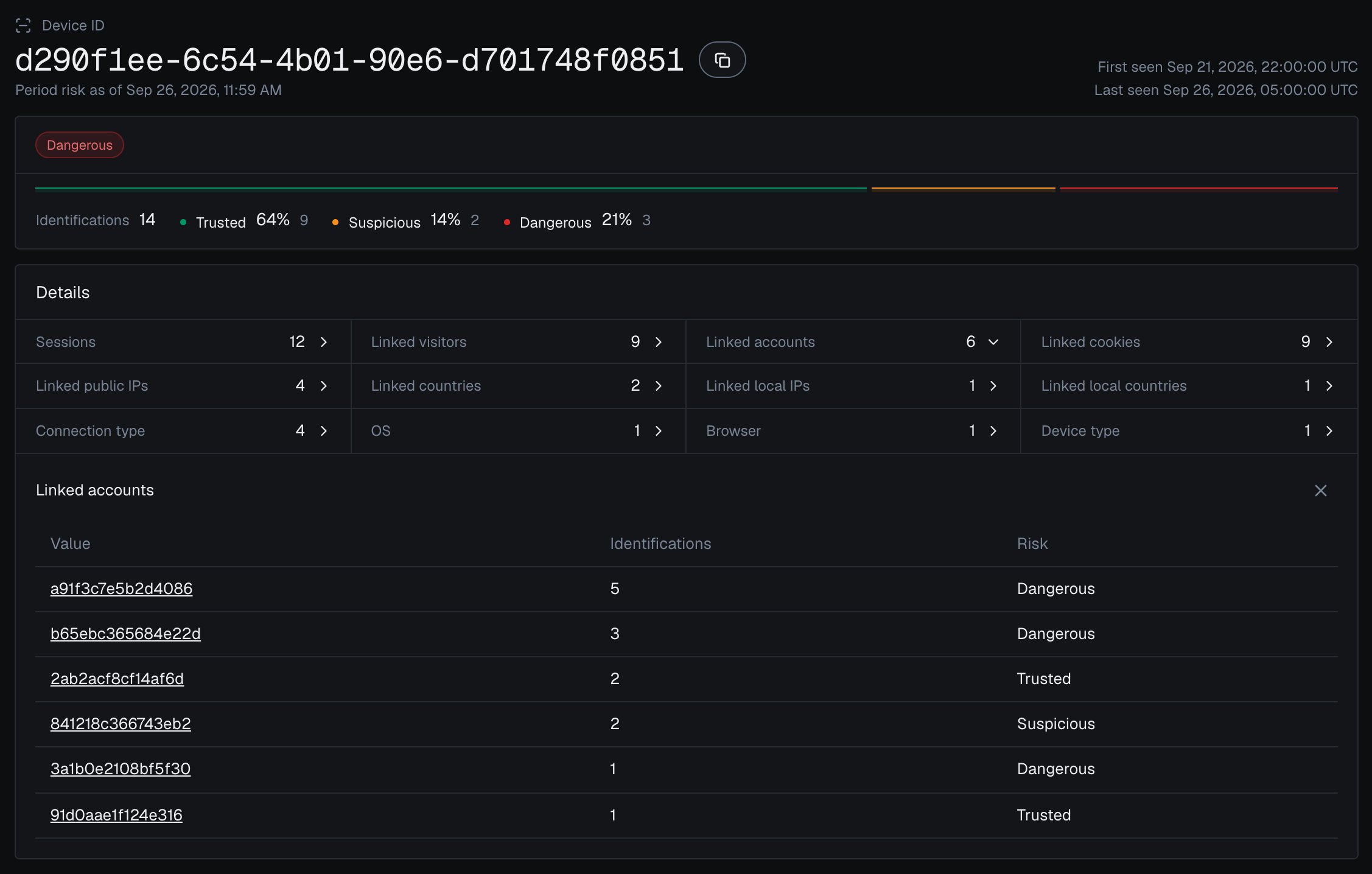
 You can also reconstruct a device's accounts live: read the History API by `device_id`. The response is `{ data, total }`; each element of `data` is one identification (newest first) carrying the `user_hid` it was made for, so distinct `user_hid` values on one `device_id` are distinct accounts behind that device. The shared `accountsBehindDevice` helper counts them and leaves out `"anonymous"`, which is not an account.
```js Gate signup on the accounts behind the device theme={null}
// Devices linked to users with a Multi-accounting event, recorded when it arrives
// through the API or webhooks or when you review it in the analytics dashboard
// (your own store), plus a live account count per device.
const watchedDevices = await loadWatchedDeviceIds();
async function deviceIsKnownFarm(deviceId) {
if (watchedDevices.has(deviceId)) return true;
const accounts = await accountsBehindDevice(deviceId).catch(() => null);
if (accounts === null) return true; // a failed History read is unverified: verify the signup
return accounts >= YOUR_ACCOUNT_LIMIT;
}
app.post('/api/signup', async (req, res) => {
// ... validation, the guard and the Risk Score check above ...
if (await deviceIsKnownFarm(risk.device_id)) {
return res.status(200).json({
requireVerification: true,
reason: 'device_linked_to_many_accounts',
});
}
return createAccount(email, password, res);
});
```
History reads on `account.shieldlabs.ai` and webhook delivery are free. For high-volume signup flows, rely on your Multi-accounting watchlist and keep live History reads for borderline signups.
Start in a logging-only mode, watch how your real signups distribute across the bands and how many accounts your devices carry, then raise friction where the data justifies it.
## Test it
Reproduce a farm signup before you trust the gate. Load your signup page, complete it once, and note the `device_id` from the webhook. Then clear cookies (or open a new incognito window, or rotate your IP through a VPN) and sign up again: the `cookie_id` and `visitor_id` change each time, but the same `device_id` comes back. Then, without clearing cookies, sign in to three test accounts from the same browser, passing a different User HID for each, and check that their identifications carry the same `device_id`; a second browser gets its own Device ID. Three accounts on one visitor reach the default Multi-accounting threshold; look for the event on those users in the analytics dashboard, the API or webhooks.
## Recommended starting policy
The three bands are defined in [Risk Scoring](/features/risk-scoring), and the per-band action playbook lives in [Acting on results](/guides/acting-on-risk-score). Mapped to a signup gate:
| Risk Score band | Suggested signup action |
| - | - |
| **Trusted** (0-29) | Create the account, log the identification |
| **Suspicious** (30-59) | Require email verification before activating |
| **Dangerous** (60-100) | Require a second factor, or reject and route to support |
| No identification for the signup, or an all-zero Device ID | Require verification before activating |
You choose the action for each band. Layer the account view on top: if the device is linked to a user with a **Multi-accounting** event, escalate one step (a Suspicious signup on that device gets the Dangerous-band friction), and treat **High** confidence more firmly than **Medium**.
The full per-band decision playbook, including signal-aware decisioning and how to combine the score with specific signals.
This documentation is built and hosted on [Mintlify](https://mintlify.com), a developer documentation platform.
You can also reconstruct a device's accounts live: read the History API by `device_id`. The response is `{ data, total }`; each element of `data` is one identification (newest first) carrying the `user_hid` it was made for, so distinct `user_hid` values on one `device_id` are distinct accounts behind that device. The shared `accountsBehindDevice` helper counts them and leaves out `"anonymous"`, which is not an account.
```js Gate signup on the accounts behind the device theme={null}
// Devices linked to users with a Multi-accounting event, recorded when it arrives
// through the API or webhooks or when you review it in the analytics dashboard
// (your own store), plus a live account count per device.
const watchedDevices = await loadWatchedDeviceIds();
async function deviceIsKnownFarm(deviceId) {
if (watchedDevices.has(deviceId)) return true;
const accounts = await accountsBehindDevice(deviceId).catch(() => null);
if (accounts === null) return true; // a failed History read is unverified: verify the signup
return accounts >= YOUR_ACCOUNT_LIMIT;
}
app.post('/api/signup', async (req, res) => {
// ... validation, the guard and the Risk Score check above ...
if (await deviceIsKnownFarm(risk.device_id)) {
return res.status(200).json({
requireVerification: true,
reason: 'device_linked_to_many_accounts',
});
}
return createAccount(email, password, res);
});
```
History reads on `account.shieldlabs.ai` and webhook delivery are free. For high-volume signup flows, rely on your Multi-accounting watchlist and keep live History reads for borderline signups.
Start in a logging-only mode, watch how your real signups distribute across the bands and how many accounts your devices carry, then raise friction where the data justifies it.
## Test it
Reproduce a farm signup before you trust the gate. Load your signup page, complete it once, and note the `device_id` from the webhook. Then clear cookies (or open a new incognito window, or rotate your IP through a VPN) and sign up again: the `cookie_id` and `visitor_id` change each time, but the same `device_id` comes back. Then, without clearing cookies, sign in to three test accounts from the same browser, passing a different User HID for each, and check that their identifications carry the same `device_id`; a second browser gets its own Device ID. Three accounts on one visitor reach the default Multi-accounting threshold; look for the event on those users in the analytics dashboard, the API or webhooks.
## Recommended starting policy
The three bands are defined in [Risk Scoring](/features/risk-scoring), and the per-band action playbook lives in [Acting on results](/guides/acting-on-risk-score). Mapped to a signup gate:
| Risk Score band | Suggested signup action |
| - | - |
| **Trusted** (0-29) | Create the account, log the identification |
| **Suspicious** (30-59) | Require email verification before activating |
| **Dangerous** (60-100) | Require a second factor, or reject and route to support |
| No identification for the signup, or an all-zero Device ID | Require verification before activating |
You choose the action for each band. Layer the account view on top: if the device is linked to a user with a **Multi-accounting** event, escalate one step (a Suspicious signup on that device gets the Dangerous-band friction), and treat **High** confidence more firmly than **Medium**.
The full per-band decision playbook, including signal-aware decisioning and how to combine the score with specific signals.
This documentation is built and hosted on [Mintlify](https://mintlify.com), a developer documentation platform.