> ## Documentation Index
> Fetch the complete documentation index at: https://docs.shieldlabs.ai/llms.txt
> Use this file to discover all available pages before exploring further.
# Returning Visitor Recognition
> Remove friction for a known customer returning on a clean, familiar device.
Most tutorials here use the Risk Score to raise friction on a risky identification. This one runs the same machinery in reverse: a known account arriving clean on a device it has used before is a good moment to **remove** friction: skip a redundant check, restore preferences, or smooth the path for someone who has been here before.
## What is returning visitor recognition?
Returning visitor recognition is identifying a known account coming back on a device it has used before, so you can shorten the experience for a genuine return instead of treating it as a first-time stranger. Use it for personalization and friction removal; authentication stays with your login and second factor.
ShieldLabs gives you three inputs for it. **The account:** pass its hashed User HID with `checkAuthenticatedUser`; every identification of the account, with its Device ID and Risk Score, is readable from the [History API](/api/server-api#read-every-identification-of-one-account) by `user_hid`. **The device:** the [Device ID](/features/identification) holds through cleared cookies, incognito mode and IP changes, which is exactly where a cookie-only "remember me" falls apart; the Visitor ID is one device plus one cookie, so it changes when cookies are cleared. **The moment:** the [Risk Score (0-100)](/features/risk-scoring) and the named risk signals on this identification show whether the return arrives on an ordinary, unmasked connection.
This recognizes a known account on a known device, and anyone using that browser inherits it. Treat it as a convenience signal and read the guardrails at the end before wiring it to anything sensitive.
## Recognize and reward a known account on a trusted device
The whole flow is one plain rule:
* **Input:** a clean identification, meaning a Trusted-band Risk Score (0-29) with no positive-weight risk signal, from the account itself on a Device ID you already tied to that account.
* **Rule:** reward the return. Skip a redundant check, restore the customer's preferences, or shorten the path.
* **Outcome:** friction removed for a known-good return, with a safe fallback to your normal flow the moment any part of the input is missing.
What makes a return trustworthy is the *absence* of anomaly. The same risk signals that flag a masked connection are, by their absence, the positive evidence here: a Trusted-band Risk Score with no positive-weight entry in `signals` means no VPN, proxy, Tor, OS mismatch or timezone mismatch fired. That is why you require no fired risk signal, not just a low-ish Risk Score. A fresh VPN or proxy fires its own risk signal, so the gate catches it. If you also want the Local IP check, compare `local_ip.country` with `public_ip.country`: `detection_flags.ip_mismatch` marks two different addresses, adds nothing to the Risk Score and can be ordinary on mobile networks.
Match on the **band plus the Device ID**, never the Device ID alone. A returning device with a Suspicious or Dangerous Risk Score is a returning device on a riskier connection, and the riskier connection is the part that should drive your decision.
## Build it
ShieldLabs recognizes the account, the device and the moment; you choose which friction to remove for each case and act on it in your backend.
Load the [snippet](/setup/snippet) where the return matters: a signed-in customer landing on your app or starting a routine action. Pass the hashed User HID with `forceCheckAuthenticatedUser`: it runs an identification every time, keeps the current Session ID and restarts the five-minute window, so the moment is identified even if the page was checked a minute ago. A plain `checkAuthenticatedUser` inside that window posts nothing and calls back with `{ status: "not_initialized" }`. Keep the `requestID` to join the browser check to the webhook.
```js theme={null}
mod.forceCheckAuthenticatedUser('8a9f-hashed-account-id', {
onInitialized: (result) => {
if (result.status !== 'initialized') return; // no identification: normal flow
fetch('/api/enter', {
method: 'POST',
headers: { 'Content-Type': 'application/json' },
body: JSON.stringify({ shieldlabsRequestId: result.requestID }),
});
},
});
```
Recognition only works once you have something to recognize. Whenever a customer completes a real, authenticated action you trust (a login behind your own auth, a verified purchase, an email confirmation), store the Device ID of that identification against that account. Over time each account accumulates a small set of devices it has genuinely used.
```js Build the trust list on a verified action theme={null}
// Call this from a flow you already trust: a successful login, a confirmed
// purchase, an email verification. `risk` is what waitForScore returns.
async function rememberTrustedDevice(accountId, risk) {
// Remember only a clean webhook identification of this account.
// A History fallback row has no `signals`, so it is skipped.
if (!Array.isArray(risk.signals)) return;
// hashAccountId: the same hashing you apply before passing the id to the snippet.
if (risk.user_hid !== hashAccountId(accountId)) return;
if (!risk.device_id || risk.device_id === NIL_DEVICE) return;
if (risk.risk_score >= 30 || risk.signals.some((s) => s.weight > 0)) return;
await trustedDevices.add({ accountId, deviceId: risk.device_id, firstSeen: Date.now() });
}
```
`NIL_DEVICE` is the all-zero Device ID, exported by the [shared helpers](/use-case). The `weight > 0` test lets through a correction entry such as `stun_late_correction`, which carries a negative weight.
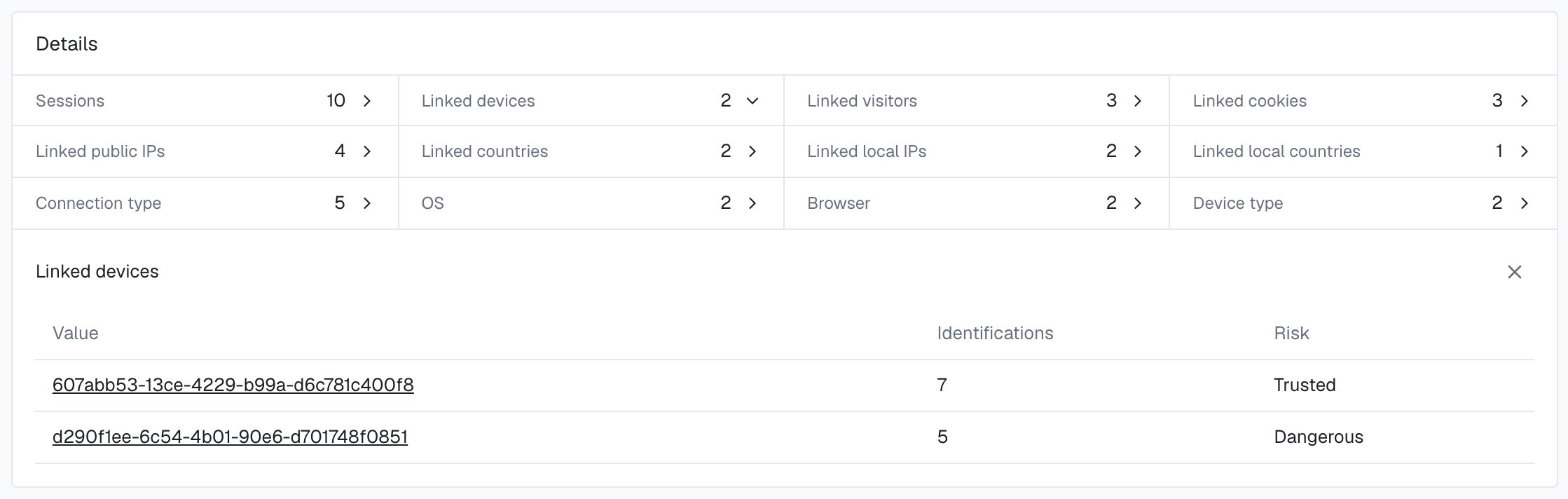
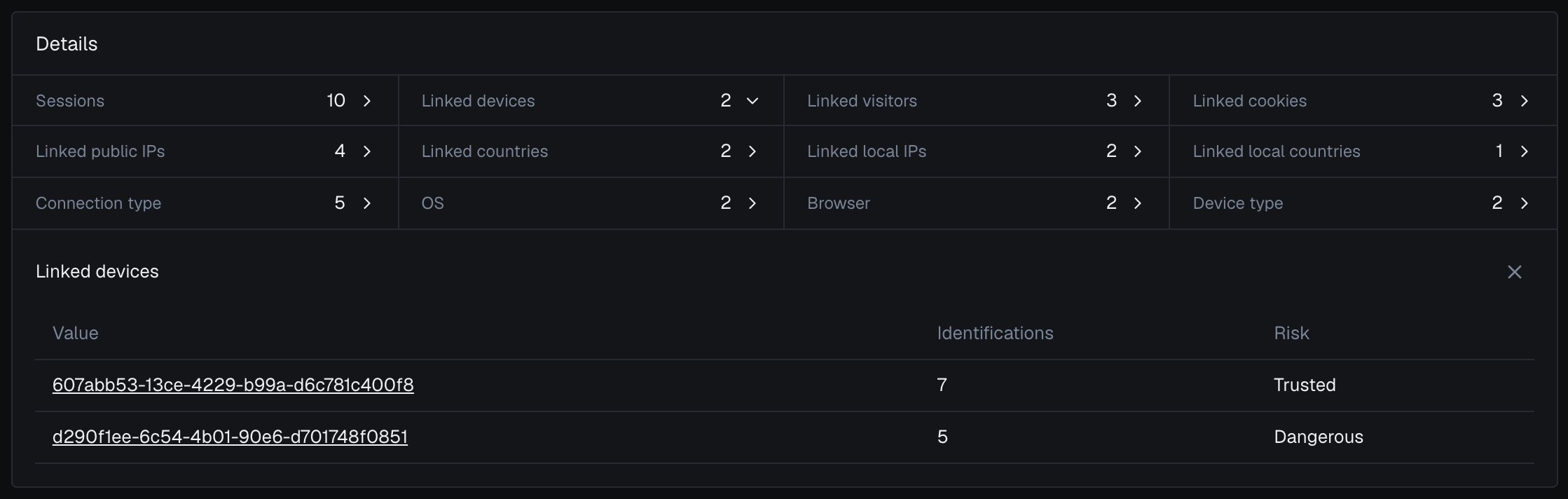
In the analytics dashboard, the account's [user card](/dashboard/entity-card) lists **Linked devices**, each with the band of the account's identifications on it in the period: the devices the account has genuinely used, next to the trust list you build here.
 On the next return, wait briefly for the identification, then check the account, the band and the device **together**. A clean Risk Score on its own is an ordinary identification; a known Device ID on its own is not enough either. The recognition is the intersection.
```js api/enter.js theme={null}
app.post('/api/enter', async (req, res) => {
const { shieldlabsRequestId } = req.body;
const accountId = req.user?.id; // the signed-in account
if (!accountId) return res.json({ recognized: false });
// Read the identification from your webhook cache (the shared `waitForScore`
// helper), falling back to a History API read by request_id.
const risk = await waitForScore(shieldlabsRequestId, 2000);
// No identification, a History fallback row (no `signals`), or an
// identification of another account: run the normal flow.
if (!risk || !Array.isArray(risk.signals)) return res.json({ recognized: false });
if (risk.user_hid !== hashAccountId(accountId)) return res.json({ recognized: false });
if (!risk.device_id || risk.device_id === NIL_DEVICE) return res.json({ recognized: false });
// Trusted band (0-29) with no positive-weight risk signal: an ordinary,
// unmasked moment. The 999 rate-limit marker is never clean.
const isClean = risk.risk_score < 30 && !risk.signals.some((s) => s.weight > 0);
const isKnownDevice = await trustedDevices.has(accountId, risk.device_id);
// Accounts you marked after a High-Risk Event reached you through the API,
// webhooks or the analytics dashboard.
const isMarked = await markedAccounts.has(accountId);
if (isClean && isKnownDevice && !isMarked) {
// Recognized return: lighten the experience.
return res.json({ recognized: true, deviceId: risk.device_id });
}
// New device, a Risk Score that is not clean, or a marked account: your normal flow.
return res.json({ recognized: false });
});
```
`waitForScore` is the shared webhook-cache read (poll the cache, then fall back to a History API read by `request_id`); the [Use Case Tutorials](/use-case) index defines it once, so this tutorial does not repeat it.
For a recognized return, remove friction. A few safe places to spend it:
* **Skip a redundant check.** A second-factor prompt the same trusted device already cleared this week can be relaxed, while staying on for anything sensitive.
* **Restore preferences.** Re-apply the customer's layout, language, or saved cart before they ask.
* **Shorten the path.** Pre-fill what you already know, or drop the customer straight onto the screen they last used.
* **Soften rate limits.** A recognized device earns more headroom than an anonymous one on the same endpoint.
Each is a convenience that degrades gracefully: if recognition fails, the customer simply gets your normal flow. When an **Account sharing** or **Account takeover** event arrives for an account through the API or webhooks, or when you review it in the analytics dashboard, act on the account. You choose the action for each case, for example keeping the full flow for it until you have reviewed it, as the `isMarked` check above does. The Risk Score and risk signals of the identification remain the input at each sign-in.
The all-or-nothing check above disqualifies any fired risk signal. If you want some benign masking to still count, such as a corporate VPN or iCloud Private Relay, branch on the individual [`detection_flags`](/glossary#detection-flags) booleans instead of requiring no fired signal (with `const flags = risk.detection_flags ?? {}`, require, say, `!flags.tor && !flags.anti_detect_browser && !flags.browser_automation`, and matching `local_ip.country` and `public_ip.country`). Loosen the gate only for convenience decisions, never for anything you would gate on authentication.
## Test it
Confirm recognition holds across the exact resets a cookie-only approach loses to. Sign in once on a clean connection, let the identification land against a trusted account, then come back:
* **Clear cookies and storage**, reload, and identify again. The `cookie_id` and `visitor_id` change, but the `device_id` stays the same.
* **Open an incognito or private window** in the same browser and identify. A fresh cookie context still resolves to the same `device_id`.
* **Reconnect on a different network** (Wi-Fi to mobile data). The IP rotates, the `device_id` does not.
Each return should carry a Trusted-band Risk Score with no positive-weight risk signal, the same `user_hid` and the same `device_id` you stored on the first identification. That match across cookie, incognito and IP resets is exactly what a "remember this device" checkbox cannot do on its own.
## Guardrails
A returning device is a convenience signal; credentials stay with your login. State the limits plainly and design around them.
* **It recognizes a known account on a known device.** Anyone using that browser inherits the recognition. A shared family laptop or a borrowed machine will match.
* **Never store or match the all-zero Device ID `00000000-0000-0000-0000-000000000000`.** An all-zero Device ID means no usable device signals reached ShieldLabs for that identification; the rate-limit marker (Risk Score 999) is one such case. Treat it, and a missing identification, as unrecognized and run your normal flow.
* **A device match smooths a path; authentication proves who is there.** ShieldLabs identifies devices with 99.9% [identification accuracy](/features/accuracy), which is enough to smooth a path, and a stranger still meets your login before any account.
* **Never make it the sole gate for anything sensitive.** Money movement, password and email changes, and data exports must always sit behind real authentication. Pair recognition with a login, a second factor, or a re-verification step. Use it to remove a redundant step, never the only step.
* **Fail closed.** No identification, a new device, an identification of another account, or a Risk Score outside the Trusted band all fall back to your full flow. Recognition is the bonus, not the baseline.
## Next
Run the same Risk Score and Device ID in the other direction with [step-up authentication](/use-case/step-up-authentication), which raises friction when an identification is **not** clean, or guard a sensitive return against a taken-over account with [account takeover](/use-case/account-takeover). ShieldLabs detects three High-Risk Events that bear on a returning account directly: [Multi-accounting](/features/high-risk-events#multi-accounting), several accounts run by one person; [Account sharing](/features/high-risk-events#account-sharing), one account used from several distinct devices; and [Account takeover](/features/high-risk-events#account-takeover), an existing account appearing in a new environment that points to someone else using it. The first two cover the inverse of trust, with tutorials in [multi-accounting](/use-case/multi-accounting) and [account sharing](/use-case/account-sharing). High-Risk Events are available in the analytics dashboard, the API and webhooks, each at Medium or High confidence.
For the building blocks underneath this tutorial, [Users, devices, visitors and IPs](/concepts/entities) explains how an account links to its devices, the [Identifiers](/features/identification) reference explains how the Device ID and Visitor ID differ and which one survives what, [Risk Scoring](/features/risk-scoring) covers the Risk Score and bands, and the [webhook payload](/api/webhooks) and [History API](/api/server-api) are the two ways to read the `device_id` and the Risk Score of an identification (`risk_score` on the webhook, `score` on History).
This documentation is built and hosted on [Mintlify](https://mintlify.com), a developer documentation platform.
On the next return, wait briefly for the identification, then check the account, the band and the device **together**. A clean Risk Score on its own is an ordinary identification; a known Device ID on its own is not enough either. The recognition is the intersection.
```js api/enter.js theme={null}
app.post('/api/enter', async (req, res) => {
const { shieldlabsRequestId } = req.body;
const accountId = req.user?.id; // the signed-in account
if (!accountId) return res.json({ recognized: false });
// Read the identification from your webhook cache (the shared `waitForScore`
// helper), falling back to a History API read by request_id.
const risk = await waitForScore(shieldlabsRequestId, 2000);
// No identification, a History fallback row (no `signals`), or an
// identification of another account: run the normal flow.
if (!risk || !Array.isArray(risk.signals)) return res.json({ recognized: false });
if (risk.user_hid !== hashAccountId(accountId)) return res.json({ recognized: false });
if (!risk.device_id || risk.device_id === NIL_DEVICE) return res.json({ recognized: false });
// Trusted band (0-29) with no positive-weight risk signal: an ordinary,
// unmasked moment. The 999 rate-limit marker is never clean.
const isClean = risk.risk_score < 30 && !risk.signals.some((s) => s.weight > 0);
const isKnownDevice = await trustedDevices.has(accountId, risk.device_id);
// Accounts you marked after a High-Risk Event reached you through the API,
// webhooks or the analytics dashboard.
const isMarked = await markedAccounts.has(accountId);
if (isClean && isKnownDevice && !isMarked) {
// Recognized return: lighten the experience.
return res.json({ recognized: true, deviceId: risk.device_id });
}
// New device, a Risk Score that is not clean, or a marked account: your normal flow.
return res.json({ recognized: false });
});
```
`waitForScore` is the shared webhook-cache read (poll the cache, then fall back to a History API read by `request_id`); the [Use Case Tutorials](/use-case) index defines it once, so this tutorial does not repeat it.
For a recognized return, remove friction. A few safe places to spend it:
* **Skip a redundant check.** A second-factor prompt the same trusted device already cleared this week can be relaxed, while staying on for anything sensitive.
* **Restore preferences.** Re-apply the customer's layout, language, or saved cart before they ask.
* **Shorten the path.** Pre-fill what you already know, or drop the customer straight onto the screen they last used.
* **Soften rate limits.** A recognized device earns more headroom than an anonymous one on the same endpoint.
Each is a convenience that degrades gracefully: if recognition fails, the customer simply gets your normal flow. When an **Account sharing** or **Account takeover** event arrives for an account through the API or webhooks, or when you review it in the analytics dashboard, act on the account. You choose the action for each case, for example keeping the full flow for it until you have reviewed it, as the `isMarked` check above does. The Risk Score and risk signals of the identification remain the input at each sign-in.
The all-or-nothing check above disqualifies any fired risk signal. If you want some benign masking to still count, such as a corporate VPN or iCloud Private Relay, branch on the individual [`detection_flags`](/glossary#detection-flags) booleans instead of requiring no fired signal (with `const flags = risk.detection_flags ?? {}`, require, say, `!flags.tor && !flags.anti_detect_browser && !flags.browser_automation`, and matching `local_ip.country` and `public_ip.country`). Loosen the gate only for convenience decisions, never for anything you would gate on authentication.
## Test it
Confirm recognition holds across the exact resets a cookie-only approach loses to. Sign in once on a clean connection, let the identification land against a trusted account, then come back:
* **Clear cookies and storage**, reload, and identify again. The `cookie_id` and `visitor_id` change, but the `device_id` stays the same.
* **Open an incognito or private window** in the same browser and identify. A fresh cookie context still resolves to the same `device_id`.
* **Reconnect on a different network** (Wi-Fi to mobile data). The IP rotates, the `device_id` does not.
Each return should carry a Trusted-band Risk Score with no positive-weight risk signal, the same `user_hid` and the same `device_id` you stored on the first identification. That match across cookie, incognito and IP resets is exactly what a "remember this device" checkbox cannot do on its own.
## Guardrails
A returning device is a convenience signal; credentials stay with your login. State the limits plainly and design around them.
* **It recognizes a known account on a known device.** Anyone using that browser inherits the recognition. A shared family laptop or a borrowed machine will match.
* **Never store or match the all-zero Device ID `00000000-0000-0000-0000-000000000000`.** An all-zero Device ID means no usable device signals reached ShieldLabs for that identification; the rate-limit marker (Risk Score 999) is one such case. Treat it, and a missing identification, as unrecognized and run your normal flow.
* **A device match smooths a path; authentication proves who is there.** ShieldLabs identifies devices with 99.9% [identification accuracy](/features/accuracy), which is enough to smooth a path, and a stranger still meets your login before any account.
* **Never make it the sole gate for anything sensitive.** Money movement, password and email changes, and data exports must always sit behind real authentication. Pair recognition with a login, a second factor, or a re-verification step. Use it to remove a redundant step, never the only step.
* **Fail closed.** No identification, a new device, an identification of another account, or a Risk Score outside the Trusted band all fall back to your full flow. Recognition is the bonus, not the baseline.
## Next
Run the same Risk Score and Device ID in the other direction with [step-up authentication](/use-case/step-up-authentication), which raises friction when an identification is **not** clean, or guard a sensitive return against a taken-over account with [account takeover](/use-case/account-takeover). ShieldLabs detects three High-Risk Events that bear on a returning account directly: [Multi-accounting](/features/high-risk-events#multi-accounting), several accounts run by one person; [Account sharing](/features/high-risk-events#account-sharing), one account used from several distinct devices; and [Account takeover](/features/high-risk-events#account-takeover), an existing account appearing in a new environment that points to someone else using it. The first two cover the inverse of trust, with tutorials in [multi-accounting](/use-case/multi-accounting) and [account sharing](/use-case/account-sharing). High-Risk Events are available in the analytics dashboard, the API and webhooks, each at Medium or High confidence.
For the building blocks underneath this tutorial, [Users, devices, visitors and IPs](/concepts/entities) explains how an account links to its devices, the [Identifiers](/features/identification) reference explains how the Device ID and Visitor ID differ and which one survives what, [Risk Scoring](/features/risk-scoring) covers the Risk Score and bands, and the [webhook payload](/api/webhooks) and [History API](/api/server-api) are the two ways to read the `device_id` and the Risk Score of an identification (`risk_score` on the webhook, `score` on History).
This documentation is built and hosted on [Mintlify](https://mintlify.com), a developer documentation platform.