> ## Documentation Index
> Fetch the complete documentation index at: https://docs.shieldlabs.ai/llms.txt
> Use this file to discover all available pages before exploring further.
# Sybil Attack
> Tie many wallets or accounts back to one person before an airdrop, vote or quota pays out.
A Sybil attack is one person wearing many faces: in a crypto airdrop, a governance vote or a per-person quota, the rule is one human, one wallet, but one person spins up dozens of wallets to claim the reward many times over. They all trace back to the same machine or network. ShieldLabs treats each wallet as an account, links it to the devices and network behind it, and detects Multi-accounting across your wallets, so you see how many wallets one person runs before the reward pays out. The [Device ID](/features/identification) holds through cleared cookies, incognito mode and IP changes.
## What is a Sybil attack?
A Sybil attack is when a single actor forges many distinct identities (wallets, addresses or accounts) to gain disproportionate influence over a system that assumes each identity is a separate person. It is the standard way airdrops get farmed, on-chain votes get swayed, and one-per-customer quotas get drained.
## How ShieldLabs surfaces it
ShieldLabs ties each claim to the wallet's account, detects when many wallets are run by one person, and scores the claim itself. Four layers answer four questions:
| Layer | What it answers | Where you read it | Latency |
| - | - | - | - |
| **Account** | "Is this wallet risky, and which devices and IPs is it linked to?" | [History API](/api/server-api#read-every-identification-of-one-account) by `user_hid`: the wallet's worst band, its Device IDs and IPs | On demand |
| **High-Risk Events** | "Is this wallet one of several run by one person?" | [Multi-accounting](/features/high-risk-events#multi-accounting) on the wallet, at Medium or High confidence, in the analytics dashboard, the API and webhooks | When detected |
| **Device** | "How many wallets already claimed from this device, even after cleared cookies, incognito or a new IP?" | [History API](/api/server-api) by `device_id`: the distinct wallets behind it | On demand |
| **Identification** | "Is this claim masked or automated right now?" | `risk_score`, the named `signals` and `detection_flags` on the [webhook](/api/webhooks) | About 300 ms |
The anchor for the count is the **Device ID**, derived server-side from the browser environment, so a cookie clear, a private window or a rotated VPN IP does not reset it. Each wallet carries its own hashed **User HID**; the **Visitor ID** changes when cookies are cleared, but the Device ID holds, and the distinct wallets behind it are the "separate" wallets on one machine. When the person rotates the public IP per wallet, the Local IP, the address the browser itself reports, can expose the network behind the exit.
## Prevent Sybil attacks
The eligibility policy: at claim time, read the wallet's account, the claim's `risk_score` and `signals`, and the distinct wallets behind its `device_id` (History API) and its `local_ip.ip` (your own webhook store). When the count crosses your one-human-one-wallet limit, or the wallet has a **Multi-accounting** event, whether it reached you through the API or webhooks or you reviewed it in the analytics dashboard, route the claim to verification or reject it. Weigh the [Risk Score (0-100)](/features/risk-scoring) and its `signals` as evidence of masking: a single clean wallet pays out, while a machine or network already behind a cluster of wallets, or a Dangerous-band masked claim, is held. ShieldLabs stops Sybil farming by linking the wallets and scoring the claim; you choose pay, verify or reject for each case. The steps below wire it up.
## Build it
Add the [snippet](/setup/snippet) to the page where the wallet claims the reward (the claim button, vote screen or quota form). Each wallet is an account to ShieldLabs: pass a hash of the wallet address as its User HID, never the raw address. Pass a hashed User HID with `checkAuthenticatedUser` on every signed-in page. Users, account-level risk and all four High-Risk Events are built on it. Within one visit (while a page of your site stays open in the browser, across route changes in a single-page app and across open tabs), `checkAnonymous` and `checkAuthenticatedUser` run at most one identification every five minutes for the same user. A call inside that window posts nothing, counts nothing, and its `onInitialized` handler receives `{ status: "not_initialized" }`. On a multi-page site, a full page load in the only open tab can start a new visit with its own identification. So call `forceCheckAuthenticatedUser` when the claim page opens: it runs an identification every time, keeps the current Session ID and restarts the five-minute window, so the claim always gets its own request ID. `onInitialized` fires when the check starts, before the snippet has sent the identification, so do not navigate away inside it: store the request ID and let the form submit normally.
```html claim.html theme={null}
```
The scored result arrives by [webhook](/api/webhooks). Verify the `X-Shield-Signature` HMAC, cache it by `request_id`, and read it back with the shared [`waitForScore` helper](/use-case), which falls back to a [History API](/api/server-api) read by `request_id`. The fields the claim decision needs:
```json theme={null}
{
"request_id": "13f84f05-7c2a-4e9b-9f1d-2a6b8c0e4d11",
"device_id": "5eb7fd5c-2a1b-4c3d-9e8f-7a6b5c4d3e2f",
"visitor_id": "161dfbad-8e7f-4a6b-9c5d-0e1f2a3b4c5d",
"user_hid": "a1b2c3d4hashedwallet",
"public_ip": { "ip": "203.0.113.42", "country": "NL" },
"local_ip": { "ip": "198.51.100.23", "country": "DE" },
"connection_type": "proxy",
"risk_score": 20,
"signals": [
{ "name": "proxy", "weight": 10 },
{ "name": "datacenter_ip", "weight": 10 }
],
"detection_flags": { "proxy": true, "datacenter_ip": true, "vpn": false, "ip_mismatch": true },
"observed_at": "2026-06-16T18:00:45Z"
}
```
`public_ip` is the public IP and country a VPN can fake; `local_ip` is the address the browser itself reports, which can differ from the public IP behind a VPN or proxy. Group claims by `local_ip.ip` as a second key alongside `device_id`: wallets that share one Local IP across different devices and public IPs are the network-level Sybil shape. The History API has no Local IP search, so keep that grouping in your own store. Keep the Local IP server-side; it is for your own logic, not for end users.
The claim is one identification. The wallet behind it has a history. The shared `accountView` helper reads the wallet's earlier identifications from the [History API](/api/server-api#read-every-identification-of-one-account) by `user_hid`: the worst band across them shows how risky the wallet has been, and its distinct Device IDs and public IPs are the devices and networks it is linked to. A wallet whose worst band is Dangerous goes to verification, and so does a wallet with a Multi-accounting event, recorded in your own system when it arrives through the API or webhooks or when you review it in the analytics dashboard. The handler in the next step reads both.
In the analytics dashboard, the wallet's user card shows the same view: its band for the selected period, its High-Risk Events, each pill coloured by its confidence, and each linked device, visitor and IP with the band of the identifications it shares with the account. [User, device, visitor and IP cards](/dashboard/entity-card) describes each part.
The Risk Score tells you whether one claim looks masked. How many wallets sit behind the machine is a separate count, off the durable `device_id`. The shared `accountsBehindDevice` helper reads the [History API](/api/server-api) by `device_id` and counts every distinct wallet that device touched, leaving out `"anonymous"`. Then choose the action.
```bash Read a device's history theme={null}
curl "https://account.shieldlabs.ai/api/v1/history/device_id/5eb7fd5c-2a1b-4c3d-9e8f-7a6b5c4d3e2f?limit=100" \
-H "Authorization: Bearer sec_your_private_api_key"
```
```js api/claim.js theme={null}
import { app, waitForScore, band, accountView, accountsBehindDevice, NIL_DEVICE } from '../shieldlabs-helpers.js';
app.post('/api/claim', async (req, res) => {
const { walletAddress, shieldlabsRequestId } = req.body;
const userHid = hashWallet(walletAddress); // the same hash the browser passed
// 1. Your normal eligibility checks first (wallet eligible, not already
// paid, within the claim window).
if (!(await walletIsEligible(walletAddress))) {
return res.status(409).json({ error: 'wallet_not_eligible' });
}
// 2. The guard: read this claim's identification. It must belong to this
// wallet. No identification is unverified, never clean.
const risk = await waitForScore(shieldlabsRequestId, 2000);
if (!risk) return res.json({ status: 'verify', reason: 'no_identification' });
if (risk.user_hid !== userHid) {
return res.json({ status: 'verify', reason: 'identification_mismatch' });
}
if (risk.risk_score > 100) {
return res.json({ status: 'verify', reason: 'rate_limit_marker' }); // the 999 marker
}
// 3. The wallet: your Multi-accounting mark ('medium' or 'high', your own
// store), then its earlier identifications without this one.
const marked = await markedWallets.get(userHid);
if (marked === 'high') return res.json({ status: 'review', reason: 'held_for_review' });
// A failed History read is unverified: route the claim to verification.
const wallet = await accountView(userHid, { excludeRequestId: risk.request_id }).catch(() => null);
if (!wallet) return res.json({ status: 'verify', reason: 'history_unavailable' });
if (marked || wallet.worstBand === 'Dangerous') {
return res.json({ status: 'verify', reason: 'risky_wallet' });
}
// 4. An all-zero Device ID means no usable device signals reached ShieldLabs:
// there is no device to count wallets on, so route the claim to verification.
if (risk.device_id === NIL_DEVICE) {
return res.json({ status: 'verify', reason: 'no_device' });
}
// 5. Distinct wallets behind this device.
const walletsOnDevice = await accountsBehindDevice(risk.device_id).catch(() => null);
if (walletsOnDevice === null) return res.json({ status: 'verify', reason: 'history_unavailable' });
if (walletsOnDevice >= YOUR_DEVICE_WALLET_LIMIT) {
return res.json({ status: 'review', reason: 'many_wallets_one_device' });
}
// 6. The claim itself. Different public and local IP countries on a device
// that already carries another wallet is the masked-network shape
// (local_ip is null on the History fallback).
const countriesDiffer = Boolean(
risk.local_ip?.country && risk.public_ip?.country
&& risk.local_ip.country !== risk.public_ip.country
);
if (band(risk.risk_score) === 'Dangerous' || (countriesDiffer && walletsOnDevice > 1)) {
return res.json({ status: 'verify', reason: 'risk_signals' });
}
// A clean claim, a clean wallet and no wallet cluster: pay out.
return grantAirdrop(walletAddress, res);
});
```
`detection_flags.ip_mismatch` marks two different addresses. It is informational, adds nothing to the Risk Score and can be ordinary on mobile networks, so the handler compares the two countries and weighs them with the wallet count rather than branching on the flag alone.
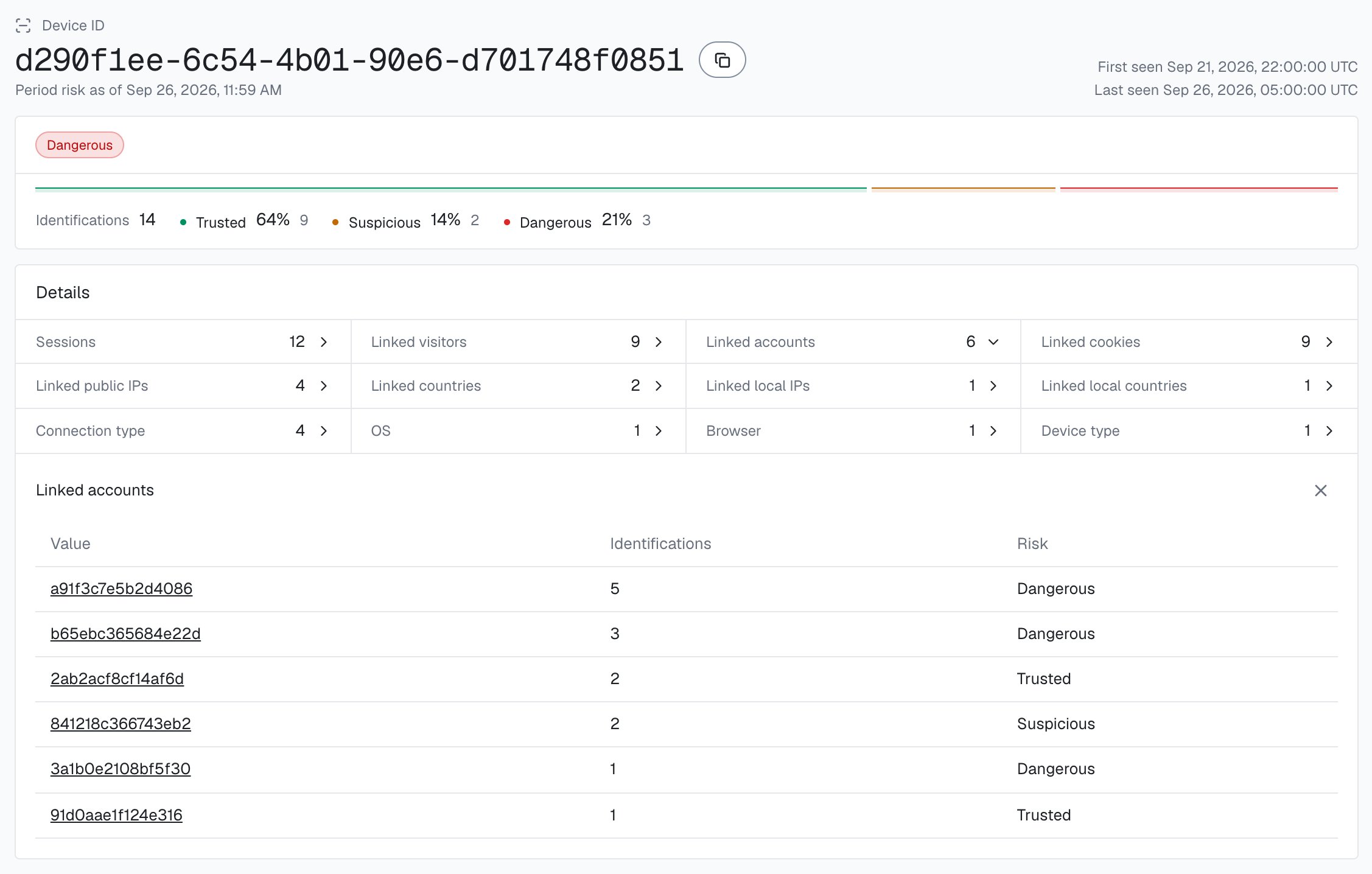
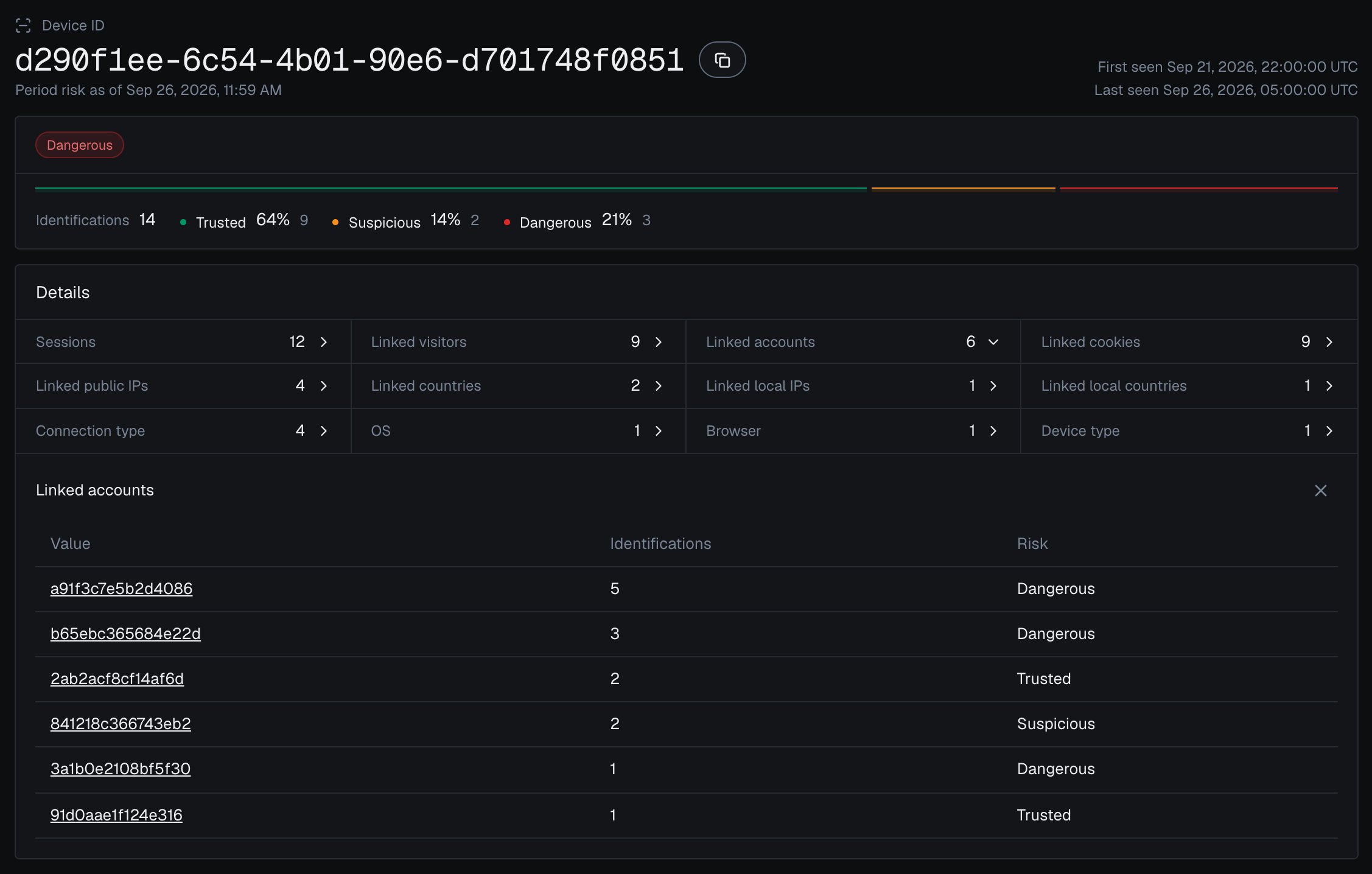
The analytics dashboard shows the same count: open a Device ID from [Analytics](/dashboard/analytics), and **Linked accounts** lists every wallet seen on it, each with the band of its identifications on that device.
 The per-claim check catches a claim right now. The standing view is the **Multi-accounting** [High-Risk Event](/features/high-risk-events#multi-accounting), which ShieldLabs detects directly with **Medium** or **High** confidence and makes available in the analytics dashboard, the API and webhooks. It covers both Sybil shapes:
One device linked to many distinct wallets: the core Sybil shape. A cleared cookie or a private window does not reset the Device ID.
Many wallets claiming through one network, even when each rotates its public IP. Catches a person spread across several devices behind one router.
When a Multi-accounting event arrives for a wallet through the API or webhooks, or when you review it in the analytics dashboard, record it against the wallet in your own system, and the handler above routes its next claim to review; you choose the action for each case. At the claim itself, the Risk Score and risk signals of the identification remain the input.
History API reads never count against your included identifications. For a high-volume airdrop, keep your own counters (wallets per Device ID and per `local_ip.ip` from the webhook) as the fast path, and reserve live History reads for the borderline claims worth the cost.
Start in logging-only mode and watch how real claims distribute before you raise friction. A real participant on a corporate VPN can reach the Suspicious band, and one wallet on a shared office network is not a farm. Decide on the Risk Score, its `signals` and the wallet count together.
## Test it
You do not need a real farm to see this work. Connect a wallet and claim once in your normal browser, and note the `device_id` on the webhook. Then play the Sybil farmer: clear cookies or open a private window, and claim again with a different wallet. The `cookie_id` and `visitor_id` change each time, but the **same `device_id` returns**, and the distinct-wallet count on that device climbs with every run, exactly the count your claim endpoint gates on. A second browser gets its own Device ID; the network the wallets share can still link them. Toggling a VPN lights up the risk signals without changing the Device ID.
Then search Analytics in the [analytics dashboard](/dashboard/analytics) for that Device ID and open it: **Linked accounts** lists every wallet you used in the test, each with the band of its identifications on that device.
## Next
The same one-person-many-accounts shape outside crypto: count the accounts behind a device at signup and at action time.
Gate a per-customer reward on the account count behind the device: the web2 cousin of an airdrop farm.
Multi-accounting and the other events ShieldLabs detects on your users, each with Medium or High confidence.
The payload your server reads, with the `device_id`, `risk_score`, `signals` and `detection_flags` fields the claim decision uses.
This documentation is built and hosted on [Mintlify](https://mintlify.com), a developer documentation platform.
The per-claim check catches a claim right now. The standing view is the **Multi-accounting** [High-Risk Event](/features/high-risk-events#multi-accounting), which ShieldLabs detects directly with **Medium** or **High** confidence and makes available in the analytics dashboard, the API and webhooks. It covers both Sybil shapes:
One device linked to many distinct wallets: the core Sybil shape. A cleared cookie or a private window does not reset the Device ID.
Many wallets claiming through one network, even when each rotates its public IP. Catches a person spread across several devices behind one router.
When a Multi-accounting event arrives for a wallet through the API or webhooks, or when you review it in the analytics dashboard, record it against the wallet in your own system, and the handler above routes its next claim to review; you choose the action for each case. At the claim itself, the Risk Score and risk signals of the identification remain the input.
History API reads never count against your included identifications. For a high-volume airdrop, keep your own counters (wallets per Device ID and per `local_ip.ip` from the webhook) as the fast path, and reserve live History reads for the borderline claims worth the cost.
Start in logging-only mode and watch how real claims distribute before you raise friction. A real participant on a corporate VPN can reach the Suspicious band, and one wallet on a shared office network is not a farm. Decide on the Risk Score, its `signals` and the wallet count together.
## Test it
You do not need a real farm to see this work. Connect a wallet and claim once in your normal browser, and note the `device_id` on the webhook. Then play the Sybil farmer: clear cookies or open a private window, and claim again with a different wallet. The `cookie_id` and `visitor_id` change each time, but the **same `device_id` returns**, and the distinct-wallet count on that device climbs with every run, exactly the count your claim endpoint gates on. A second browser gets its own Device ID; the network the wallets share can still link them. Toggling a VPN lights up the risk signals without changing the Device ID.
Then search Analytics in the [analytics dashboard](/dashboard/analytics) for that Device ID and open it: **Linked accounts** lists every wallet you used in the test, each with the band of its identifications on that device.
## Next
The same one-person-many-accounts shape outside crypto: count the accounts behind a device at signup and at action time.
Gate a per-customer reward on the account count behind the device: the web2 cousin of an airdrop farm.
Multi-accounting and the other events ShieldLabs detects on your users, each with Medium or High confidence.
The payload your server reads, with the `device_id`, `risk_score`, `signals` and `detection_flags` fields the claim decision uses.
This documentation is built and hosted on [Mintlify](https://mintlify.com), a developer documentation platform.