

0-100 (Trusted / Suspicious / Dangerous) and comes only from its risk signals. The one exception is the 999 ban marker described below. This page is about keeping the gateway healthy under load.
In normal use you rarely hit these limits. Within one visit, the snippet runs at most one identification every five minutes for the same user for
checkAnonymous and checkAuthenticatedUser, shared across open tabs; only forceCheck* calls run every time. Limits exist to absorb abusive traffic, not legitimate integration patterns.The limits at a glance
The snippet posts collected signals torest.shieldlabs.ai. That ingest gateway applies protections in this order: per IP, then domain freeze / per domain (by plan). /health is not rate-limited.
None of these feed the Risk Score. A sticky IP ban can still surface the marker value
999 in a stored identification (see below). Soft 429s on the domain cap or a domain freeze do not write 999.
The Management API on api.shieldlabs.ai applies the same per-IP limit (15/min, 10-minute ban) and concurrency cap (512 in-flight) independently. It does not use the per-domain limits. A 429 or 503 there returns {"error":"too many requests"} or {"error":"server is busy"}.
The History API on account.shieldlabs.ai (/api/v1 and legacy /pub) is not the ingest gateway. It has its own soft cap: 15 requests per second per domain (each Private API Key reads one domain). Crossing it returns 429 {"error":"too many requests"} with no sticky ban: retry in the next second. One History lookup after each identification stays inside this ceiling even at the Scale ingest rate (15 per second).
Per-IP rate limit and the 10-minute ban
A single source IP may make up to 15 requests per minute to the REST ingest endpoint. One identification uses three to five of those requests (a challenge, the identification itself and its follow-up network checks), so one IP can run only about three to five identifications per minute before the ban. Cross the limit and the gateway returns:429. The ban clears automatically; there is no manual unban step and nothing to configure.
Guard against the “999” ban marker
When an IP is banned, the browser receives the429, but your backend can still see an identification for that request: ShieldLabs writes a marker value of 999 to mark the banned request, and that identification can reach you on a webhook delivery or a History API row. The 999 is not capped to 100 on the ban path, so it arrives as-is. You may therefore receive a payload where data.risk_score (webhook) or score (History API) is 999.
A 429 from the per-domain cap or a domain freeze is a soft reject: no ban, and no 999 marker.
Per-domain ingest (soft 429)
Every request for one registered host shares a single per-second budget, regardless of how many visitor IPs are hitting it. The budget follows the account plan:
Exceeding the budget returns the same
429 body as the per-IP limit. The domain is not banned; traffic is accepted again in the next second. Upgrade the plan if a busy site needs more headroom. How many domains you may hold is separate; see Domains.
Domain freeze (plan RPS)
If the domain stays at that cap for 10 seconds in a row, ShieldLabs pauses processing for that domain: further requests get the same429 JSON, they are not scored, and they are not billed. The network check for that domain is paused the same way. This is not the Paused status and not the per-IP 10-minute ban (no 999). Processing starts again after 10 consecutive seconds below the cap.
In the analytics dashboard, open Integration > Domains: the domain shows the Frozen status with At the rate limit · HTTP 429. On Integration > Install, a banner for the frozen domain explains that its calls are not billed and that it resumes on its own once traffic eases. The account owner also gets at most one email per domain every 24 hours. Integration describes every domain status.

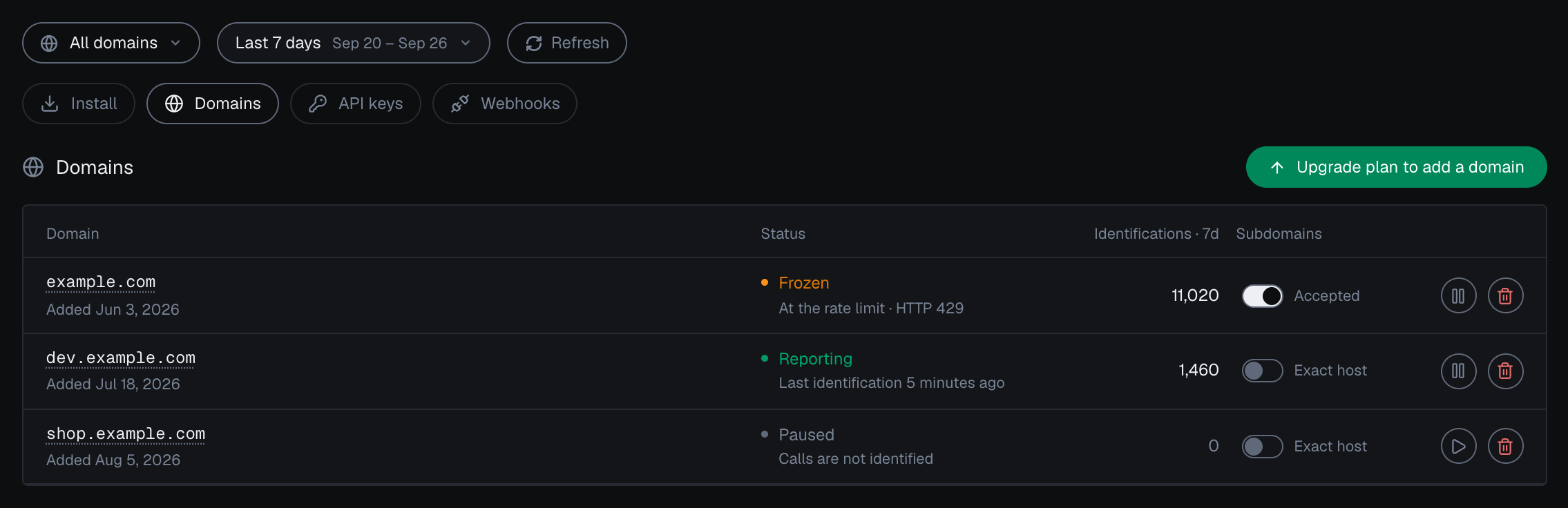
A frozen domain in the analytics dashboard: at its rate limit, calls get HTTP 429.


A frozen domain on Integration > Install in the analytics dashboard: calls get HTTP 429, are not billed, and the domain resumes on its own once traffic eases.
Concurrency cap (503)
Independent of the rate limits, the gateway caps the number of simultaneous in-flight requests across all traffic. When that cap (512 connections) is saturated, new requests get:503 here means “try again shortly,” not “you did something wrong.” It is transient back-pressure. The snippet does not need special handling for this; if you call the Management API server-side and hit a 503, retry with a short backoff.
Request body size (512 KB)
Each request body to the REST gateway is capped at 512 KB. The signal payload the snippet sends is well under this in normal operation, so you will not approach the cap unless something is wrong upstream (for example, a payload being duplicated or wrapped before it reaches the gateway). Oversized bodies are rejected before scoring.Included volume is separate (402)
Reaching your included volume is a billing condition, separate from rate limits, with its own status code:402 means your account’s included volume is used up, so the identification request cannot be processed. It is unrelated to how fast you send traffic. Identification resumes when the billing cycle resets or when you change plan. The Billing page covers how identifications are counted, and the Errors page lists the full status-code reference.
How to stay within the limits
1
Let the snippet post from the browser
The snippet is designed to call
rest.shieldlabs.ai directly from each visitor’s browser, so requests are naturally spread across many client IPs. Do not relay snippet traffic through a single server, which would funnel everyone onto one IP and trip the 15/minute limit.2
Rely on the built-in five-minute window
checkAnonymous and checkAuthenticatedUser run at most one identification every five minutes for the same user within one visit, shared across open tabs. On a multi-page site, a full page load in the only open tab can start a new visit. Use forceCheckAnonymous / forceCheckAuthenticatedUser only at meaningful moments (right after login, before a sensitive action), not in a loop.3
Read results, do not poll the gateway
Get results from the webhook (delivered automatically) or, when you need a guaranteed read, from the History API. Do not re-fire identification calls to “refresh” a Risk Score.
4
Back off on 429 and 503
For a per-IP
429, treat that IP as blocked until the 10-minute ban window passes. For a domain 429, wait a second and retry. Treat 503 as transient and retry after a short, jittered delay.Quick reference
The Errors page documents every status code ShieldLabs can return and how to handle it.